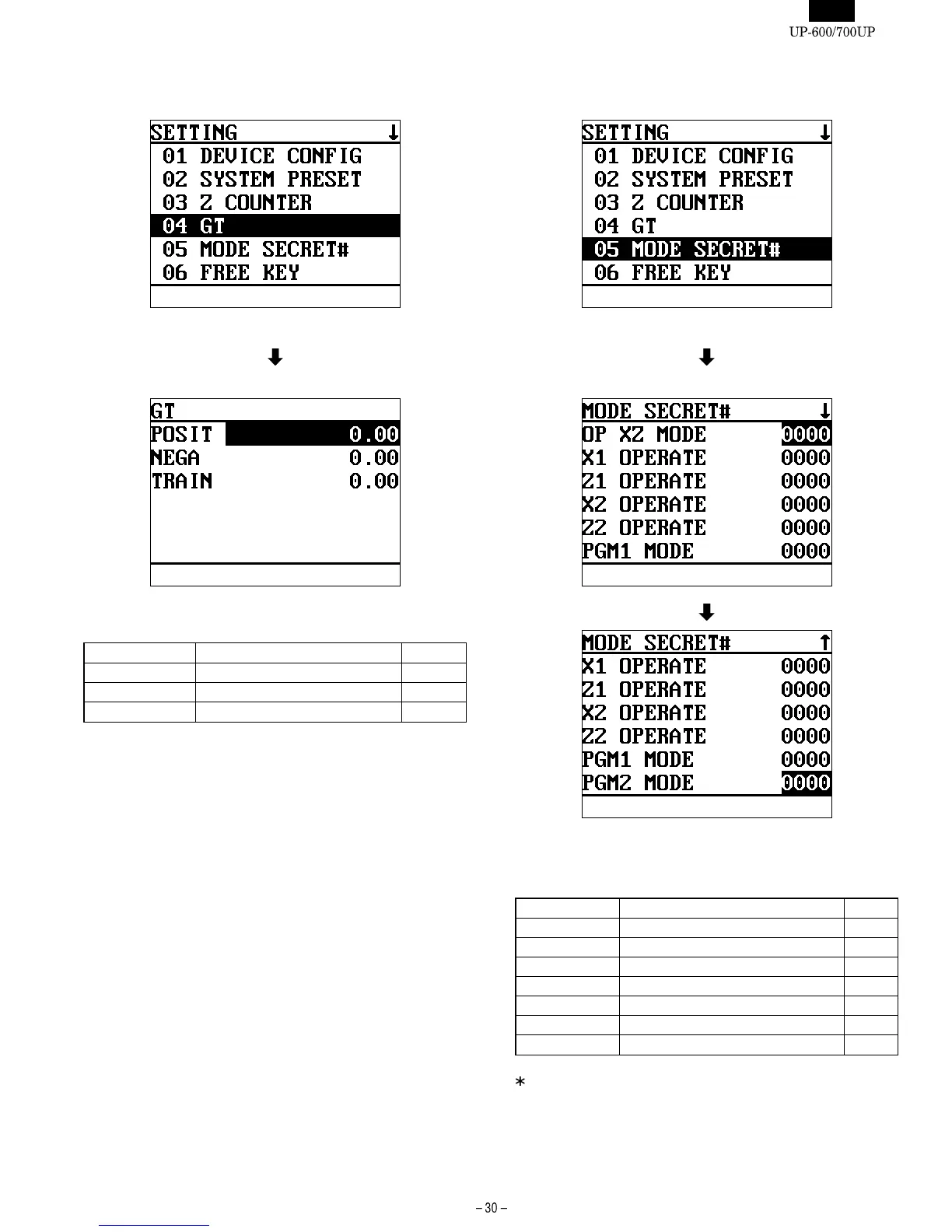
4. [04 GT]
DISPLAY: Setting item select screen
Select "04 GT" and press the ENTER key.
DISPLAY: GT COUNTER screen
Select the GT counter to be changed and enter the value.
The content of displayed GT counter are as listed in the table below.
DISPLAY TEXT CONTENTS MRS
POSIT GT2 (Positive GT) : Max.13 digits 0.00
NEGA GT3 (Negative GT) : Max.13 digits 0.00
TRAIN Training GT : Max.13 digits
GT1 is obtained by the following equation.
EQUATION: GT1 = GT2 - GT3
5. [05 MODE SECRET# ]
DISPLAY: Setting item select screen
Select "05 MODE SECRET#" and press the ENTER key.
DISPLAY: MODE SECRET# screen
Select the MODE to be changed and enter the value.
The content of displayed MODE SECRET# are as listed in the table
below.
DISPLAY TEXT CONTENTS MRS
OP XZ MODE OP X/Z mode secret code : 4 digits 0000
X1 OPERATE X1 operation secret code : 4 digits *1 0000
Z1 OPERATE Z1 operation secret code : 4 digits *2 0000
X2 OPERATE X2 operation secret code : 4 digits *1 0000
Z2 OPERATE Z2 operation secret code : 4 digits *2 0000
PGM1 MODE PGM1 mode secret code : 4 digits
PGM2 MODE PGM1 mode secret code : 4 digits
If "0000" is entered "compulsory secret code entry" is canceled.
*1 : "X1,X2 operation secret code" is used when an operater selects
"READING" menu in X/Z mode.
*2 : "Z1,Z2 operation secret code" is used when an operater selects
the menu except "READING" ("RESETTING" etc.)in X/Z mode.













 To Next Page