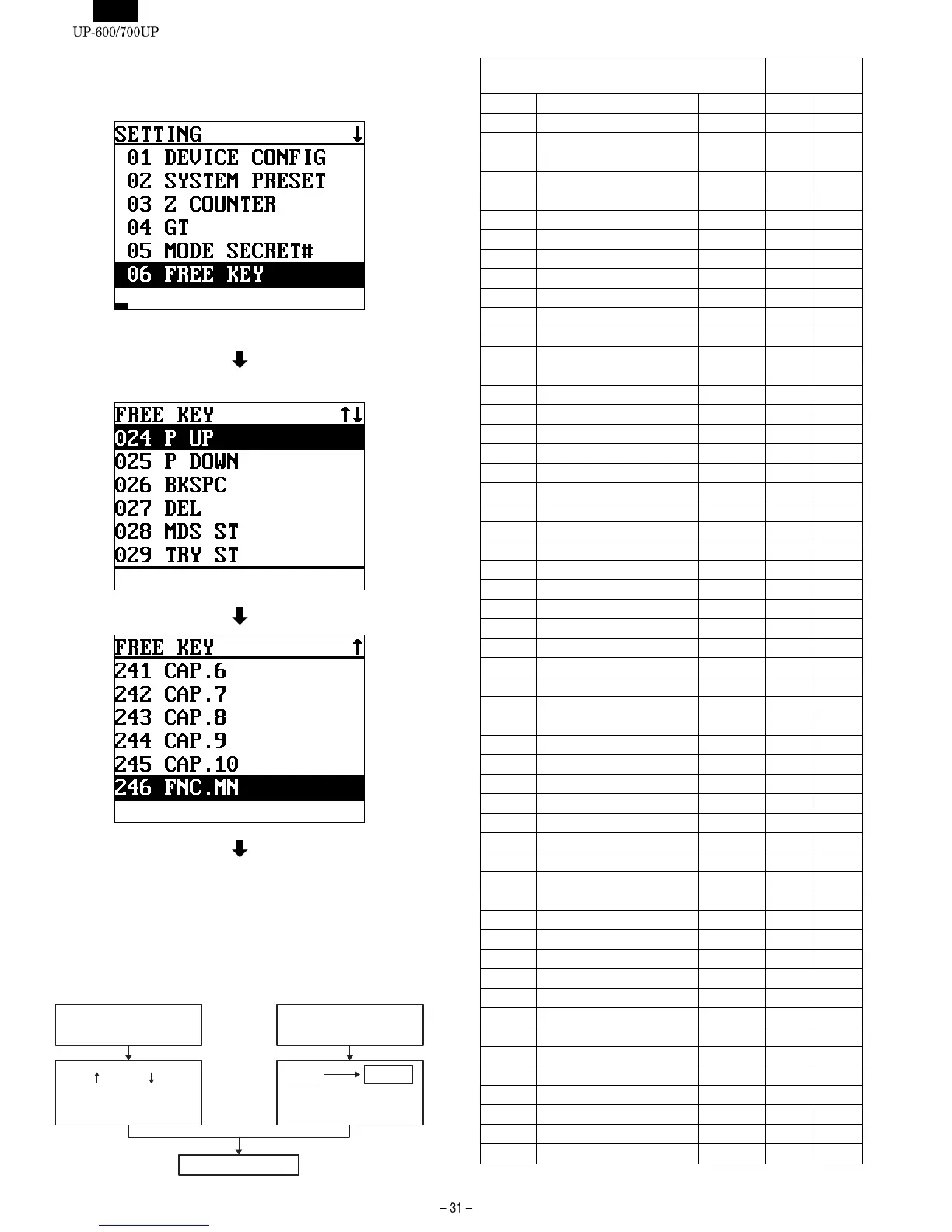
6. [06 FREE KEY]
DISPLAY: Setting item select screen
Select "06 FREE KEY" and press the ENTER key.
DISPLAY: FREE KEY LAYOUT screen
To shift the screen, use the cursor key, or enter the key No. and
press the ENTER key.
Since key No. 1 - 23 are fixed, the initial screen starts from key
No.26.
When forming keys: Select the key to be formad with the cursor and
press the key to be formed.
Position code
(MRS)
Key No. Function name Key text
UP-600 UP-700
999 INHIBIT
1 0 KEY 0 KEY 29 98
2 1 KEY 1 KEY 24 99
3 2 KEY 2 KEY 30 108
4 3 KEY 3 KEY 36 117
5 4 KEY 4 KEY 25 100
6 5 KEY 5 KEY 31 109
7 6 KEY 6 KEY 37 118
8 7 KEY 7 KEY 26 101
9 8 KEY 8 KEY 32 110
10 9 KEY 9 KEY 38 119
11 00 KEY 00 KEY 25 107
12 000KEY 000KEY --- 116
13 Decimal point key . KEY 33 111
14 Clear key CL 39 120
15 Multiplication key @/FOR 27 102
16 Subtotal key SBTL 78 125
17 Cursor UP UP 9 81
18 Cursor DOWN DOWN 8 80
19 Cursor LEFT LEFT 3 71
20 Corsor RIGHT RIGHT 13 89
21 Cancel key CANCEL 10 121
22 Enter key ENTER 12 90
23 CA/AT key CA/AT 77 134
24 Page up key P UP 15 92
25 Page down key P DOWN 14 91
26 Back space key BKSPC --- ---
27 Delete key DEL --- ---
28 Merchandise subtotal key MDS ST 72 ---
29 Tray subtotal key TRY ST --- ---
30 Gasoline sales subtotal key GAS ST --- ---
31 Non-add code/Time key #/TM 11 ---
32 No sale key NS 74 ---
33 Scale key SCALE --- ---
34 PLU/UPC key PLU 40 128
35 Level shift # key LEVEL# --- 130
36 Level 1 key L1 --- ---
37 Level 2 key L2 --- ---
38 Level 3 key L3 --- ---
39 Level 4 key L4 --- ---
40 Level 5 key L5 --- ---
41 Price shift # key P.SHT# --- 129
42 Price 1 key P1 --- ---
43 Price 2 key P2 --- ---
44 Price 3 key P3 --- ---
45 Price 4 key P4 --- ---
46 Price 5 key P5 --- ---
47 Price 6 key P6 --- ---
48 Tax 1 shift key TAX1SF 7 138
49 Tax 2 shift key TAX2SF --- ---
50 Tax 3 shift key TAX3SF --- ---
51 Tax 4 shift key TAX4SF --- ---
52 Food stamp shift key FS SFT 76 ---
53 Group discount 1 shift key GD1SFT --- ---
With " " key and " "key,
the screen is selected and the
key No. specified
With the cursor key,
the key No. is retrieved and
specified.
Retrieve and specification by
directly entering the key No.
Press the key to be formed
XXX ENTER
Key No.
With the above operation, the
screen is selected and the key No.













 To Next Page