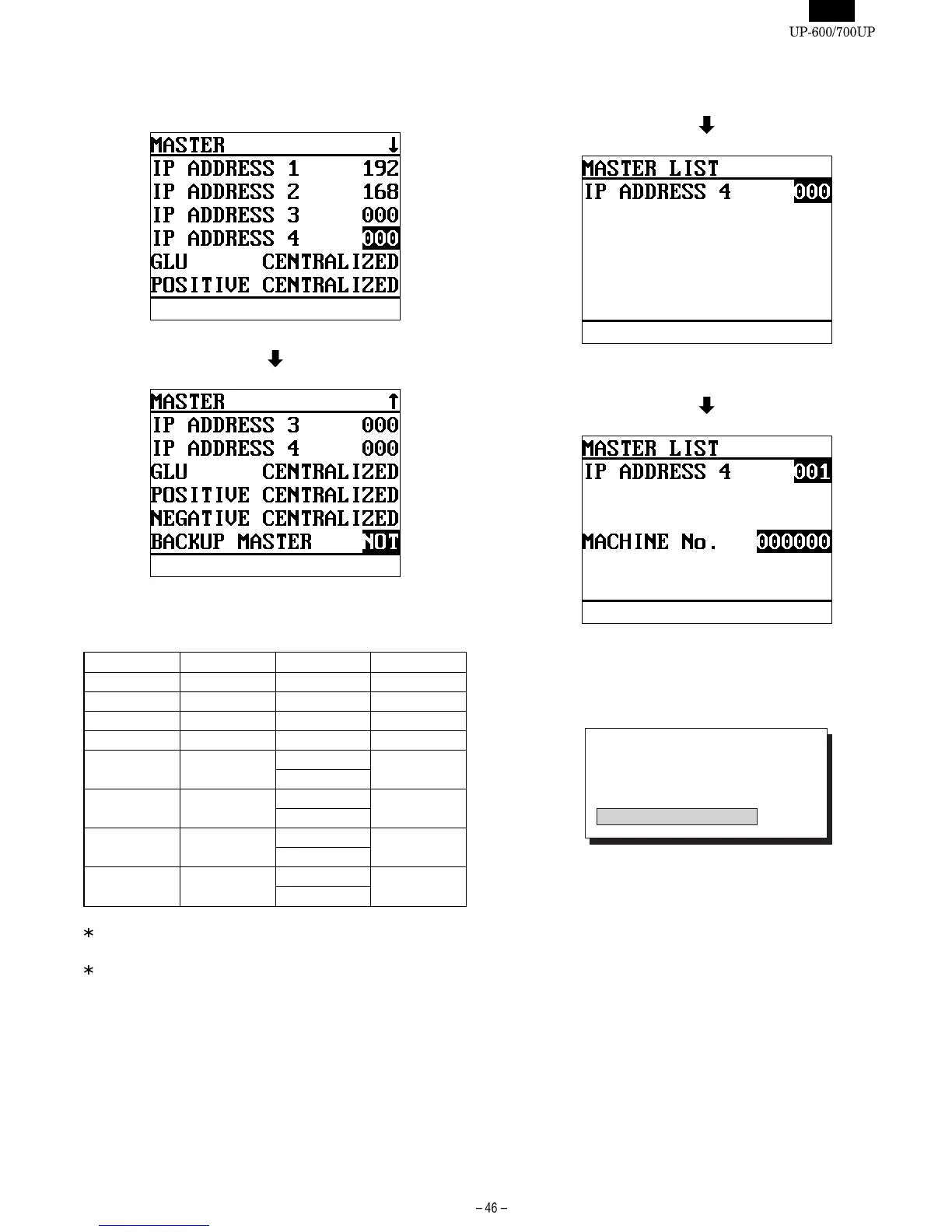
[2 MASTER]
DISPLAY: Setting screen
Select the item to be changed and press the ENTER key.
The setting content is described below.
DISPLAY TEXT CONTENTS SELECT ITEM MRS
IP ADDRESS 1 192
IP ADDRESS 2 168
IP ADDRESS 3 000
IP ADDRESS 4 Terminal No. 001-254 000
GLU GLU system CENTRALIZED CENTRALIZED
INDIVIDUAL
POSITIVE Positive #
system
CENTRALIZED CENTRALIZED
INDIVIDUAL
NEGATIVE Negative #
system
CENTRALIZED CENTRALIZED
INDIVIDUAL
BACKUP
MASTER
Backup master
function
EXIST NOT
NOT
Regarding IP address 1-3, use the same address for all machines
(master, back-up master, and satellites) on the inline system.
For IP address 4, enter the terminal No. on the inline system.
When all the machine are set, press the [CA/AT] key.
Set the IP address 4 for the master list and press the ENTER key
Set the Machine No. for the master list and press the ENTER key
The [IRC SETTING] screen appears to start the setup.
DISPLAY:
IRC SET UP
1: SAVE FILE DELETE
2: OTHER FILE DELETE
3: SAVE FILE NON CREATE
4: OTHER FILE CREATE
>>>>> USE FONT <<<<<
Helvetica/ Helvetica-Condensed/ Century-Schoolbook/ Symbol & OriginalFonts: (RingWorld2/RingFont2/Pa
Symbol/PartsCod)
- - - - - - - - - - - - - - - - - - - - - - - - - - - - - - - - - - - - - - - - - - - - - - - - - - - - - - -














 To Next Page