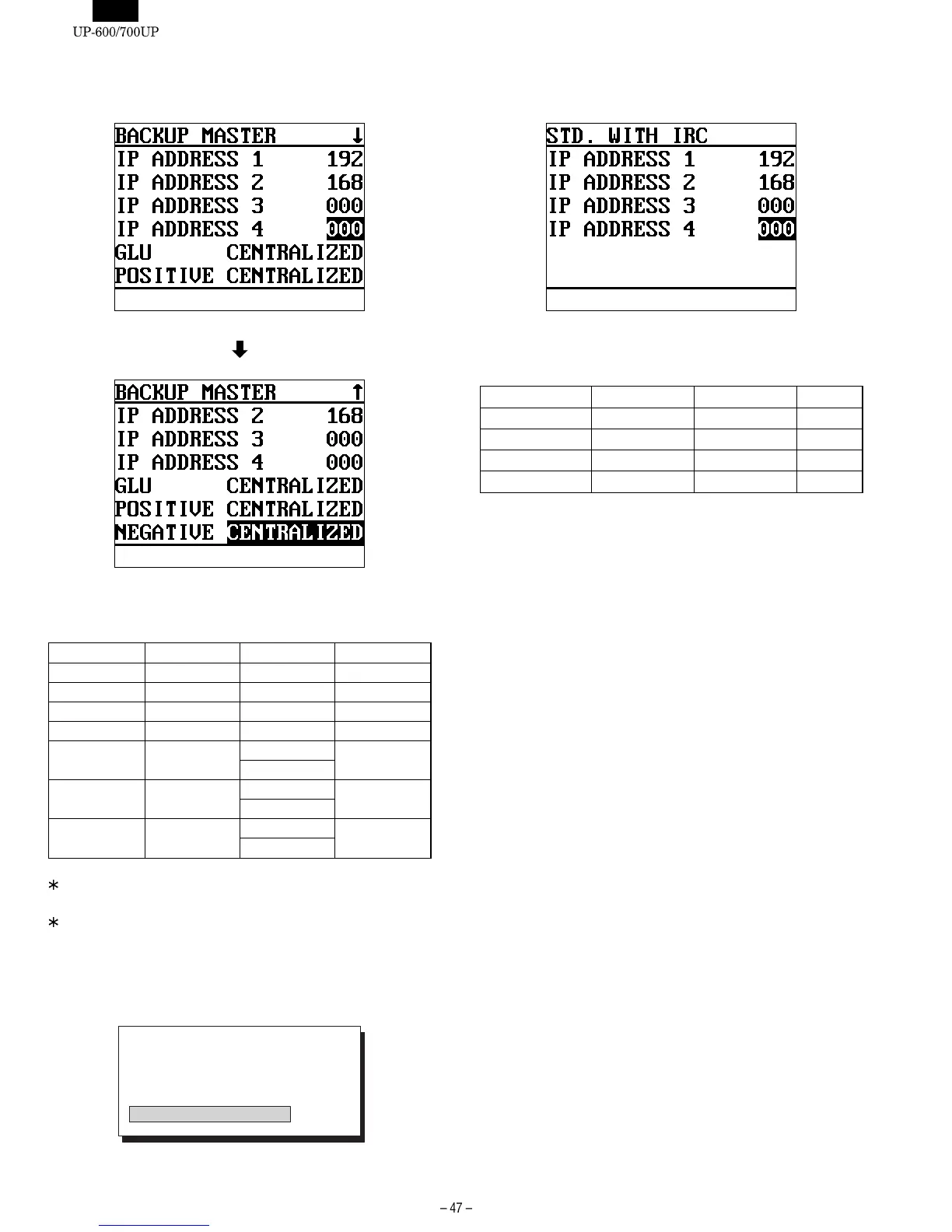
[3 BACKUP MASTER]
DISPLAY: Setting screen
Select the item to be changed and press the ENTER key.
The setting content is described below.
DISPLAY TEXT CONTENTS SELECT ITEM MRS
IP ADDRESS 1 192
IP ADDRESS 2 168
IP ADDRESS 3 000
IP ADDRESS 4 Terminal No. 001-254 000
GLU GLU system CENTRALIZED CENTRALIZED
INDIVIDUAL
POSITIVE Positive #
system
CENTRALIZED CENTRALIZED
INDIVIDUAL
NEGATIVE Negative #
system
CENTRALIZED CENTRALIZED
INDIVIDUAL
Regarding IP address 1-3, use the same address for all machines
(master, back-up master, and satellites) on the inline system.
For IP address 4, enter the terminal No. on the inline system.
When all the machine are set, press the [CA/AT] key.
The [IRC SETTING] screen appears to start the setup.
DISPLAY:
[4 STD. WITH IRC]
DISPLAY: Setting screen
Select the item to be changed and press the ENTER key.
The setting content is described below.
DISPLAY TEXT CONTENTS SELECT ITEM MRS
IP ADDRESS 1 192
IP ADDRESS 2 168
IP ADDRESS 3 000
IP ADDRESS 4 Terminal No. 001-254 000
[5 STAND ALONE]
Used to restore to a stand alone machine.
2. [2 IRC RESET]
This operation clears only the work memory for inline operations.
The program memory for inline operations remained unchanged even
after the resetting here is performed.
Inline communications can also be achieved.
IRC SET UP
1: SAVE FILE DELETE
2: OTHER FILE DELETE
3: SAVE FILE NON CREATE
4: OTHER FILE CREATE















 To Next Page