HOW TO USE VISS AND VISS ERASE FUNCTION BASIC OPERATIONS
How
to Use VISS ADD
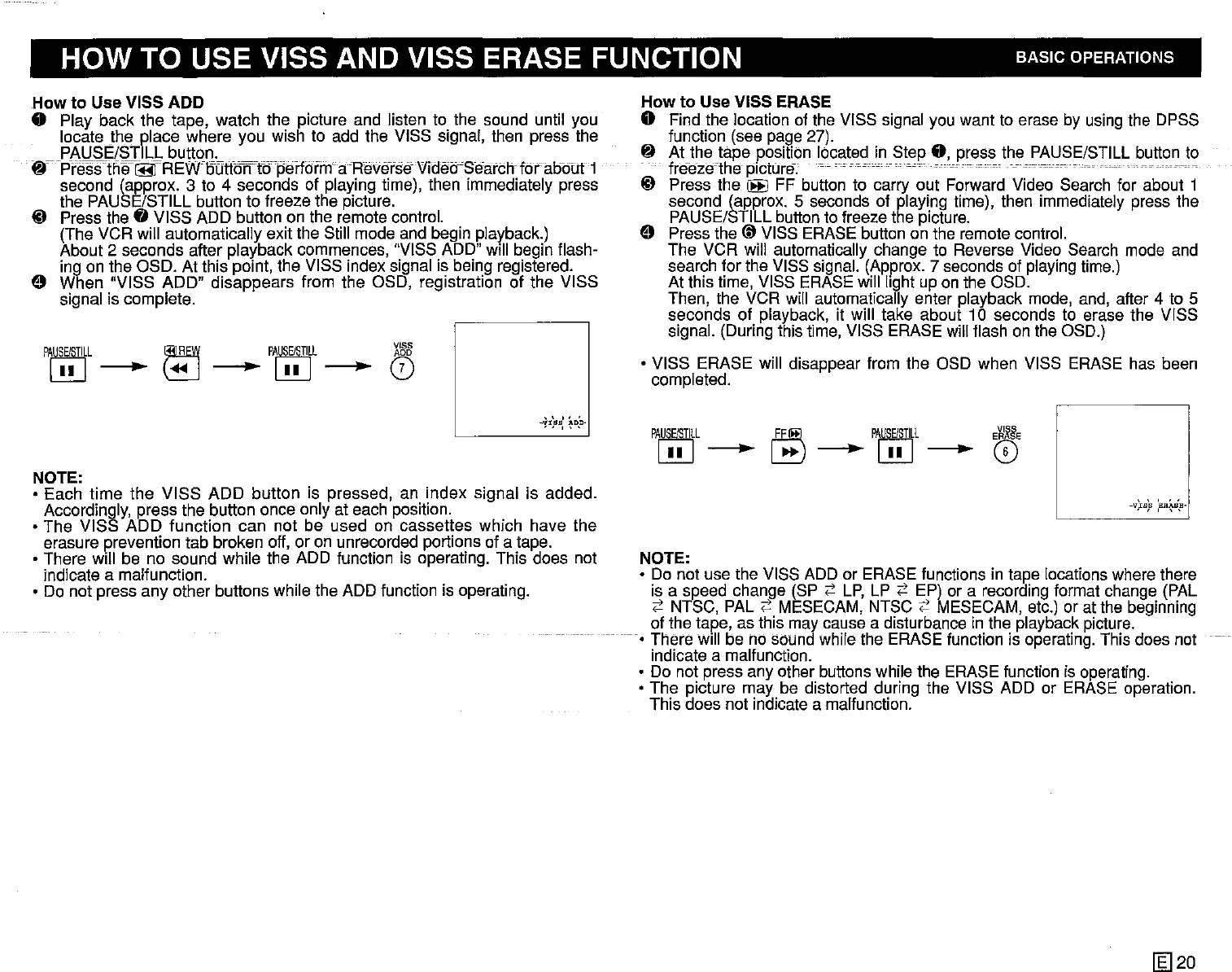
o Play back the tape, watch the picture and listen to the sound until you
locate the place where you wish to add the VISS signal, then press the
PAUSE/STILL button.
frpYifsstf1e~~REWoutforn6peifdrrn--
aHelierseVidetrSearchfdraobtJt-1
second (approx. 3 to 4 seconds of playing time), then immediately press
the PAUSE/STILL button to freeze the picture.
~ Press the 0 VISS ADD button on the remote control.
(The VCR will automatically exit the Still mode and begin piayback.)
About 2 seconds after playback commences, "VISS ADD" will begin flash-
ing on the OSO. At this point, the VISS index signal is being registered.
o When "VISS ADD" disappears from the OSO, registration of the VISS
signal is complete.
P~L
~
PA~L
X'&8
L!U-~-L!U-0
" " ,
-,!1,9B,
tDp-
NOTE:
o Each time the VISS ADD button is pressed, an index signal is added.
Accordingly, press the button once only at each position.
o The VISS ADD function can not be used on cassettes which have the
erasure prevention tab broken off, or on unrecorded portions of a tape.
o There will be no sound while the ADD function is operating. This does not
indicate a malfunction.
o Do not press any other buttons while the ADD function is operating.
How
to Use VISS ERASE
o Find the iocation of the VISS signal you want to erase by using the OPSS
function (see page 27).
~
Atthetape
position located in Step
0,
press the PAUSE/STILL button to
freeze-the picture. -
------
--
---.---
~ Press the
~
FF button to carry out Forward Video Search for about 1
second (approx. 5 seconds of playing time), then immediately press the
PAUSE/STILL button to freeze the picture.
o Press the (D VISS ERASE button on the remote control.
The VCR will automatically change to Reverse Video Search mode and
search for the VISS signal. (Approx. 7 seconds of playing time.)
At this time, VISS ERASE will light up on the OSO.
Then, the VCR will automatically enter playback mode, and, after 4 to 5
seconds of playback, it will take about 10 seconds to erase the VISS
signal. (During this time, VISS ERASE will flash on the OSD.)
o VISS ERASE will disappear from the OSD when VISS ERASE has been
completed.
PA~L
(F!ffi)
P~L
E~E
L!U-
~-L!U-~
-VlB,B
,BR~B,B·
NOTE:
o Do not use the VISS ADD or ERASE functions in tape locations where there
is a speed change (SP
;::'
LP,
LP
;::'
EP) or a recording format change (PAL
;::'
NTSC, PAL;::' MESECAM, NTSC
;::'
MESECAM, etc.) or at the beginning
of the tape, as this may cause a disturbance in the playback picture.
--0
There will be no sound while the ERASE function is operating. This does not
--
indicate a malfunction.
o Do not press any other buttons while the ERASE function is operating.
o The picture may be distorted during the VISS ADD or ERASE operation.
This does not indicate a malfunction.
[g]20


 To Next Page
 Loading...




