RECORDING A TV PROGRAMME BASIC OPERATIONS
111-.
I
....
\."
••
II\oIllv
...
VIUIII~
........
t'
...
.,
•••
'J
UJ
Il
......
..,IUIl.~
.............
u
............
1'...
..,
................
y~
..
"""
••
Recording Speed
SP
lP
EP
TapeColour
System
PAL
0
0
MESECAM
0 0
SECAM 0 0
NTSC
0
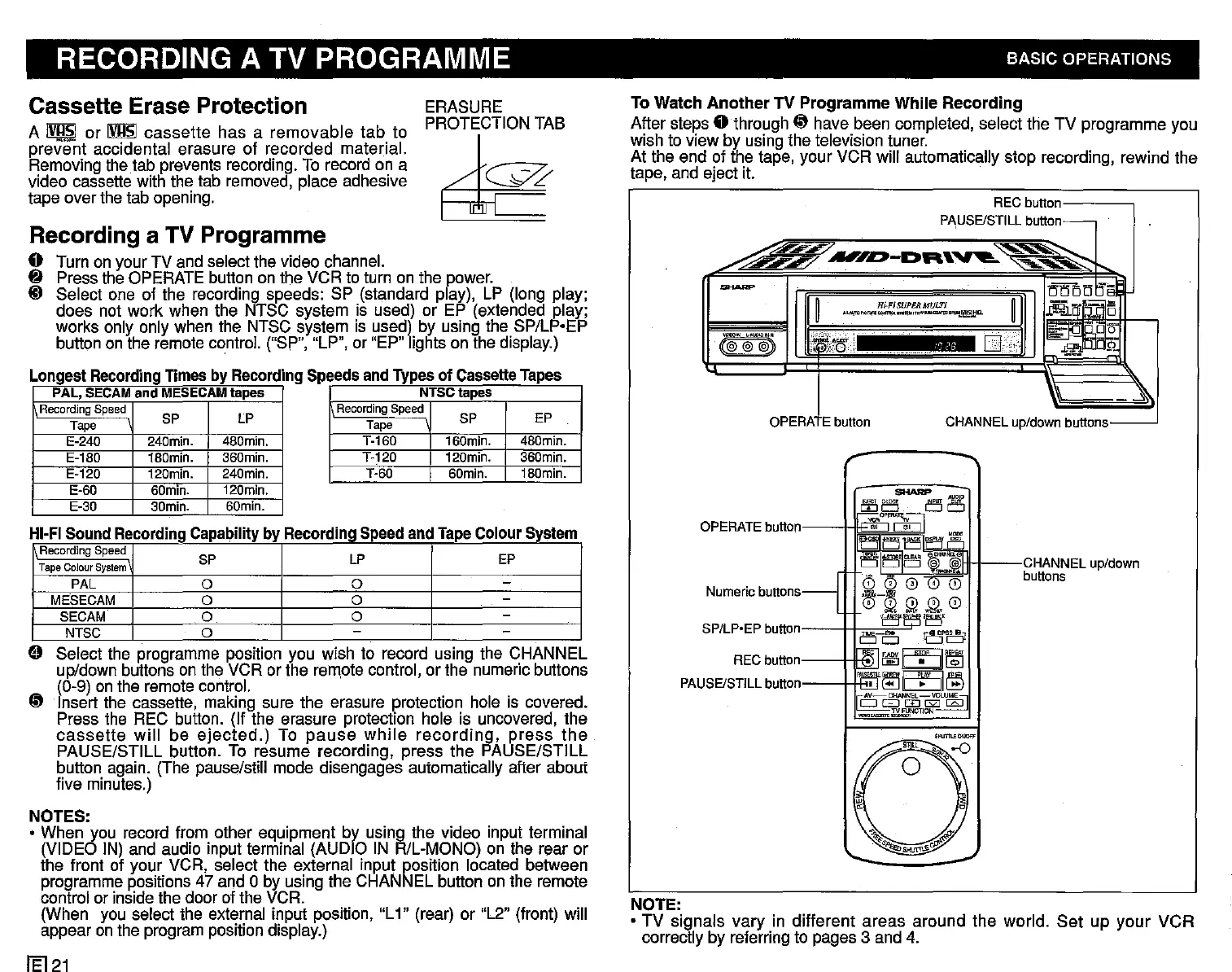
o Select the programme position you wish to record using the CHANNEL
Up/down
buttons on the VCR or the remote control, or the numeric buttons
(0-9) on the remote control.
~
Insert the cassette, making sure the erasure protection hole is covered.
Press the REC button. (If the erasure protection hole is uncovered, the
cassette
will
be
ejected.)
To
pause
while
recording,
press
the
PAUSE/STILL button. To resume recording, press the PAUSE/STILL
button again. (The pause/still mode disengages automatically after about
five minutes.)
1~~~~~t----CHANNElu~down
L, buttons
RECbutton
PI\USE/STlll
button-
.....
~!i;;;;."""
~..-..-.i'/
..,.I~-DR'~
~~
"-
-
mrni52'~
~
H;"FISUPERMUC!"f
~
~EPm:5
.,"""-
__
,.........,...."
....
~~"tID.
..
~-"'
..
"
j~tff':
CJj.
is.:..;-~
~o'b
((@@@.J)
=
.JJ;l",.Q1C
p.
U
~
SP/lp.EP button I I
..
'='
c:;::
Numericbuttons
p/down buttons
OPERATE
button
11
RECbutton~
PAUSE/STill
button~
To Watch
Another
TV Programme While Recording
After steps
0 through
~
have been completed, select the TV programme you
wish to view by using the television tuner.
At the end of the tape, your VCR will automatically stop recording, rewind the
tape, and eject it.
NOTE:
• TV signals vary in different areas around the world.
Set
up your VCR
correctly by referring to pages 3 and 4.
ERASURE
PROTECTION TAB
~
NTSClapes
RecordingSpeed
SP
EP
Tape
T-160 160min. 480min.
T-120
120min.
360min.
T-60
SDmin.
180min.
PAL,
SECAMand MESECAMlapes
RecordingSpeed
SP
lP
Tape
E-240
240min. 480min.
E-180 180min. 360min.
E-120 120min. 240min.
E-60
SDmin.
120min.
E-30
SOmin.
6Dmin.
Cassette Erase Protection
A
IV!!~
or
IVJ.lsl
cassette
has a
removable
tab
to
prevent accidental erasure of recorded material.
Removing the tab prevents recording. To record on a
video cassette with the tab removed, place adhesive
tape over the tab opening.
Recording a TV Programme
o Turn on your TV and select the video channel.
8 Press the OPERATE button on the VCR to turn on the power.
ID Select one of the recording speeds: SP (standard play), LP (long play;
does not work when the NTSC system is used) or EP (extended play;
works only only when the NTSC system is used) by using the SP/Lp·EP
button on the remote control. ("SP", "LP", or "EP" lights on the display.)
Longest Recording Timesby RecordingSpeedsandTypesof Cassette
Tapes
NOTES:
• When you record from other equipment by using the video input terminal
(VIDEO IN) and audio input terminal (AUDIO IN R/L-MONO) on the rear or
the front of your VCR, select the external input position located between
programme positions 47 and 0 by using the CHANNEL button on the remote
control or inside the door of the VCR.
(When you select the external input position, "L1" (rear) or "L2" (front) will
appear on the program position display.)
/El
21


 To Next Page
 Loading...




