BASIC OPERATIONS
Selecting the input signal
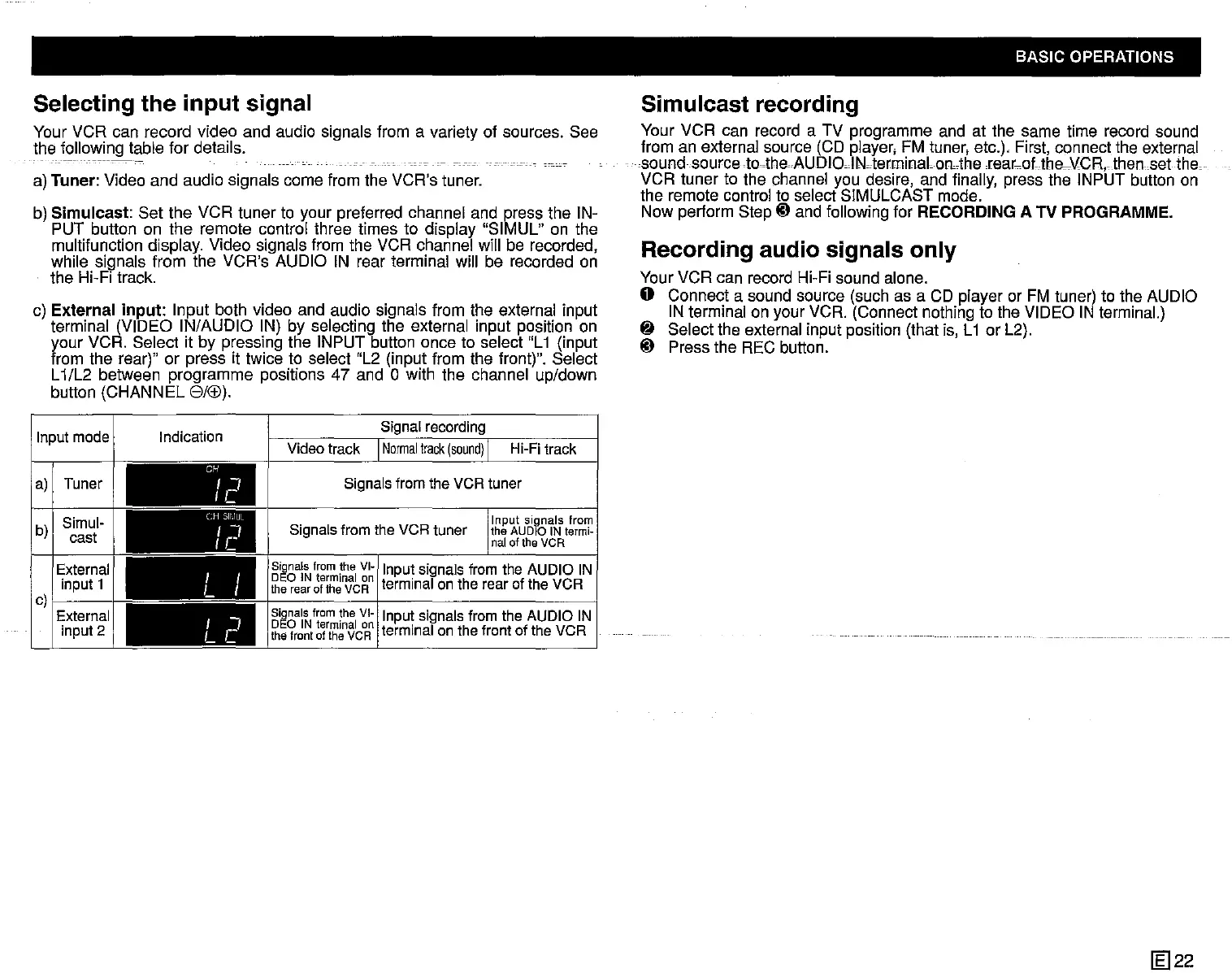
Your VCR can record video and audio signals from a variety of sources. See
the following table for details.
-
---
------_.-
-
a) Tuner: Video and audio signals come from the VCR's tuner.
b)
Simulcast:
Set the VCR tuner to your preferred channel and press the IN-
PUT button on the remote control three times to display "SIMUL" on the
multifunction display. Video signals from the VCR channel will be recorded,
while signals from the VCR's AUDIO IN rear terminal will be recorded on
the Hi-Fi track.
c)
External
input:
Input both video and audio signals from the external input
terminal (VIDEO IN/AUDIO IN) by selecting the external input position on
your VCR. Select it by pressing the INPUT button once to select "L1 (input
from the rear)" or press it twice to select "L2 (input from the front)". Select
L1/L2 between programme positions 47 and 0 with the channel up/down
button (CHANNEL
GAB).
Simulcast recording
Your VCR can record a TV programme and at the same time record sound
from an external source (CD player, FM tuner, etc.), First, connect the external
sound source to-the
AUDIOolNoterminaLonAherear_oUh8--\,lCR, then
set
theo
VCR tuner to the channel you desire, and finally, press the INPUT button on
the remote control to select SIMULCAST mode.
Now perform Step
tD
and following for RECORDING A TV PROGRAMME.
Recording audio signals only
Your VCR can record Hi-Fi sound alone.
o Connect a sound source (such as a CD player or FM tuner) to the AUDIO
IN terminal on your VCR. (Connect nothing to the VIDEO IN terminal.)
~
Select the external input position (that is, L1 or L2).
tD
Press the REC button.
Signal
recording
Signals
fromthe VCRtuner
Video
track I
Normal
track
(sound)
I
Hi-Fi
track
Signals
from
the
VI~
1
I
t si I f
DEO IN terminal on npu signaS rom the
AUDIO
IN
therearoftheVCR
terminal
onthe
rear
ofthe VCR
Input signals from
the AUDIO IN
termi-
naloftheVCR
Signals
fromthe VCRtuner
Signals
from
the
VI-I
I t sl I
DEO IN terminal on
npu,
signaS fromthe
AUDIO
IN
the front of the VCR
terminal
onthe frontof the VCR
(H
SIIIUL
Ir
J
CH
Ir
J
I I
L I
I I
Le
Indication
Inputmode
a) Tuner
b)
Simul-
cast
External
input1
c)I
External
input2
1m22



 To Next Page