TIMER RECORDING (OSP: ON SCREEN PROGRAMME) TIMER RECORDING
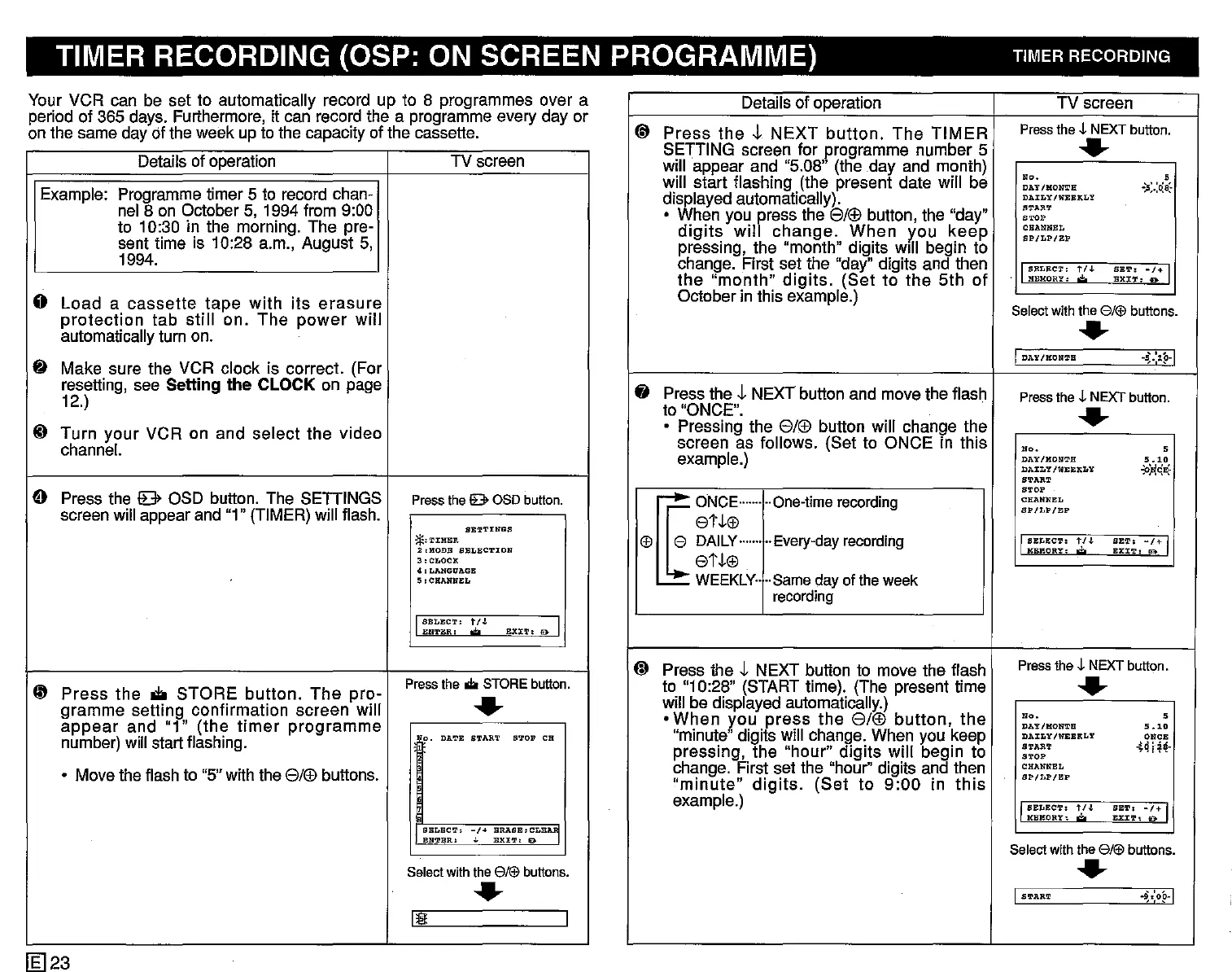
Your VCR can be set to automatically record up to 8 programmes over a
period of 365 days. Furthermore, it can record the a programme every day or
on the same day of the week up to the capacity of the cassette.
Details of operation TV screen
Example: Programme timer 5 to record chan-
nel 8 on October 5, 1994 from 9:00
to 10:30 in the morning. The pre-
sent time is 10:28 a.m., August 5,
1994.
0
Load
a
cassette
tape
with
its
erasure
protection
tab
still
on.
The
power
will
automatically turn on.
~ Make sure the
VCR
clock is correct. (For
resetting, see Setting
the
CLOCK on page
12.)
..
Turn
your
VCR on and
select
the
video
channel.
e Press the
lE>
OSD button. The
SETIINGS
Press
the
IB>
OSD
button.
screen will appear and "1" (TIMER) will flash.
SB'1'T!NGS
*'i'IHER
2,HODB SELBCTION
3.CLOCK
4:LANGUAGB
5:CHANNE:L
I
SBLECT.
t/.l.
EX:CT. 10> I
EnTER:
e
~
Press
the.
STORE
button.
The
pro-
Press
the
.do
STORE
button.
gramme
setting
confirmation
screen
will
..
appear
and
"1"
(the
timer
programme
o.
DA'1'E
START
S'l'OP CH
number) will start flashing.
• Move the flash to "5" with the
8/®
buttons.
e
BELEe'!'.
-/+
BRASE.CLE~
BN'1'BR.
,
EXI'1':
lE)
Select
with
the
8/1ifJ
buttons
.
..
Ill!
I
[g]23
Details of operation TV screen
@
Press
the
J.
NEXT
button.
The
TIMER
Press
the
~
NEXT
button.
SETTING screen for programme number 5
..
will appear and "5.08" (the day and month)
No.
s
will start flashing (the present date will be
DAY/HONTH
-)i;.:~8:
displayed automatically).
DAILY!WElElKLY
START
• When you press the
8/®
button, the "day"
'TOP
digits
will
change.
When
y.ou
keep
CHANNEL
BP/LP/EP
pressing, the "month" digits
Will
begin to
change. First set the "day" digits and then
I
SELECT:
t/J.
BET:
-/+
I
the
"month"
digits.
(Set
to
the
5th
of
HEMORY:
'*'
BXJ:'J'.
a
October in this example.)
Select
with
the
8/1ifJ
buttons.
..
I
DAY/KON'l'H
.~.:lp-1
fj
Press the
J.
NEXT button and move the flash
Press
the
-l-
NEXT
button.
to "ONCE".
..
• Pressing the
8/®
button will change the
screen as follows. (Set to ONCE in this
N".
s
example.)
DAY/HONTH
5.10
DAILY
IW:EBKLY
-P!lG*
S'l'AR'l'
STOP
~ooc,-
..
One-time
recording
CHAN'N"BL
SP/LP/BP
etJ.G'!
G'!
EDAILy
....
·..
..
Every-day
recording
I
SELECT.
t/J.
BE'!'.
-/+
I
etJ.G'!
HEllORT
•
.;.
BXJ:'l':
!El>
WEEKLY
..
..
Same
dayof theweek
recording
@
Press the
J.
NEXT button to move the flash
Press
the
~
NEXT
button.
to "10:28" (START time). (The present time
..
will be displayed automatically.)
•
When
you
press
the
8/®
button,
the
No.
s
DAY/HON'l'1I
5.10
"minute" digits will change. When you keep
DAILY/WEEKLY
ONCE
pressing, the
"hour"
digits
will
begin to
START
-!4
i~~-
STOP
change. First set the "hour" digits and then
CHANNEL
"minute"
digits.
(Set
to
9:00
in
this
BP/LP/EP
example.)
IBELEC''1', 1'/.1.
BE'1',
-/+
I
HBKORY,
'*'
EXJ:'1', D
Select
with
the
8/1ifJ
buttons
.
..
I
S!L'AR'1'
~,:oH


 To Next Page
 Loading...




