I
Key
to
easy
setting
I
If you use the numeric buttons (0 to 9 and
/.._
buttons) on the remote control,
you can set the
timer
programme more easily. For setting, see Key to
easy
setting
on page 10.
NOTES:
• If the video cassette runs out before recording all the programmes, your VCR will
stop, eject the cassette,and shutoff automatically.
• If power is interruptedfor morethan 20 minutes (powerfailure, etc.),all timersettings
will be cancelled.
• If the TIMER ON/OFF button is pressed when there is no cassette
loaded,
"TIMER"
flashes for 5 seconds, indicatingthat timer recording is not possible.
• If the TIMER ON/OFFbutton is pressed while a cassette with an
uncovered
erasure
protection hole is
loaded,
"TIMER"flashes and the cassetteis ejected.
• When "TIMER" is lit, regular VCR operation, clock setting and setting/cancelling/
confirming timer positions are not possible. For regular VCR operation, clock setting
and setting/cancelling/confirming timer positions,press the TIMER ON/OFFbuttonto
disengagethe timer
("TIMER"
disappears), andthen turn on your VCR.
• During timer recording, the timer cannot be set or checked.
• Toterminate timer recording, pressthe STOPbuttonduring timer
recording.
• If no buttons are pressed within one minute while setting a timer programme, the
mode automaticallyreturnsto the previousmode.
• If the same time is input for the start time and the stop time, the timer settingwill be
cancelled.
Details
of operation
TV screen
~
Press
the
J,
NEXT
button.
The
flash
will
Press
the
-l-
NEXT
button.
I
move
to
"9:00"
(STOP
time).
(The
START
......
lime
Will be
automatically
lndlcated.)"
....
C
-
• Press the e/(£) button to set as in START
ae . s
DAY/MONTH S
.10
time setting.
D./l.ILY/WEElKLY
aRCIl
START
9,00
(Set to 10:30 in this example.)
STOP
-~
i
~~
CHANNEl.
BP/LP/Ell'
I
SEL1W'T,
1/.1.
BRT.
-'+1
Ml'lMORY, Jr.
E::l!:I'l" U
Set by using
the@
button.
......
I
STOP
-l:o:\~p-I
@
Press
the
J,
NEXT
button.
The
flash
will
Press
the
-l-
NEXT
button.
move to "00"
(CHANNEL).
......
•
Press
the e/(£) button to set the channel.
(Set
to 0, 8 in
this
example).
ae
. s
DAY/MONTH
5.10
DAILY/Wgl:':ltLY ONCS
NOTES:
START
9.00
STOP
10,30
•
When
you
record
from
other
audiovisual
CHANNEL
.:O:cl;
equipment
or
perform
simulcast recording,
SP/LPIJU~
press
the
INPUT
button
on
the
remote
I
BBLBCT,
t/"-
SET'
~/+
I
control
to
set
the
flash
to
the
input
you
MEMORY'
.;.
RXJ:'l',
!it
desire.
Setby
using
the8/(fJ
button.
INPUT
......
G"1"
•
"L1"
I
CHANNBL
-:o:a:1
(Normal channel)
(Rear
external
~
input)
INPUT
INPUT
INPUT
"SIMUL1"
OIl
"L2"
(Simulinput) (Frontexternal
input)
Gl
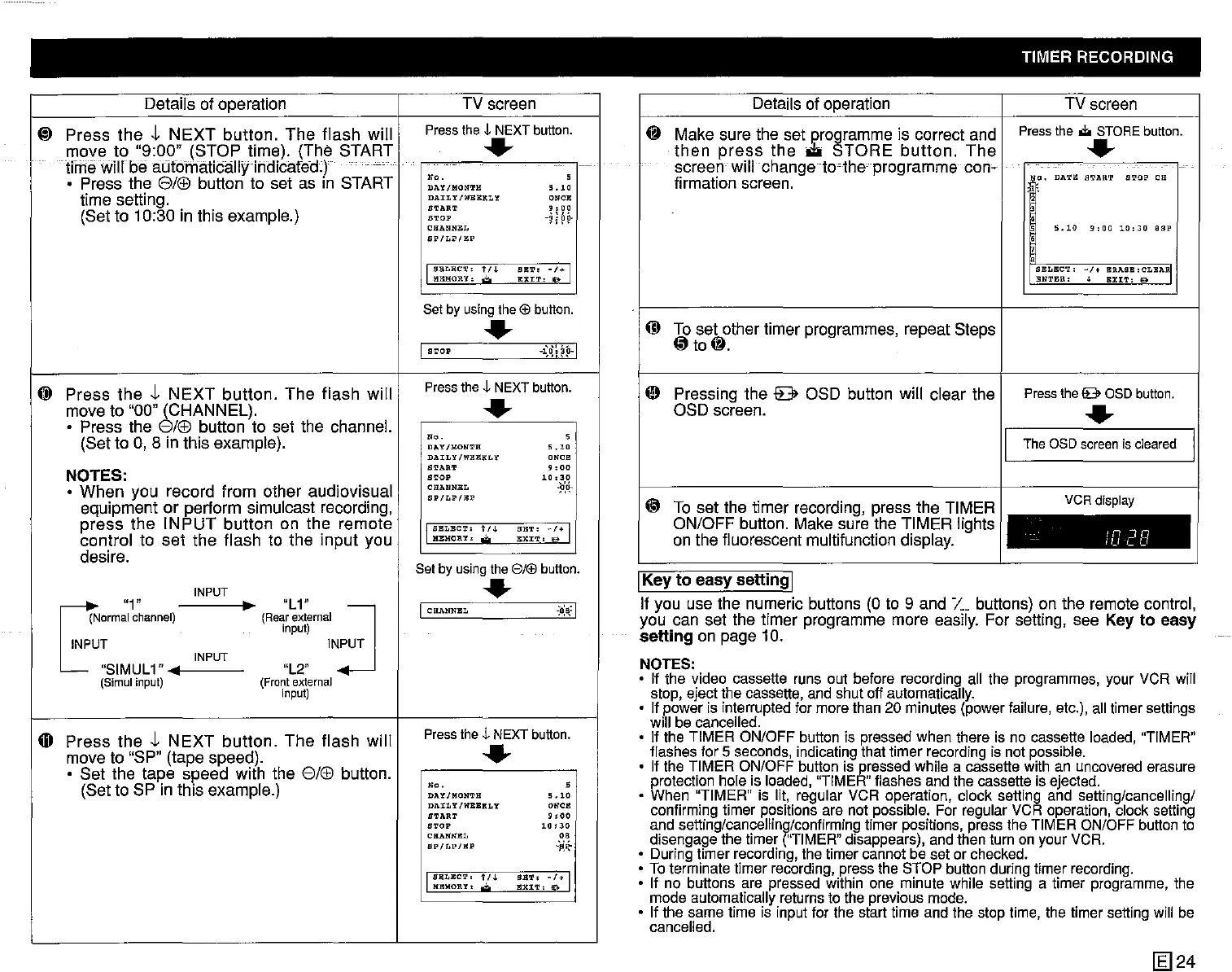
Press
the
J,
NEXT
button.
The
flash
will
Press
the
.l.
NEXT
button.
move to "SP" (tape speed).
......
•
Set
the
tape
speed
with the e/(£) button.
ne . s
(Set
to SP in
this
example.)
DAY/MONTH
5.10
DAILY/WEEKLY ONCE
START 9 I
00
STOP
10,30
CHANNeL
ea
BP/LP/BP
-}J:~
IISBUCTI
~J.
:~i~,
-/+
I
MEMORY'
Details of operation
~
Make sure the set programme is correct and
then
press
the
oiIli
STORE
button.
The
screen
willchangeto·theprogramme
con-
firmation screen.
CD
To
set
other timer programmes, repeat Steps
(i'
to~.
o Pressing the 0 OSD button will
clear
the
OSD
screen.
@ To
set
the
timer
recording, press the TIMER
ON/OFF
button. Make sure the
TIMER
iights
on the fluorescent multifunction display.
TIMER RECORDING
TV screen
Press
the...
STORE
button.
......
o.
DATE START STOP CH
5.10
9,00
10:30
asp
SELBCT,
-I
+
BRAaB,
CLBARI
BNTER'
~
BXIT:
0
Press the 9 aso button.
......
The aso screen is cleared
VCR
display
In
10
-
IU
C [J
[g]24


 To Next Page
 Loading...




