CONFIRMING TIMER PROGRAMMES
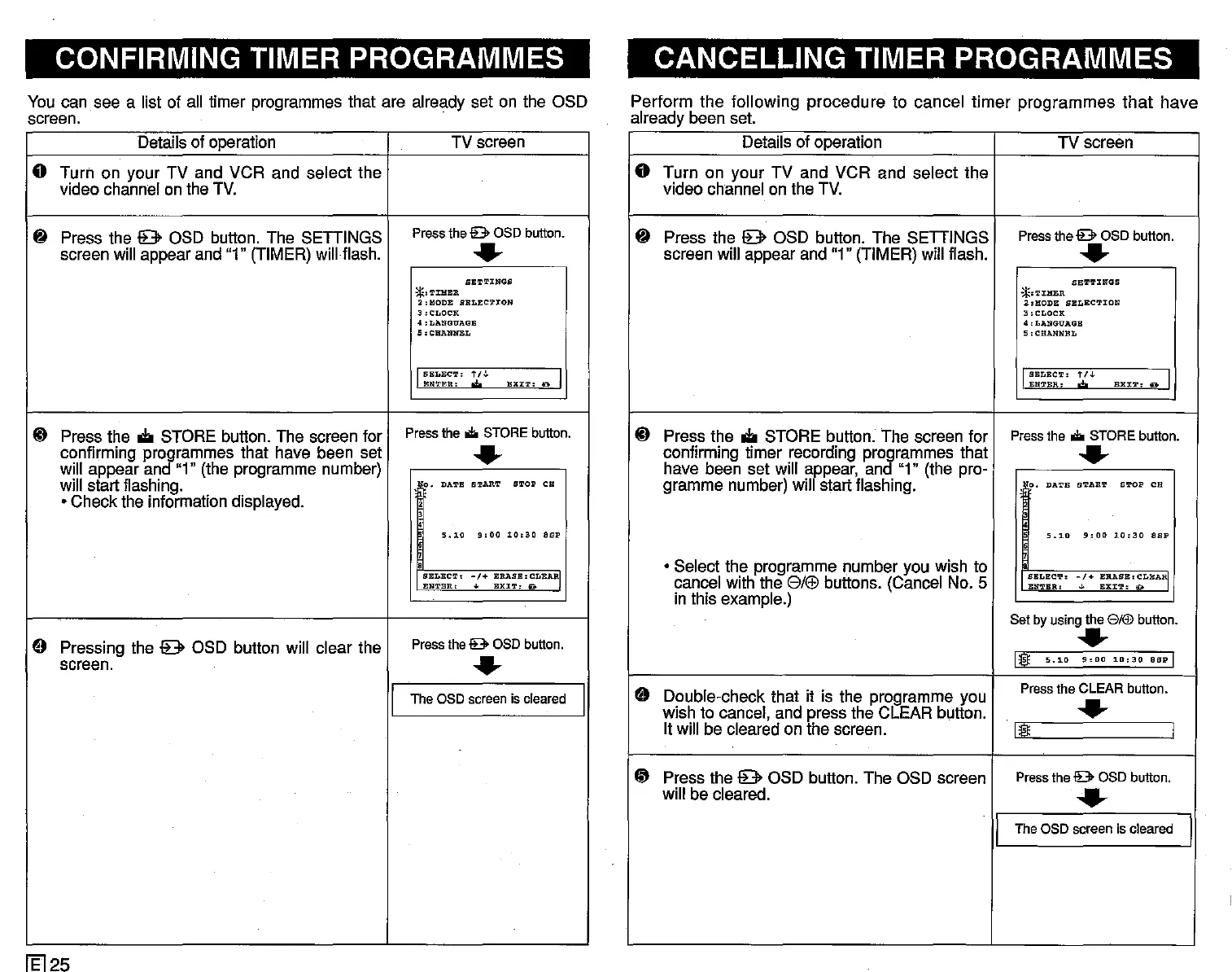
You can see a list of all timer programmes that are already set on the OSD
screen.
Details of operation
TV screen
o Turn on your TV and VCR and select the
video channel on the TV.
8 Press the 9 OSD button. The SETTINGS
Press the
lB>
OSD button.
screen will appear and "1" (TIMER) will flash.
..
SETTINGS
*.TIHER
2,MODE SELECTION
3,CLOCK
;!"LANGUAGE
5:CHANNEL
J
SELEC'r:
t/J.
EXIT.
D I
ENTER.
'*'
~ Press the
oIi
STORE button. The screen for
Press
the.
STORE button.
confirming programmes that have been set
..
will appear and "1" (the programme number)
will start flashing.
o.
DATE START STOP CH
• Check the information displayed.
5.10
g:OO
10:30
asp
::~=~~'
-j+
:~~~~':RARI
9 Pressing the 9 OSD button will clear the
Press the
lB>
OSD button.
screen.
..
I
Theaso
screen
is
cleared
I
fEl25
CANCELLING TIMER PROGRAMMES
Perform the following procedure to cancel timer programmes
that
have
already been set.
Details of operation
TV screen
o Turn on your TV and VCR and select the
video channel on the TV.
8 Press the 9 OSD button. The SETTINGS
Press the lB>OSD button.
screen will appear and "1" (TIMER) will flash.
..
SET!L'INGS
*.TJ:HER
2:HODE
SELECTION
3,CLOCK
4 ,LANGUAGE
5:CHANNBL
I
SELECT:
t/J.
EXX':l', D I
ENTER:
W
~
Press the
oIi
STORE button. The screen for
Press
the.
STORE button.
confirming timer recording programmes that
..
have been set will appear, and "1" (the pro-
gramme number) will start flashing.
e ,
DATE
START
S!L'OP
CB
5.10
9,00
10:30
asp
s
• Select the programme number you wish to
cancel with the
SI(£)
buttons. (Cancel No. 5
::~:~~:
-:+
:~:~'~BA~
in this example.)
Set by using the 8/!IJ button.
..
1I
5.10
!hOO
10:30
asp I
9
Double-check that it is the programme you
Pressthe CLEAR button.
wish to cancel, and press the CLEAR button.
..
It will be cleared on the screen.
1I I
~
Press the 9 OSD button. The OSD screen
Pressthe lB>OSD button.
will be cleared.
......
I
Theaso
screen
is
cleared
I



 To Next Page