RANDOM REPEAT TWO-WAY CHILD-LOCK SYSTEM
Details of operation I Multifunction display
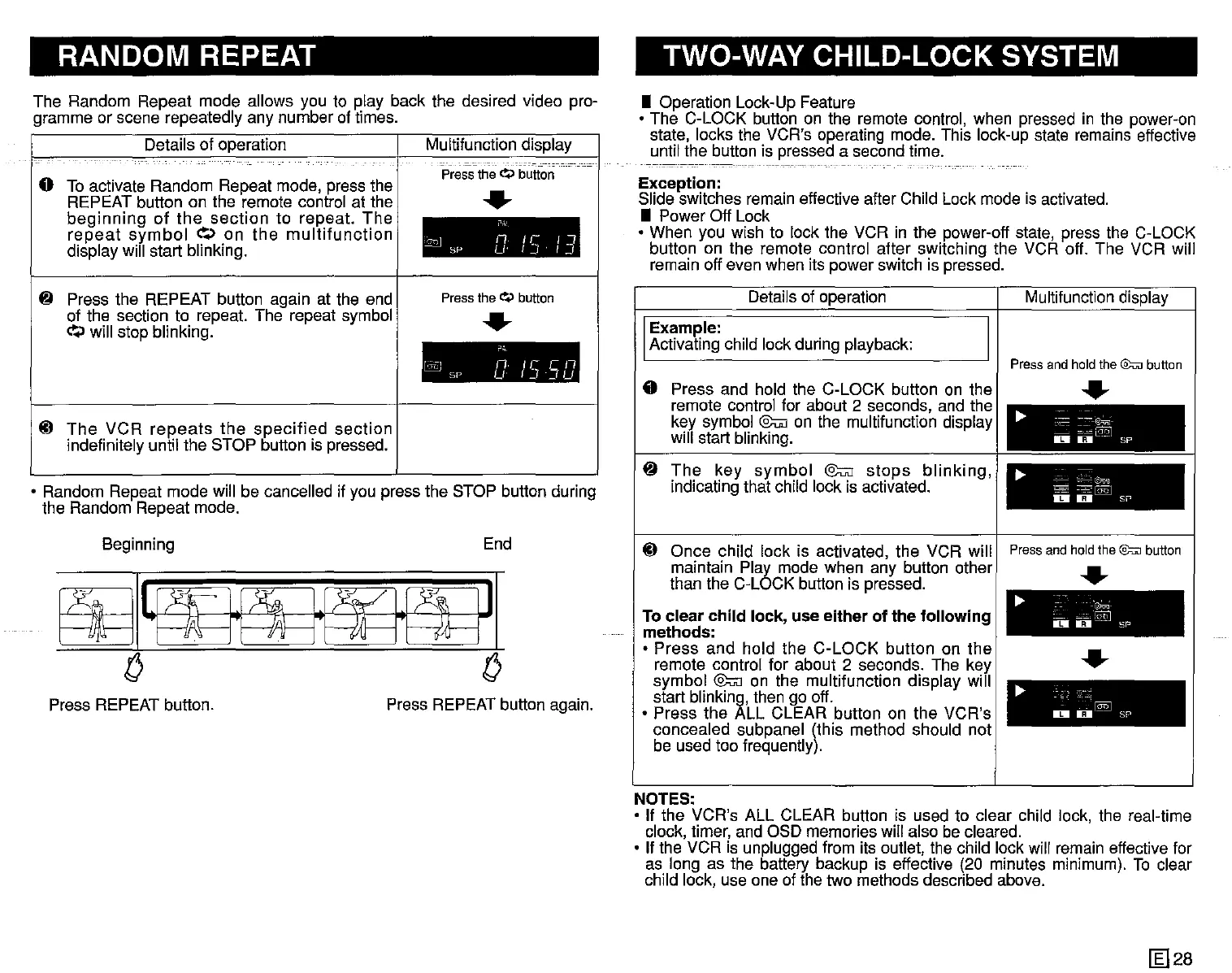
The Random Repeat mode allows you to play back the desired video pro-
gramme or scene repeatedly any number of times.
o To activate Random Repeat mode, press the
REPEAT button on the remote control at the
beginning
of
the
section
to repeat.
The
repeat
symbol
~.>
on
the
multifunction
display will start blinking.
Press
the
~
button
..
,
~
n/l-"
sr- u
IJ
I.~J
• Operation Lock-Up Feature
• The C-LOCK button on the remote control, when pressed in the power-on
state, locks the VCR's operating mode. This lock-up state remains effective
until the button is pressed a second time.
------------------._----
Exception:
Slide switches remain effective after Child Lock mode is activated.
• Power Off Lock
• When you wish to lock the VCR in the power-off state, press the C-LOCK
button on the remote control after switching the VCR off. The VCR will
remain off even when its power switch is pressed.
• Random Repeat mode will be cancelled if you press the STOP button during
the Random Repeat mode.
~ Press the REPEAT button again at the end
of the section to repeat. The repeat symbol
~.>
will stop blinking.
lil
The
VCR
repeats
the
specified
section
indefinitely until the STOP button is pressed.
Press
theQ
button
..
.,
l©
nu-en
SP
u
f~13U
Details of operation
Example:
Activating child lock during playback:
o Press and hold the C-LOCK button on the
remote controi for about 2 seconds, and the
key symbol @u;] on the multifunction display
will start blinking.
~
The
key
symbol
@u;]
stops
blinking,
indicating that child lock is activated.
Multifunction display
Press
and
hold
the
@;;:n]
button
..
...
=~
~=:-'~
IDIU--sP
...
~
~~~
DD
SI'
~I~J
o
~
.'~.
-
~:";:.I:§Q]
IDI
IIiJI
SP
~
@"I
o
1iII-
sr-
Beginning
Press REPEAT button.
End
Press REPEAT button again.
lil Once child lock is activated, the VCR will I Pressandhold
the@:uJ
button
maintain Play mode when any button other ___
than the C-LOCK button is pressed.
......
To clear child lock, use either of the following
methods:
• Press and hold the C-LOCK button on the I •
remote control for about 2 seconds. The key ......
symbol @u;] on the multifunction display will
start blinking, then go off.
• Press the ALL CLEAR button on the VCR's
concealed subpanel (this method should not
be used too frequently).
NOTES:
• If the VCR's ALL CLEAR button is used to clear child lock, the real-time
clock, timer, and OSD memories will also be cleared.
• If the VCR is unplugged from its outlet, the child lock will remain effective for
as long as the battery backup is effective (20 minutes minimum). To clear
child lock, use one of the two methods described above.
~28


 To Next Page
 Loading...




