REMOTE CONTROL PREPARATIONS
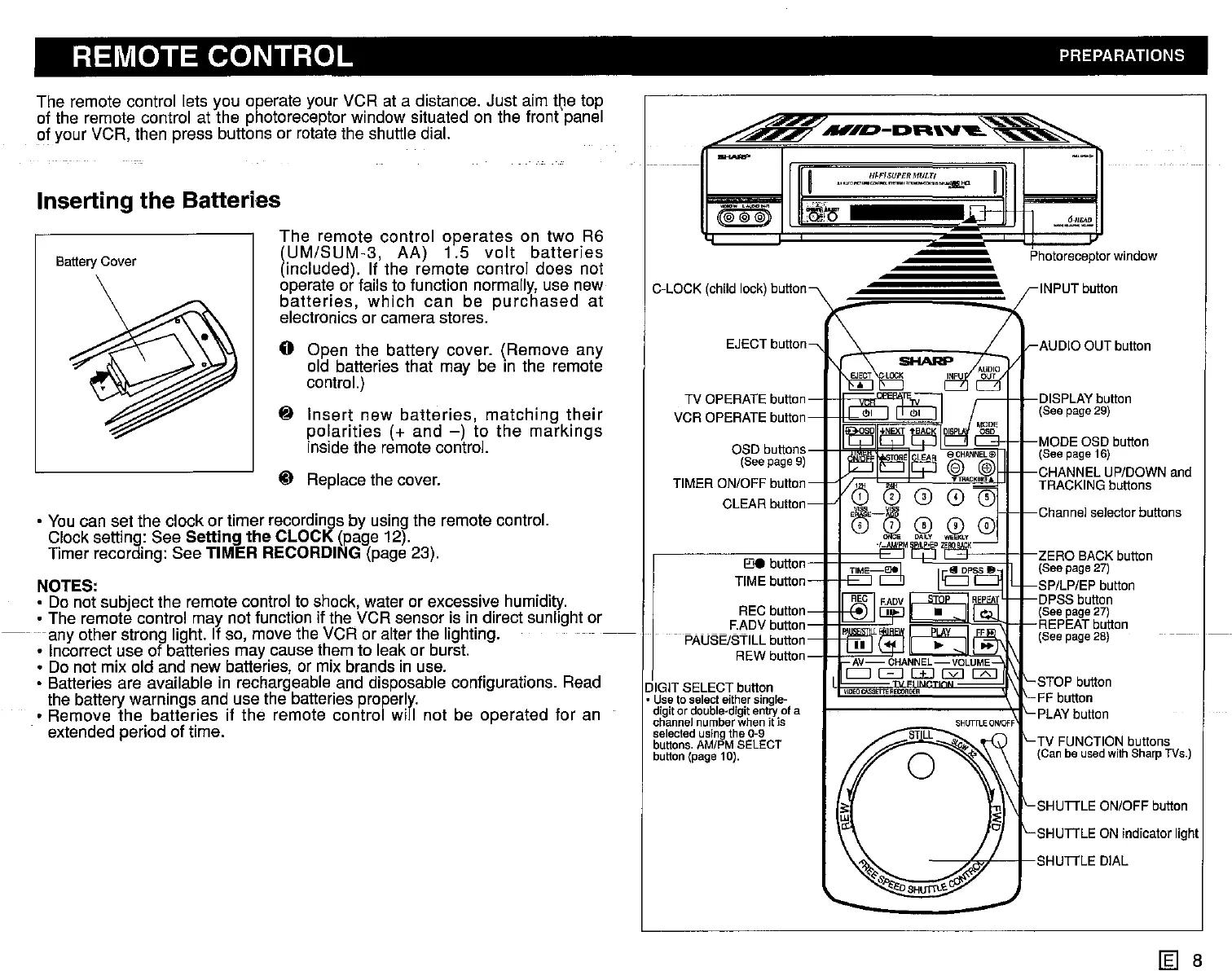
The remote control lets you operate your VCR at a distance. Just aim the top
of the remote control at the photoreceptor window situated on the frontpanel
of your VCR, then press buttons or rotate the shuttle dial.
~
"""~-DR'V'-~
Inserting the Batteries
_.~E2.
INPUT button
AUDIO OUT button
Channel
selector
buttons
SHUTTLE ON/OFF button
TV FUNCTION buttons
(Canbe
used
with
SharpTVs.)
Photoreceptor
window
- I I DISPLAY button
(See page29)
SHUTTLE ON Indicator light
,{j
I-SHUTTLE
DIAL
~ETTE
RECORDER
REO
I
.,,",,,,..,,.'!!:.!:!,s.!!,;!:~MUL~,
............
, .
n1lJ:
11
.~IQ
EJECT button
(@~@=@)
~~
TV OPERATE button
-J-IF:E~~h
VCR OPERATE button 0
~MODE
OSD button
O"U'''.'~I
"" (See page16)
CHANNEL UP/DOWN and
TRACKING buttons
E'Je
button
TIME button
I I F"l
OSD buttons
(Seepage 9)
TIMER ON/OFF button
CLEAR button
C-LOCK (child lock) button
DIGIT SELECT button
• Useto
select
either
single-
digit
or
double-digit
entry
ofa
channel
number
whenitis
selected
using
the0-9
buttons.
AM/PMSELECT
button
(page10).
The
remote control
operates
on two R6
(UM/SUM-3,
AA)
1.5
volt
batteries
(included). If the remote controi does not
operate or fails to function normally, use new
batteries,
which
can
be
purchased
at
electronics or camera stores.
o Open the battery cover. (Remove any
old batteries that may be in the remote
control.)
~
Insert
new
batteries,
matching
their
polarities
(+ and
-)
to
the
markings
inside the remote control.
~ Replace the cover.
Battery
Cover
• You can set the clock or timer recordings by using the remote control.
Clock setting: See
Setting the CLOCK (page 12).
Timer recording: See
TIMER RECORDING (page 23).
NOTES:
• Do not subject the remote control to shock, water or excessive humidity.
• The remote control may not function if the VCR sensor is in direct sunlight or
any other strong light. If so, move the VCR or alter the lighting.
• Incorrect use of batteries may cause them to leak or burst.
• Do not mix old and new batteries, or mix brands in use.
• Batteries are available in rechargeable and disposable configurations. Read
the battery warnings and use the batteries properly.
• Remove the batteries if
the remote control wiil not be operated for an
extended period of time.
[g] 8



 To Next Page