PREPARATIONS
ADJUSTING THE VIDEO CHANNEL
Connecting to TV and Audio Equipment
Rear of the VCR
~o
~~
~
iti!
.
~IOO
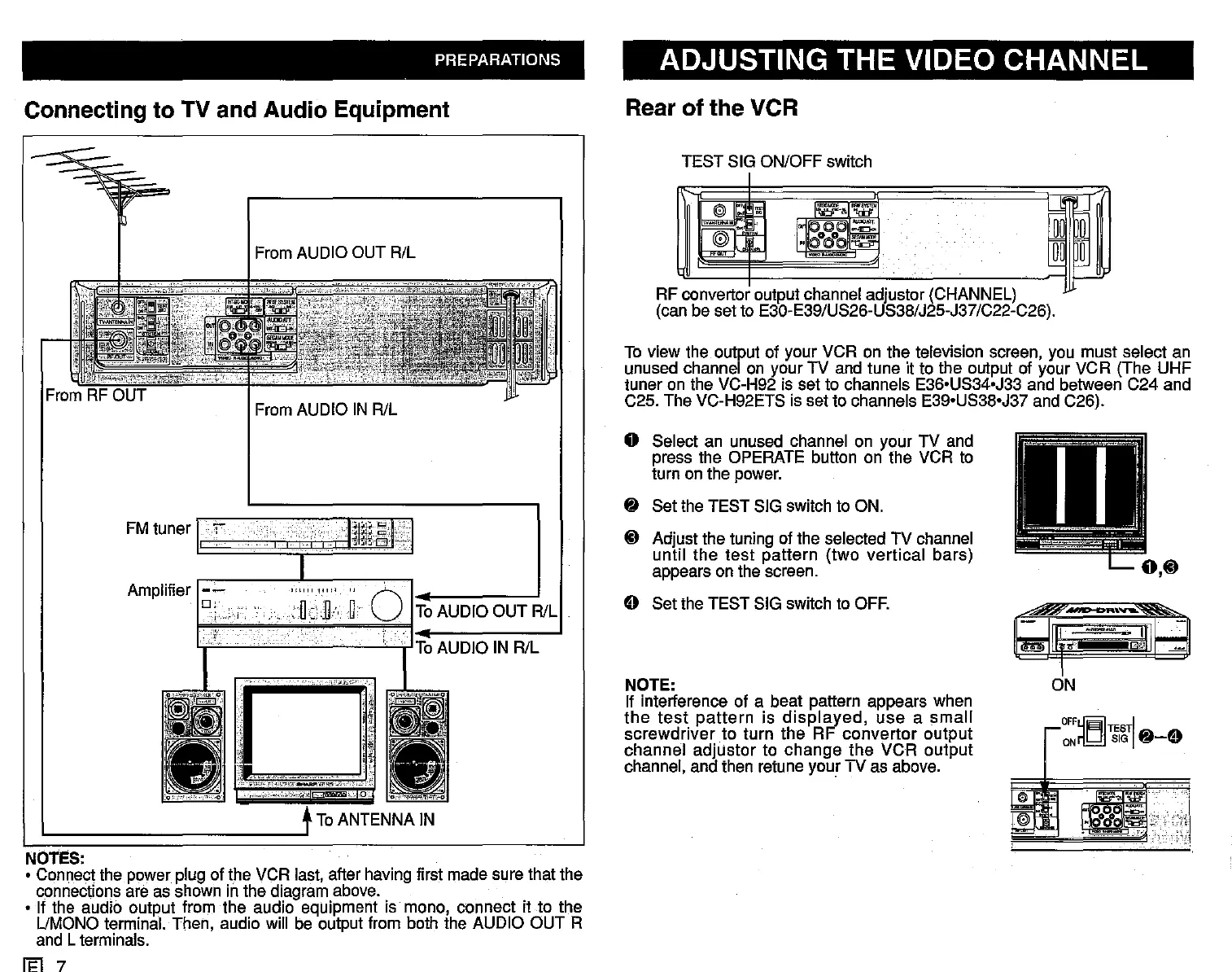
To view the output of your VCR on the television screen, you must select an
unused channel on your TV and tune it to the output of your VCR (The UHF
tuner on the VC-H92 is set to channels E36'US34'J33 and between C24 and
C25. The VC-H92ETS is set to channels E39'US38'J37 and C26).
RF convertor output channel adjustor (CHANNEL)
(can be set to E30-E39/US26-US38/J25-J37/C22-C26).
TEST SIG ON/OFF
switc.h
From AUDIO IN R/L
From AUDIO OUT R/L
OFF~Til~TI
~-E)
ONri.b!.I
e
I~
NOTE:
If interferenc.e of a beat pattern appears when
the
test
pattern
is
displayed,
use
a
small
sc.rewdriver to turn the RF
convertor
output
channel adjustor to
c.hange
the
VCR output
channel, and then retune your TV as above.
o Select an unused channel on your TV and
press the OPERATE button on the VCR to
turn on the power.
~
Set the TEST SIG switch to ON.
i}
Adjust the tuning of the selected TV channel
until
the
test
pattern
(two verttcal bars)
appears on the screen.
E) Set the TEST SIG
switc.h
to OFF.
ToAUDIO
IN R/L
ToAUDIO OUT RlL
!.":;;.i'y,-'
'''''''''''iO
'_0i:_""'_'«"_.';'
To ANTENNA IN
Amplifier
FM tuner
I,
"I
I I
Ittol
q
I
•
NOTES:
• Connect the power plug of the VCR last, after having first made sure that the
connections are as shown in the diagram above.
• If the audio output from the audio equipment is mono, connect it to the
UMONO terminal. Then, audio will be output from both the AUDIO OUT R
and L terminals.
Ii=l
7



 To Next Page