Superimposing a Title
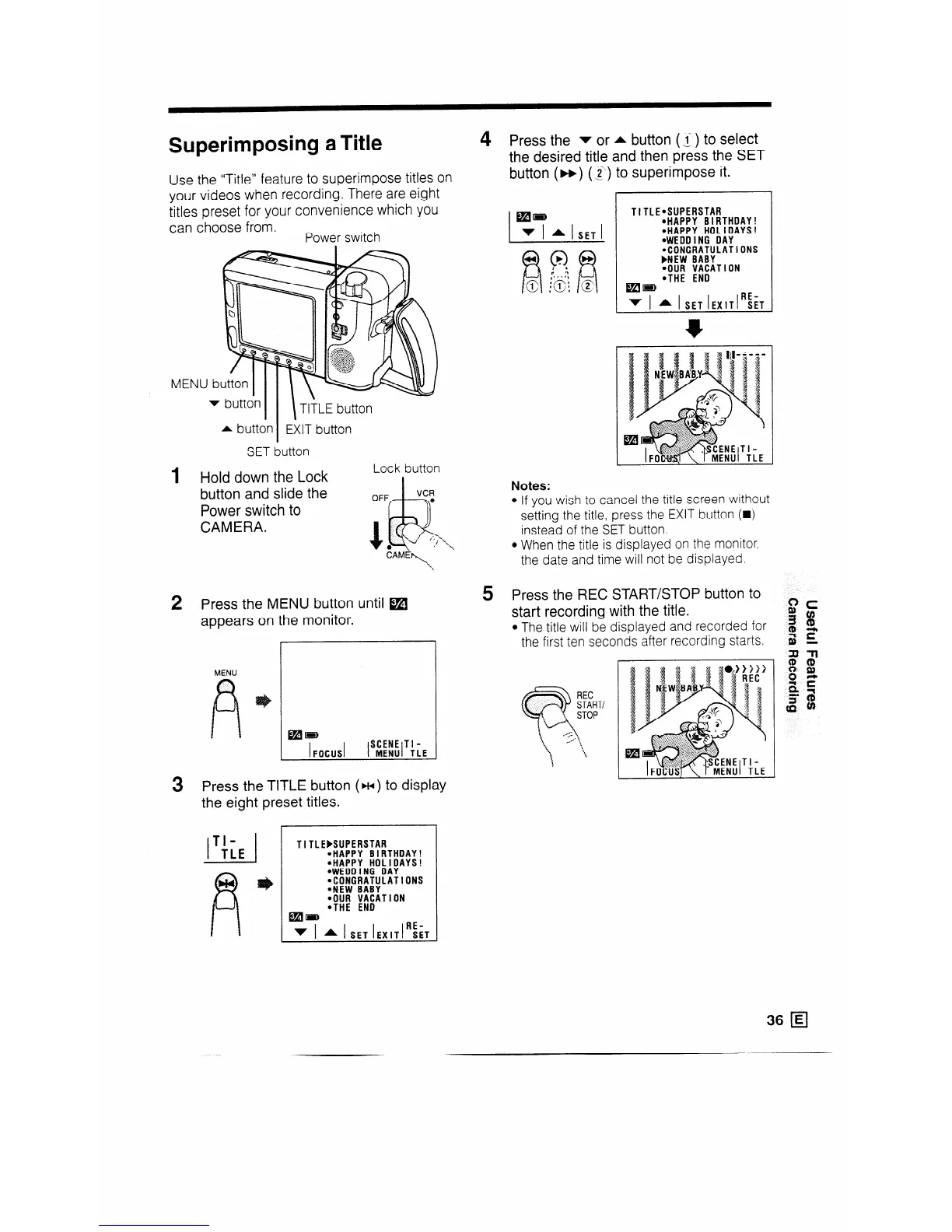
Use the “Title” feature to superimpose titles on
your videos when recording. There are eight
titles preset for your convenience which you
can choose from.
Power switch
MENU
v button
II I
Tl?LE button
1
2
* button EXIT button
I
SET button
Hold down the Lock
Lock button
button and slide the
Power switch to
CAMERA.
Press the MENU button until m
appears on the monitor.
MENU
3
Press the TITLE
button ( w ) to display
the eight preset titles.
I I
TI-
TLE
TITLEMUPERSTAR
*HAPPY BIRTHDAY!
l HAPPY HOLIDAYS!
*WEDDING DAY
.CONGRATULATIONS
.NEW BABY
*OUR VACATION
*THE ENO
mm
v I A I SET IEXITI~~T
Press the v or A button (.f ) to select
the desired title and then press the SET
button (H) (g;) to superimpose it.
TITLE*SUPERSTAR
@HAPPY BIRTHDAY!
*HAPPY HOLIDAYS!
*WEDDING DAY
.CONGRATULATIONS
FNEW BABY
4;; ;;;ATlON
mm
v I * I SET IEXITI~~T
Notes:
l If you wis 1 to cancel the title screen without
setting the title, press the EXIT button (w)
instead of the SET button.
l When the title is displayed on the monitor,
the date and time will not be displayed.
5 Press the REC START/STOP button to
start recording with the title.
l The title will be displayed and recorded for
the first ten seconds after recording starts.
36 q










 To Next Page