Useful Features
Camera Recording
Changing the Preset Titles
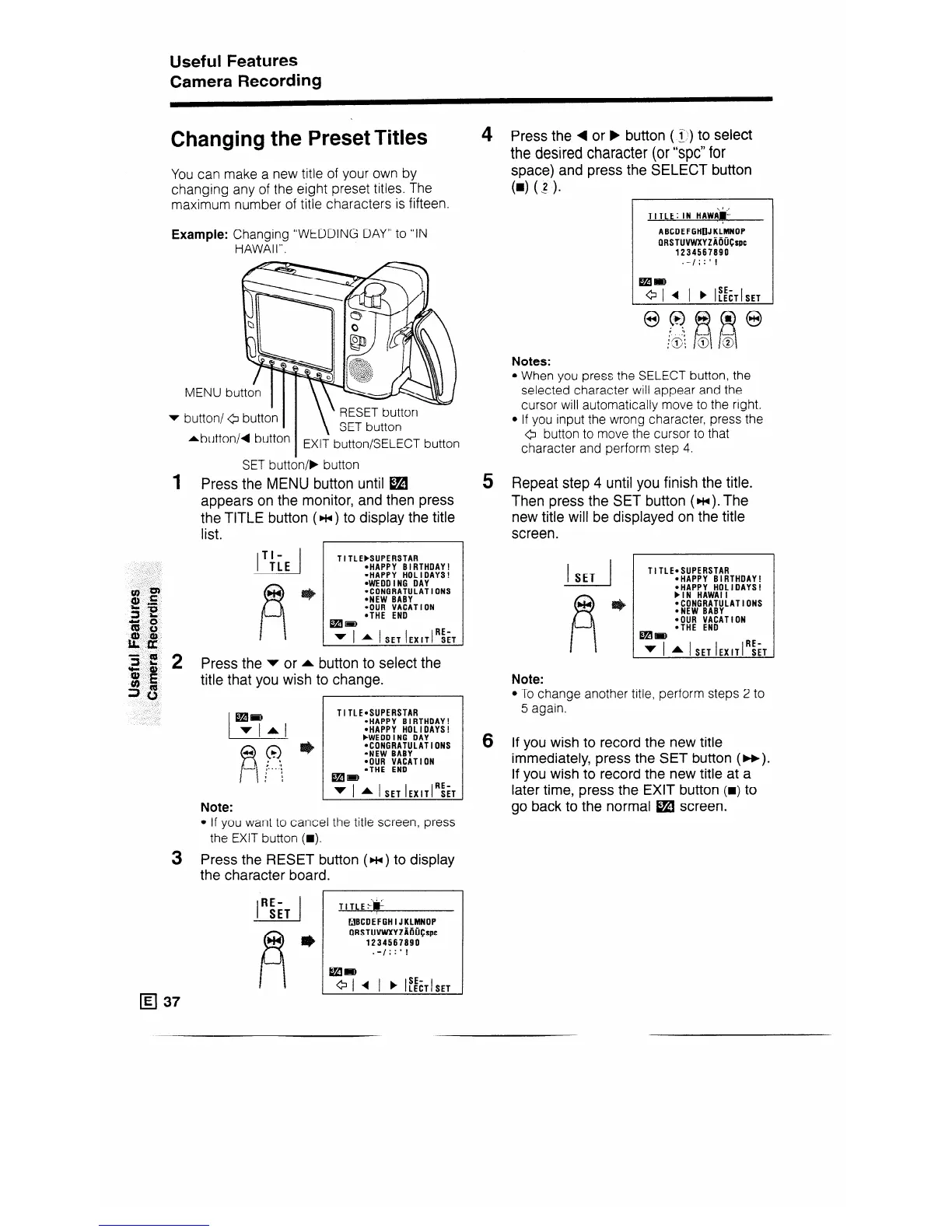
You can make a new title of your own by
changing any of the eight preset titles. The
maximum number of title characters is fifteen.
Example: Changing “WEDDING DAY” to “IN
HAWAII”.
4 Press the 4 or F button ( 1)) to select
the desired character (or “spc” for
space) and press the SELECT button
W (1).
TITLE: IN HAWi&
ABCDEFGHOJKLMNOP
. . _ .
QRSTUVWXYZADU~spc
1234567890
.-/;:‘I
Notes:
MENU bu
v button/ 6
1
3
q 37
rbutton/d button
I
EXI? button/SELECT button
SET button/F button
Press the MENU button until W
appears on the monitor, and then press
the TITLE button (w ) to display the title
list.
TI-
!-J
TLE
TITL EbSUPERSTAR
*HAPPY BIRTHDAY!
aHAPPY HOLIDAYS!
l WEDD I NG
DAY
l CDNGRATULATlDNS
*NEW BABY
4;‘: ;;;A’1 ON
A I SET IEXITI~~T
Press the v or A button to select the
title that you wish to change.
1
TITLE.SUPERSTAR
.HAPPY BIRTHDAY!
*HAPPY HOLIDAYS!
FWEDD I NG DAY
*CONGRATULATIONS
*NEW BABY
*OUR VACATION
*THE END
Iall-
v I * I SET IEXITI~~T
Note:
l If you want to cancel the title screen, press
the EXIT button (m).
Press the RESET button (w) to display
the character board.
r
RE-
i
SET
.\I ,
TITLE+
q BCDEFGH I J KLMNDP
_.._
QRSTUVWXYZAOU~spc
1234567890
.-/;:‘I
+ I 4 I ) IKCTISET
l When you press the SELECT button, the
selected character will appear and the
cursor will automatically move to the right.
l If you input the wrong character, press the
0 button to move the cursor to that
character and perform step 4.
5 Repeat step 4 until you finish the title.
Then press the SET button (~).The
new title will be displayed on the title
screen.
I I SET
TI TLEaSUPERSTAR
aHAPPY BIRTHDAY!
.HAPPY HOLIDAYS!
bIN HAWAII
*CONGRATULATIONS
*NEW BABY
4;; :/;ATION
Ial=
v I A I SET IEXITI~~T
Note:
l To change another title, perform steps 2 to
5 again.
6 If you wish to record the new title
immediately, press the SET button (w).
If you wish to record the new title at a
later time, press the EXIT button (B) to
go back to the normal @I screen.










 To Next Page