EasyManua.ls Logo

Sharp WQ-T281Z - Names of Parts; New Function; Voltage Selection

Sharp WQ-T281Z
19 pages
Print Icon
To Next Page IconTo Next Page
To Previous Page IconTo Previous Page
Loading...
WO-T2812Z
WQ-T2812
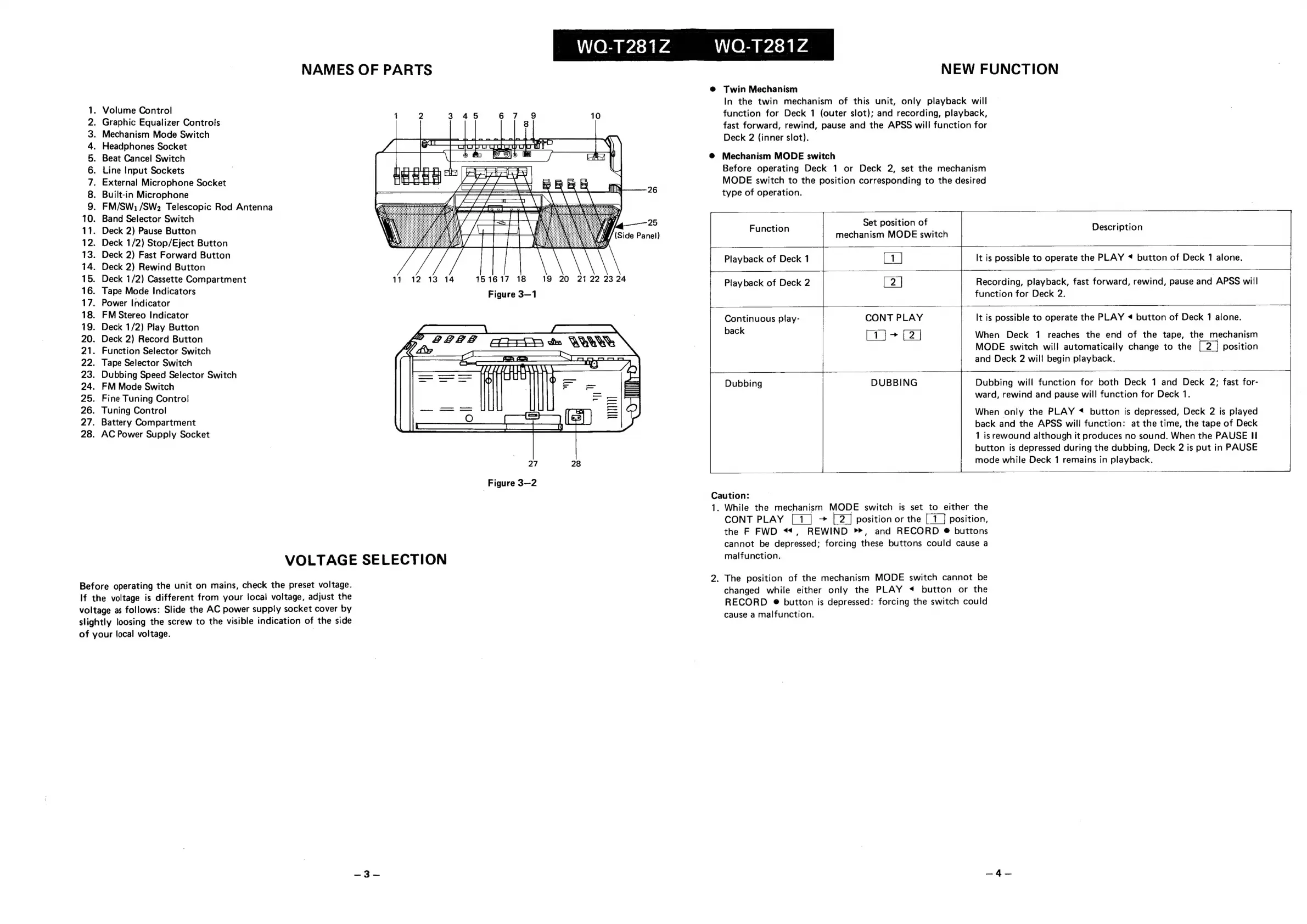
NAMES
OF
PARTS
.
Volume
Control
.
Graphic
Equalizer
Controls
8
.
Mechanism
Mode
Switch
Headphones
Socket
Beat
Cancel
Switch
.
Line
Input
Sockets
.
External
Microphone
Socket
.
Built-in
Microphone
.
FM/SW:1/SW2
Telescopic
Rod
Antenna
10.
Band
Selector
Switch
11.
Deck
2)
Pause
Button
12.
Deck
1/2)
Stop/Eject
Button
13.
Deck
2)
Fast
Forward
Button
14.
Deck
2)
Rewind
Button
15.
Deck
1/2)
Cassette
Compartment
11
12
13
14
16.
Tape
Mode
Indicators
17.
Power
Indicator
18.
FM
Stereo
Indicator
19.
Deck
1/2)
Play
Button
20.
Deck
2)
Record
Button
21.
Function
Selector
Switch
22.
Tape
Selector
Switch
23.
Dubbing
Speed
Selector
Switch
24.
FM
Mode
Switch
25.
Fine
Tuning
Control
26.
Tuning
Control
27.
Battery
Compartment
28.
AC
Power
Supply
Socket
OMONOMAAWNH—
151617
18
19
20
2122
23
24
Figure
3—1
|
TE,
barf
28?
Carep
&
WW
Figure
3—2
VOLTAGE
SELECTION
Before
operating
the
unit
on
mains,
check
the
preset
voltage.
If
the
voltage
is
different
from
your
local
voltage,
adjust
the
voltage
as
follows:
Slide
the
AC
power
supply
socket
cover
by
slightly
loosing
the
screw
to
the
visible
indication
of
the
side
of
your
local
voltage.
|
Playback
of
Deck
1
NEW
FUNCTION
Twin
Mechanism
In
the
twin
mechanism
of
this
unit,
only
playback
will
function
for
Deck
1
(outer
slot);
and
recording,
playback,
fast
forward,
rewind,
pause
and
the
APSS
will
function
for
Deck
2
(inner
slot).
Mechanism
MODE
switch
Before
operating
Deck
1
or
Deck
2,
set
the
mechanism
MODE
switch
to
the
position
corresponding
to
the
desired
type
of
operation.
Set
position
of
mechanism
MODE
switch
[1]
Function
Description
It is
possible
to
operate
the
PLAY
«
button
of
Deck
1
alone.
Recording,
playback,
fast
forward,
rewind,
pause
and
APSS
will
function
for
Deck
2.
Playback
of
Deck
2
CONT
PLAY
It
is
possible
to
operate
the
PLAY
<
button
of
Deck
1
alone.
eae
eee
Continuous
play-
back
When
Deck
1
reaches
the
end
of
the
tape,
the
mechanism
MODE
switch
will
automatically
change
to
the
position
and
Deck
2
will!
begin
playback.
Dubbing
DUBBING
Dubbing
will
function
for
both
Deck
1
and
Deck
2;
fast
for-
ward,
rewind
and
pause
will
function
for
Deck
1.
When
only
the
PLAY
«<
button
is
depressed,
Deck
2
is
played
back
and
the
APSS
will
function:
at
the
time,
the
tape
of
Deck
1
is
rewound
although
it
produces
no
sound.
When
the
PAUSE
I
button
is
depressed
during
the
dubbing,
Deck
2
is
put
in
PAUSE
mode
while
Deck
1
remains
in
playback.
Caution:
1.
While
the
mechanism
MODE
switch
is
set
to
either
the
CONT
PLAY
[1]
>
position
or
the
position,
the
F
FWD
<4,
REWIND
>>,
and
RECORD
®
buttons
Cannot
be
depressed;
forcing
these
buttons
could
cause
a
malfunction.
2.
The
position
of
the
mechanism
MODE
switch
cannot
be
changed
while
either
only
the
PLAY
<
button
or
the
RECORD
@
button
is
depressed:
forcing
the
switch
could
cause
a
malfunction.

Related product manuals