~-AllOVS
4. Drawer test
1) Key operation
2) Test procedure
The drawer opens with the above key operation. Check that the
drawer is open. Press any key to terminate the test.
Completion print 04
5. Printer test
1) Key operation
5+~
2) Test procedure
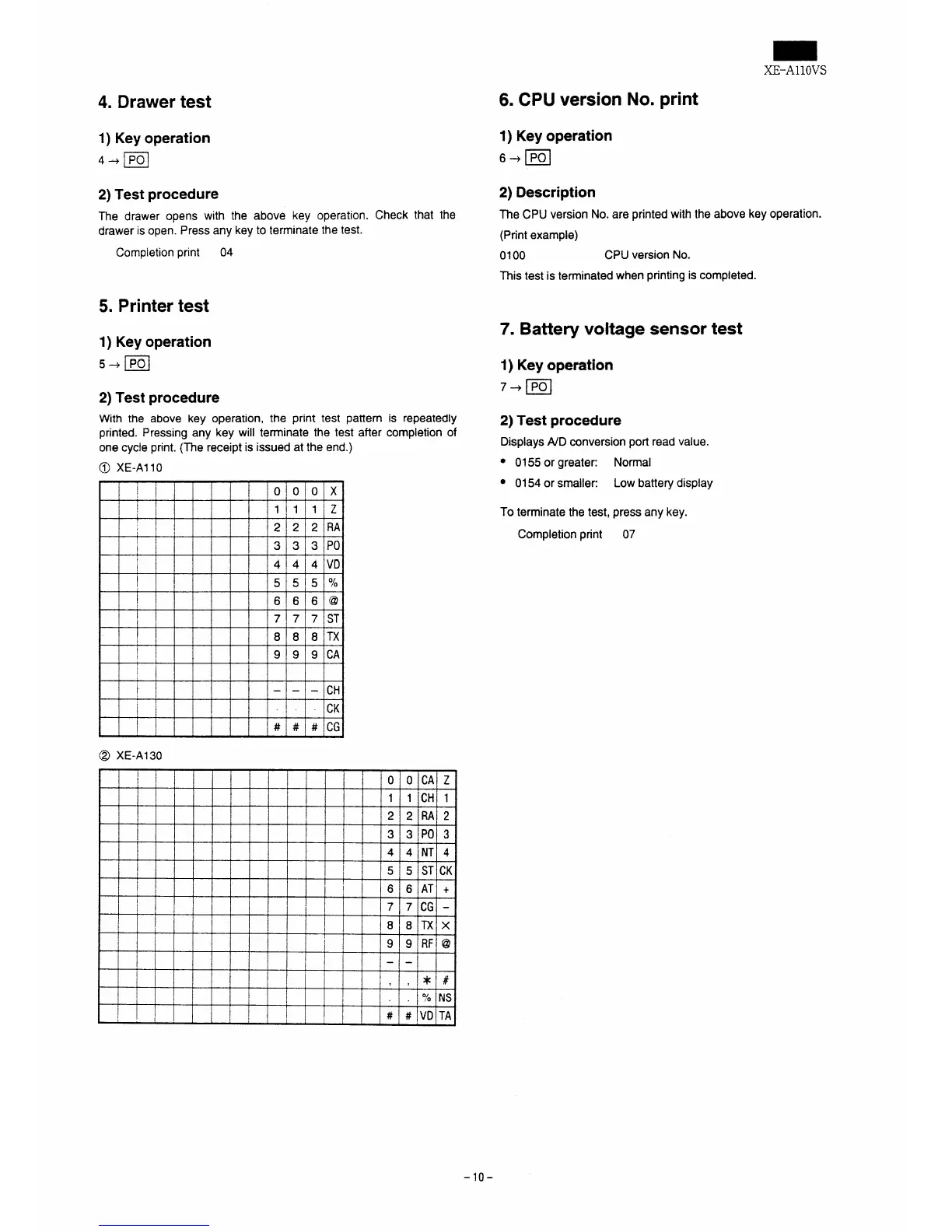
With the above key operation, the print test pattern is repeatedly
printed. Pressing any key will terminate the test after completion of
one cycle print. {The receipt is issued at the end.)
@ XE-A11O
,
0 010
x
I
1 1
1 z
I
I
* . .
‘1
I
!
3 3 3
Po
1
4 4
4 VD
!
! ,
!
5 5
5
0/0
6 6
6 @
i
7 7
7 ST
t
8 8
8 TX
I
9 9
9 CA
{
I
——
-
GH
I
CK
# #
# CG
@ XE-A130
I
o 0 ICA
z
!
1 1 ICH
1
2 2 IRA
2
3 3 Po 3
I
4 4 NT 4
i
I
5 5 ST
CK
[ *
6 6 AT
+
I
,
7 7 CG -
8 8 Tx
x
9 9 RF @
- -
,
, ,
*\#
$
I?4
NS
[
# # \VD TA
6. CPU version
1) Key operation
6+~
No.print
2) Description
The CPU version No. are printed with the above key operation.
(Print example)
0100
CPU version No.
This test is terminated when printing is completed.
7. Battery voltagesensortest
1)Key operation
7+~
2) Test procedure
Displays A/D mnversion port read value.
● 0155 or greater:
Normal
● 0154 or smaller:
Low battery display
To terminate the test, press any key.
Completion print 07
-10-


 To Next Page