39
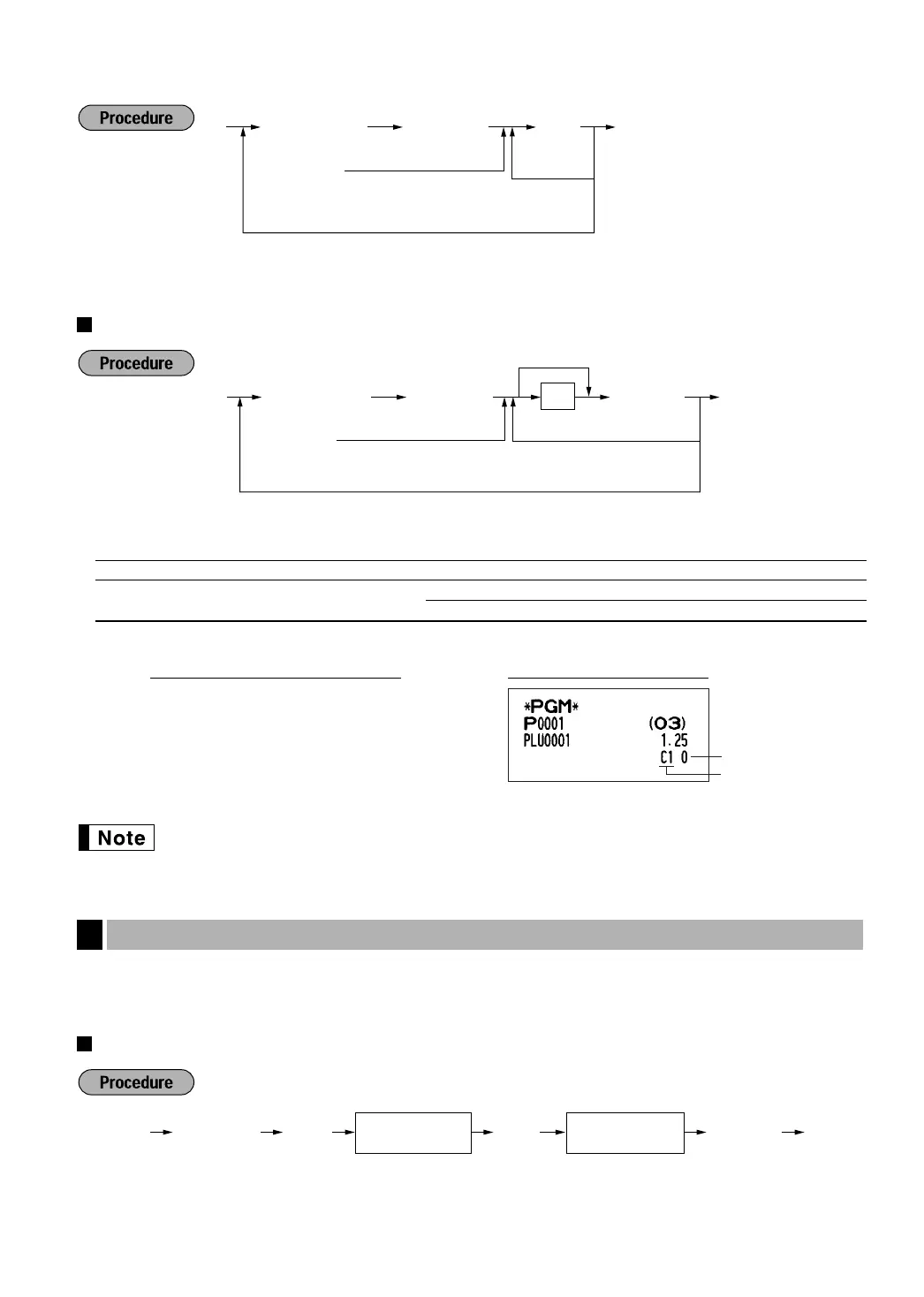
To delete a PLU/UPC code, use the following sequence:
Function selection
*: Item: Selection: Entry:
A Commission group number 0-2 (0: Non commission)(default:0)
B PLU/sub-department selection Sub-department 0
(For PLU code only) PLU* 1
When programming UPC codes, always enter 1 for B.
When you program all 7000 PLU/UPC codes, the programming sequence will be complete with a
press of the
s
key.
Based on each clerk’s sales total of each commission group and the corresponding commission rate, the
commission amounts are calculated, which is printed on clerk reports.
Commission rate
Commission Rate Programming
3
PLU/sub-dept. selection
Commission group
number
1
o
10
sA
PrintKey operation example
o
To program “00”
As
AB
PLU/UPC code
*
To program the following PLU/UPC
To program another PLU/UPC
Ä
Scan UPC code
PLU/UPC code
ov
To delete the following
PLU/UPC
To delete another PLU/UPC
A
Ä
Scan UPC code
s
Commission
number (1 or 2)
@@28 sA
Commission rate
(0.00 - 999.99)
A505_3 FOR THE MANAGER 06.6.16 0:39 PM Page 39


 To Next Page