37
Dimension: 140mm x 215mm
Set Up (Continued)
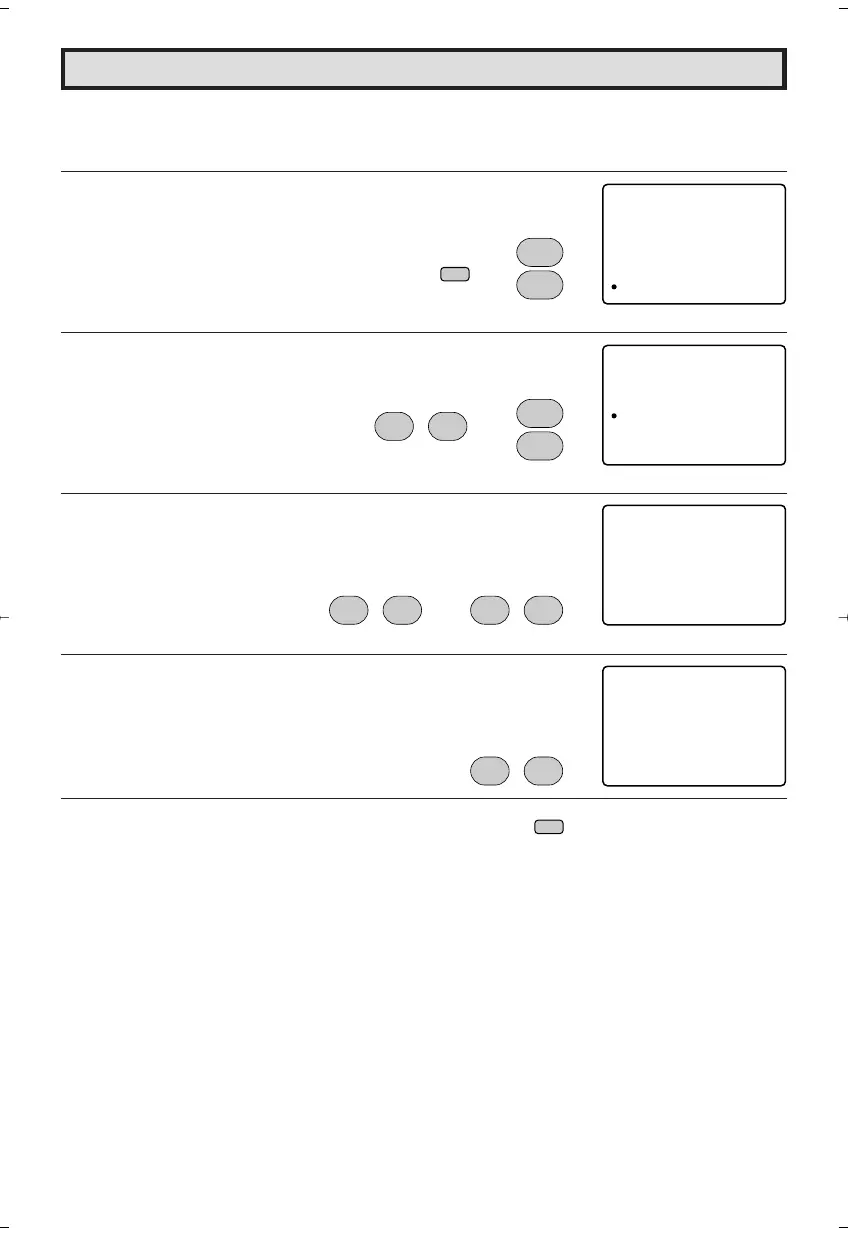
L AUTO INPUT
The unit is preset to switch to the INPUT 2 mode automatically when VIDEO equipment is
connected to the INPUT 2 terminal. Do the following to switch this feature off:
1 Press
MENU
to access MAIN MENU screen.
2 Press
CH UP (
8
)
or
DOWN (
9
)
to move the “a” mark to “SETUP”.
3 Press
VOL (+)
or
(–)
to access SETUP mode, then press
CH UP
(
8
)
or
DOWN (
9
)
to move the “a” mark to “AUTO INPUT”.
4 Press
VOL (+)
or
(–)
to access AUTO INPUT select mode.
5 Press
VOL (+)
or
(–)
to select “OFF” or “ON”.
6 You may turn off “AUTO INPUT” when it is not in use.
Press
VOL (+)
or
(–)
to select “OFF”.
7 Press
MENU
to exit.
CH
8
9
CH
→
CH
8
9
CH
→
;
:
VOL
–
VOL
+
;
:
VOL
–
VOL
+
;
:
VOL
–
VOL
+
MENU
;
:
VOL
–
VOL
+
→
MENU
SLEEP T IMER
VIDEO ADJUST
AUD I O ADJUST
AUD I O SELECT
CLOSED CAPT
CH TSE UP
ION
PAREN
SETUP
TAL CON ROLT
(MAIN MENU screen)
SET PU
LANG GUA E
ENERGY SAVE
BLUE SCREE
AUTO I NPUT
N
(SETUP mode)
OAUT I NPUT
:ONATST US
2)IN(PUT
(AUTO INPUT select mode)
OAUT I NPUT
:OFFATST US
2)IN(PUT
20F650[34-39].p65 9/12/04, 1:43 PM37






 To Next Page