02/10/1 XL_45H_H_E3.fm
E-20
ENGLISH
XL-45H
8
7
6
5
4
3
2
1
RDS Radio
To recall stations in memory
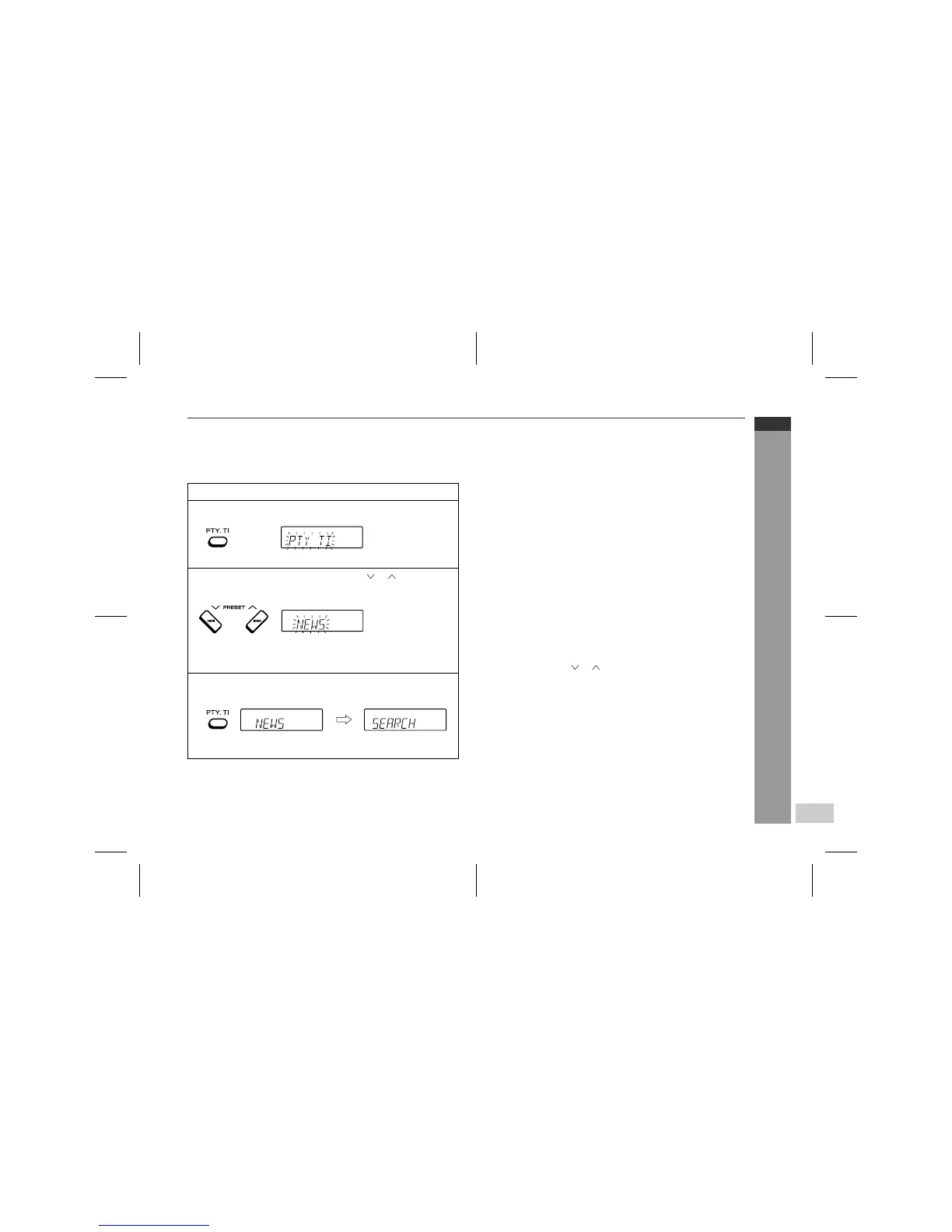
To specify programmed types and select stations (PTY search):
You can search a station by specifying the programme type (news,
sports, traffic programme, etc. ... see page 17) from the stations in
memory.
Notes:
z
If the display has stopped flashing, start again from step 2. If the
unit finds a desired programme type, the corresponding channel
number will flash for about 4 seconds which the station name will
flash for 7 seconds which will remain lit.
z
If you want to listen to the same programme type of another sta-
tion, press the PTY.TI button whilst the channel number or station
name is flashing. The unit will look for the next station.
z
If no station can be found, "NOT FOUND" will appear for 4 sec-
onds.
If you select the traffic programme:
If you select the traffic programme (TP) in step 3, "TP" will appear.
(This does not mean that you can listen to the traffic information at
that time.)
When a traffic information is broadcast, "TA" will appear.
To specify station names and select stations manually:
You can select a station by specifying the name (BBC R1, BBC R2,
etc.) from the stations stored in memory.
Before starting this operation, you must store one or more station
names in memory.
1
Press the TUNER (BAND) button to select "FM".
2
Press the PTY.TI button.
"PTY TI" will flash for about 4 seconds.
3
Within 4 seconds, press the PRESET ( or ) button to se-
lect the programme type.
Each time the button is pressed, the programme type will ap-
pear. If the button is held down for more than 0.5 seconds, the
programme type will appear continuously.
4
Whilst the selected programme type is flashing (within 4
seconds), press the PTY.TI button again.
After the selected programme type has been lit for 2 seconds,
"SEARCH" will appear, and the search operation will start.
1 Press the TUNER (BAND) button to select the FM band.
2 Press the PRESET ( or ) button to select a desired station.
3 The station name will be displayed for 3 seconds. Then the dis-
play will change.


 To Next Page