EasyManua.ls Logo

Sharp XL-DK227NH - User Manual

Sharp XL-DK227NH
40 pages
Print Icon
To Next Page IconTo Next Page
Loading...
2008/June/13 XL-DK227NH/DK257NH_AUS
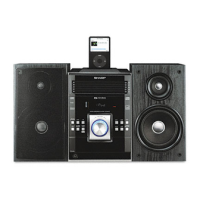
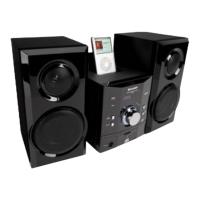
MICRO COMPONENT SYSTEM
XL-DK227NH Micro component system consisting of XL-DK227NH
(main unit) and CP-DK227NH (speaker system).
XL-DK257NH Micro component system consisting of XL-DK257NH
(main unit) and CP-DK257NH (speaker system).
The illustration printed in this operation manual are for the model
XL-DK227NH.
MODEL
OPERATION MANUAL
iPod is a trademark of Apple Inc., registered in
the U.S. and other countries.
XL-DK227NH
AUDIO
IN
XL-DK257NH
XL-DK227NH
XL-DK257NH
AUDIO
IN

Questions and Answers

  • M
    Mary BurnettAug 17, 2025
    Why does my Sharp XL-DK227NH remote control not operate?
    • D
      Darlene BenjaminAug 17, 2025
      If the remote control for your Sharp Stereo System isn't working, consider these potential causes: * Check if the AC power lead of the unit is properly plugged in. * Ensure the batteries are correctly inserted with the right polarity. * Replace the batteries if they are dead. * Adjust the distance or angle from which you are using the remote. * Make sure the remote control sensor isn't exposed to strong light.
  • W
    William PattonAug 19, 2025
    What to do if Sharp XL-DK227NH has no sound and no image on TV/monitor?
    • T
      terriadamsAug 19, 2025
      If you're not getting any sound or picture when using your Sharp Stereo System with a TV or monitor, here are a few things to check: * Make sure the iPod is playing and properly connected to the unit. * Verify that the AC power lead of the unit is plugged in. * Ensure the video cable is correctly connected. * Confirm that the TV/monitor's input selection is properly set. * Check if the display shows “DOCK OK”.
  • M
    Michael MartinAug 22, 2025
    What to do if my Sharp XL-DK227NH Stereo System produces no sound?
    • M
      Manuel MatthewsAug 22, 2025
      If you're not getting any sound from your Sharp Stereo System, here are a few things to check: * Make sure the volume isn't set to “0”. If it is, increase the volume level. * If headphones are connected, disconnect them. * Check the speaker wires and reconnect them if they're disconnected.
  • K
    Kimberly ReyesAug 25, 2025
    What to do if my Sharp XL-DK227NH Stereo System is malfunctioning due to condensation?
    • C
      carlajohnstonAug 26, 2025
      If your Sharp Stereo System is malfunctioning due to condensation, which can be caused by sudden temperature changes or operating in a humid environment, leave the power on with no disc in the unit until normal playback is possible (about 1 hour). Also, wipe off any condensation on the transmitter.
  • A
    Angela WrightAug 27, 2025
    Why does my Sharp XL-DK227NH radio make unusual noises?
    • H
      hughesmiguelAug 27, 2025
      If your Sharp Stereo System radio is making unusual noises, it could be due to the unit's placement. Try moving it away from the TV or computer. Also, ensure the FM aerial or AM loop aerial is properly placed, away from the AC power lead if located nearby.
  • K
    Kristin PhamAug 30, 2025
    What to do if playback sounds are skipped or stopped on my Sharp XL-DK227NH?
    • D
      danielburchAug 30, 2025
      If the playback sounds are skipping or stopping on your Sharp Stereo System, consider these potential causes: * Move the unit away from sources of excessive vibrations. * Clean the disc. * Allow the unit to dry out if condensation has formed inside.
  • J
    Jennifer RiveraSep 2, 2025
    What to do if Sharp XL-DK227NH is not responding when a button is pressed?
    • S
      samantha70Sep 2, 2025
      If your Sharp Stereo System isn't responding when you press a button, try setting the unit to the power stand-by mode and then turning it back on. Alternatively, reset the unit.
  • J
    Justin JohnsonSep 4, 2025
    What to do if my Sharp XL-DK227NH playback does not start, stops, or isn't performed properly?
    • B
      Barry WatkinsSep 4, 2025
      If playback on your Sharp Stereo System doesn't start, stops unexpectedly, or isn't performing correctly, check the following: * Make sure the disc is loaded correctly (not upside down). * Confirm the disc meets the required standards. * If the disc is distorted or scratched, replace it.
  • J
    John ThompsonSep 8, 2025
    What to do if my Sharp Stereo System malfunctions due to external interference?
    • D
      dawn83Sep 8, 2025
      If your Sharp Stereo System malfunctions due to strong external interference or incorrect operation, try setting the unit to the stand-by mode and turning the power on again. If that doesn't work, unplug and plug in the unit, and then turn the power on.
  • M
    Mr. David MillerSep 12, 2025
    How to clear all memory by resetting my Sharp Stereo System?
    • S
      Stephen FoxSep 12, 2025
      To clear all the memory on your Sharp Stereo System by resetting it, press the ON/STAND-BY button to enter the power stand-by mode. While pressing down the button, press the CD button until “CLEAR ALL” appears.

Summary

Special Notes and Warnings

WARNINGS

Safety warnings about unit operation and potential hazards.

CAUTION

Precautions regarding laser product safety and iPod certification.

General Precautions for Safe Operation

System Connections - Overview

System Connections - Detailed Procedures

System Connections - Power and Demonstration Mode

Remote Control Operation and Testing

General Unit Controls and Features

Listening to the iPod - Compatibility and Setup

Supported iPod Models and Adaptor Connection

List of compatible iPods and guide to selecting the correct adaptor.

iPod Operations - Insertion, Removal, and Playback

Inserting and Removing iPod Adaptors

Steps for installing and removing iPod adaptors from the docking station.

Initiating iPod Playback and Disconnection

Instructions for starting iPod playback and safely disconnecting the unit.

iPod Operations - Menu Navigation and Video Output

Navigating iPod Menus and Watching Videos on TV

How to navigate iPod menus and view videos on a TV.

iPod System and Playback Functionality

Details on iPod system operations and playback detection features.

Playing CDs, MP3 s, and WMAs

Understanding MP3 and WMA File Formats

Explanation of MP3 and WMA audio compression formats and system compatibility.

Advanced CD;MP3;WMA Playback Features

Advanced CD;MP3;WMA Playback Modes

Programmed Playback for CDs and MP3;WMA

MP3;WMA Folder Playback Guide

Playing MP3;WMA Files from Folders

Guide to playing audio files organized in folders on discs.

Folder Playback Order Logic

Explanation of how folder order is determined and managed.

MP3;WMA Disc Playback Procedure with Folder Mode

Folder Mode Playback Steps

Detailed procedure for playing MP3/WMA discs with folder mode enabled.

Listening to the Radio - Tuning and Reception

Radio Station Memory and Scanning

Radio Data System (RDS) Features Overview

Information Provided by RDS

How RDS displays station names, traffic info, and program types.

RDS Auto Station Programme Memory (ASPM) Usage

Using ASPM to Store Stations

Guide to automatically scanning and storing RDS stations.

RDS Operation and Programme Type (PTY) Search

RDS Operation Notes and Radio Text Display

Notes on RDS operation, radio text display, and handling weak signals.

PTY Search for Programmed Stations

How to search for stations based on programme type (PTY).

RDS Station Selection and PTY Code Explanations

Manual Station Selection and PTY Code Descriptions

How to manually select stations and descriptions of PTY codes.

Timer and Sleep Operations - Setting the Timer

Timer and Sleep Operations - Timer Configuration

Timer and Sleep Operations - Advanced Functions

Troubleshooting Common Issues

General and iPod Troubleshooting

Solutions for common issues with the unit, iPod, and general operation.

Remote, Tuner, and CD Player Troubleshooting

Solutions for problems related to remote control, tuner, and CD player functions.

Sharp XL-DK227NH Specifications

General IconGeneral
Impedance4 Ω
Frequency range20 - 20000 Hz
RMS rated power32 W
Signal-to-Noise Ratio (SNR)90 dB
Peak Music Power Output (PMPO)64 W
Total Harmonic Distortion (THD)10 %
Subwoofer driver diameter (imperial)4 \
MP3 playbackYes
Audio formats supportedMP3, WMA
RDS featuresTA, TP
AM band range522 - 1.620 kHz
FM band range87.5 - 108 MHz
Product colorBlack
Number of optical discs1 discs
Speakers2
I/O ports1 x Audio in 1 x Subwoofer pre-out
Speaker depth164.5 mm
Speaker width130 mm
Speaker height260 mm
DVD Audio playbackNo
Dimensions (WxDxH)180 x 273 x 260 mm
Power requirementsAC 220 – 240V, 50Hz
Apple docking compatibilityiPod
Headphone outputs1
Headphone connectivity3.5 mm
Volume controlRotary
Power consumption (standby)0.6 W
Power consumption (typical)40 W
Weight and Dimensions IconWeight and Dimensions
Weight4100 g
Center speaker weight1900 g

Related product manuals