04/1/20 XL-HP737H(H)E4.fm
E-32
ENGLISH
8
XL-HP737H
TINSZA065AWZZ
Advanced Features
" To recall stations in memory
To specify programmed types and select stations (PTY
search):
You can search a station by specifying the programme type (news,
sports, traffic programme, etc. ... see pages 33 - 34) from the sta-
tions in memory.
1
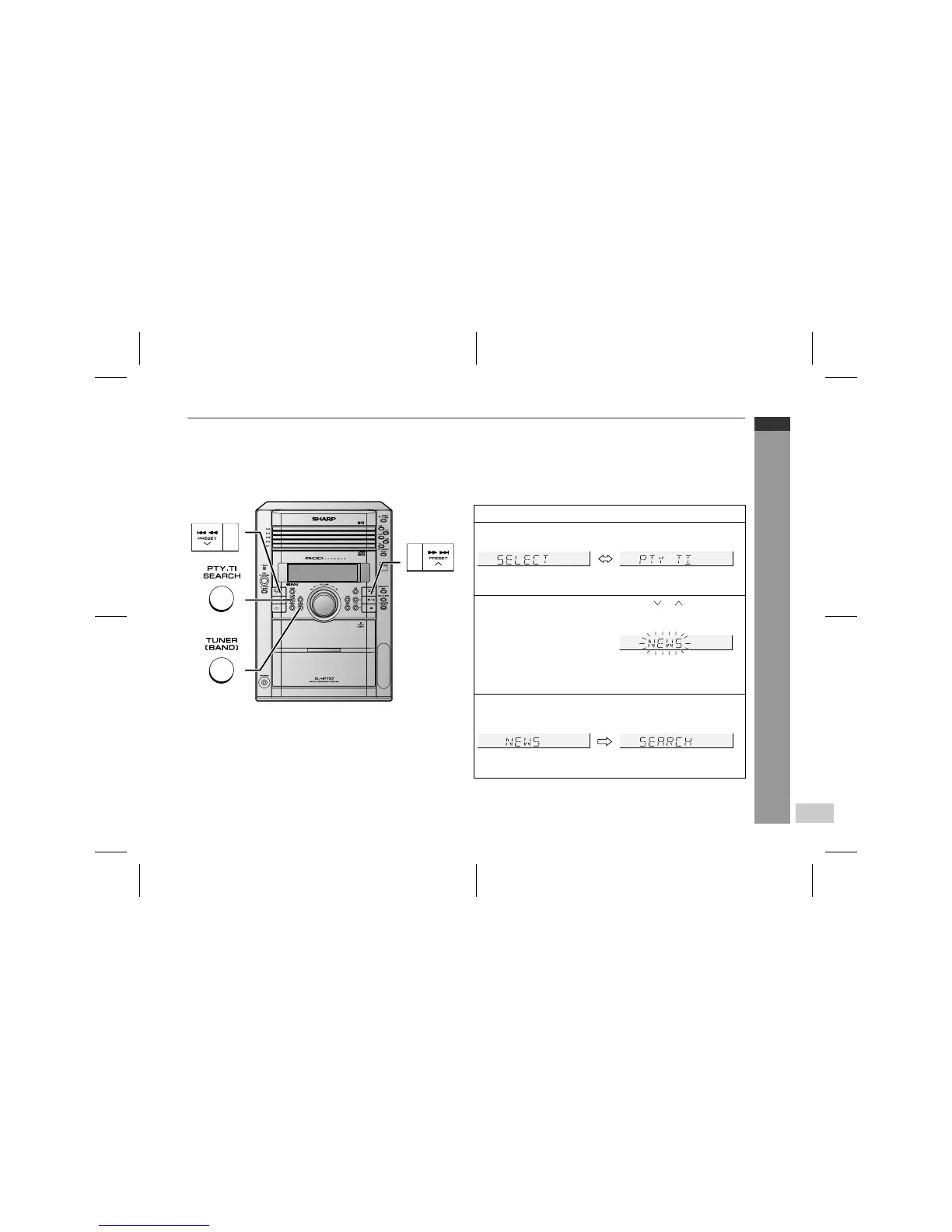
Press the TUNER (BAND) button to select the FM.
2
Press the PTY.TI SEARCH button.
"SELECT" and "PTY TI" will appear alternately for about 6 sec-
onds.
3
Within 6 seconds, press the PRESET ( or ) button to se-
lect the programme type.
Each time the button is pressed, the programme type will ap-
pear. If the button is held down for more than 0.5 seconds, the
programme type will appear continuously.
4
Whilst the selected programme type is flashing (within 6
seconds), press the PTY.TI SEARCH button again.
After the selected programme type has been lit for 2 seconds,
"SEARCH" will appear, and the search operation will start.


 To Next Page