EasyManua.ls Logo

Sharp XL-HP404E - User Manual

Sharp XL-HP404E
36 pages
Print Icon
To Next Page IconTo Next Page
Loading...
03/10/20 XL-HP404E(A)_FRONT.fm
TINSEA009AWZZ
Thank you for purchasing this SHARP product.
To obtain the best performance from this product,
please read this manual carefully. It will guide you in
operating your SHARP product.
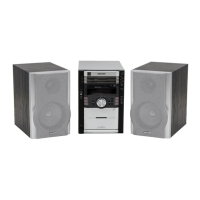
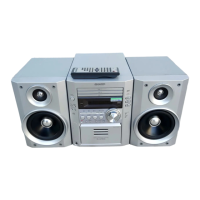
MICRO COMPONENT SYSTEM
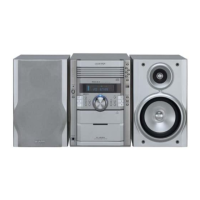
XL-HP404E Micro Component System consisting of XL-
HP404E (main unit) and CP-HP404E (speaker system).
XL-HP404E(A) TINSEA009AWZZ
1
MODEL
OPERATION MANUAL
XL-HP404E

Other manuals for Sharp XL-HP404E

Questions and Answers

  • S
    Stephanie Peters PhDAug 15, 2025
    Why is there no sound coming from my Sharp Hi Fi Component?
    • N
      nicholas70Aug 16, 2025
      If you are not hearing any sound from your Sharp Hi Fi Component, check the following: Ensure that the volume level is not set to "0", verify that headphones are not connected, and make sure the speaker wires are properly connected.
  • C
    Christopher DanielsAug 19, 2025
    What to do if buttons on my Sharp Hi Fi Component don't respond?
    • D
      Dr. Jesus MillerAug 19, 2025
      If your Sharp Hi Fi Component is not responding when you press a button, set the unit to the power stand-by mode and then turn it back on. If the unit still malfunctions, reset it.
  • S
    Stacy BentonAug 21, 2025
    Why does playback not start or stop on my Sharp Hi Fi Component?
    • D
      Denise GreenAug 21, 2025
      If playback on your Sharp Hi Fi Component doesn't start, stops in the middle, or isn't performed properly, check if the disc is loaded upside down, if the disc satisfy the standards, or if the disc is distorted or scratched.
  • M
    michael98Aug 25, 2025
    How to stop my Sharp Hi Fi Component radio from making unusual noises?
    • H
      Heather Smith DDSAug 25, 2025
      If your Sharp Hi Fi Component radio is making unusual noises continuously, check if the unit is placed near a TV or computer. Also, verify that the FM aerial or AM loop aerial is placed properly; if it's near the AC power lead, move it away.
  • K
    kingnicoleAug 27, 2025
    What to do if Sharp Hi Fi Component skips or stops during playback?
    • A
      Alexandria LewisAug 27, 2025
      If playback sounds are skipped or stopped in the middle of a track on your Sharp Hi Fi Component, check if the unit is located near excessive vibrations, if the disc is very dirty, or if condensation has formed inside the unit.
  • J
    James YoderAug 30, 2025
    Why is there no sound coming from my Sharp XL-HP404E?
    • A
      Alan CopelandAug 30, 2025
      If no sound is heard from your Sharp Stereo System, check the following: * Ensure the volume level is not set to "0". * Verify that headphones are not connected. * Confirm that the speaker wires are properly connected.
  • S
    Scott HudsonSep 2, 2025
    What to do if my Sharp Stereo System radio makes unusual noises continuously?
    • B
      Barry DavisSep 2, 2025
      If your Sharp Stereo System is making unusual noises continuously while using the radio, check the placement of the unit and the aerials. * Ensure the unit is not placed near a TV or computer. * Verify the FM aerial or AM loop aerial is placed properly. If the aerial is near the AC power lead, move it away.
  • K
    Kristi RuizSep 5, 2025
    What to do if playback does not start on Sharp XL-HP404E Stereo System?
    • C
      Christine OlsonSep 5, 2025
      If playback on your Sharp Stereo System does not start, stops in the middle, or is not performed properly, check the following: * Ensure the disc is loaded correctly (not upside down). * Verify the disc meets the required standards. * Check if the disc is distorted or scratched.
  • B
    Brenda RamosSep 9, 2025
    Why does playback skip on my Sharp XL-HP404E?
    • P
      phillipchambersSep 9, 2025
      If the playback sounds are skipped, or stopped in the middle of a track on your Sharp Stereo System, consider these potential causes: * Ensure the unit is not located near excessive vibrations. * Check if the disc is very dirty. * Consider whether condensation has formed inside the unit.
  • J
    Justin FrederickSep 12, 2025
    What to do if buttons don't respond on Sharp Stereo System?
    • K
      karen16Sep 12, 2025
      If your Sharp Stereo System does not respond when a button is pressed, set the unit to the power stand-by mode and then turn it back on. If the unit still malfunctions, reset it. (Refer to page 31.)

Summary

General Information

Welcome Message

Welcomes the user and introduces the product manual.

Important Instructions and Safety

Special Notes and Cautions

Provides essential safety warnings, laser product caution, and notes for users in Australia.

Accessories Included

Included Accessories

Lists the accessories that should be included with the product.

General Operational Precautions

Placement and Environmental Precautions

Details guidelines for unit placement, ventilation, environmental conditions, and electrical safety.

Controls and Indicators

Front Panel Controls

Identifies and describes the controls located on the front panel of the unit.

Display Indicators

Details the various indicators on the unit's display and their meanings.

Rear Panel Connections

Identifies and describes the connections and ports on the rear panel of the unit.

Remote Control Overview

Lists and describes the buttons and functions of the remote control transmitter.

Preparation for Use

System Connections Diagram

Illustrates how to connect speakers, aerials, and power supply to the system.

Aerial and Speaker Connection Details

Provides detailed instructions and cautions for connecting aerials and speakers.

AC Power and Demonstration Mode

Explains AC power connection, initial demonstration mode, and how to cancel it.

Remote Control Battery Installation and Testing

Guides on installing batteries in the remote and testing its functionality.

Basic Operation

General Controls and Sound Adjustment

Describes volume, bass control, and equalizer settings for sound customization.

Setting the Clock

Provides step-by-step instructions for setting the system's clock.

CD Playback

Basic CD Playback Operation

Explains how to insert discs and start basic playback of audio CDs.

CD Playback Functions

Covers functions like play, stop, pause, track skipping, and fast forward/reverse during CD playback.

Advanced CD Playback Features

Details how to select specific discs and use direct track search for playback.

Repeat and Random Play Modes

Explains how to use repeat play for tracks or discs and random play for discs.

Programmed CD Playback

Guides on creating custom playback sequences by programming specific tracks from discs.

Radio Operation

Tuning and FM Stereo Reception

Instructions for tuning into radio stations and enabling FM stereo reception.

Station Memorization and Recall

Explains how to store and recall radio stations using preset tuning and memory functions.

Tape Playback

Cassette Tape Playback

Step-by-step guide for loading and playing cassette tapes, including playback direction options.

Tape Functions and Recording Preparation

Covers tape functions like fast forward/rewind and explains pre-recording steps including erase-prevention tabs.

Tape Recording

Recording from CD to Tape

Details the process of recording audio from a CD onto a cassette tape.

Continuous and Radio Recording

Explains recording multiple CDs, recording from the radio, and tape erasing.

Advanced Features

Timer Operation Overview

Introduces timer playback and recording functions, including Once Timer and Daily Timer types.

Setting Timer Playback or Recording

Provides detailed steps for setting up timer playback or recording, including source selection and volume adjustment.

Managing Timer Settings

Covers checking, cancelling, and reusing programmed timer settings.

Sleep Operation and Combined Use

Explains how to use the sleep timer for automatic shut-off and combining sleep with timer functions.

System Enhancement and Headphones

Details connecting external audio sources, recording to tape, and using headphones with the system.

Subwoofer Connection and Troubleshooting

Describes subwoofer connection and provides a general troubleshooting guide for common issues.

References

Troubleshooting Specific Components

Offers solutions for problems related to the cassette deck, tuner, and remote control.

Handling, Care, and Maintenance

Provides guidance on handling compact discs, cleaning the unit, tape parts, and pickup lens.

Product Specifications

Lists detailed technical specifications for the amplifier, CD player, tuner, and cassette deck.

Warranty Information

SHARP Consumer Product Warranty

Outlines the terms and conditions of the manufacturer's warranty for the product.

Sharp XL-HP404E Specifications

General IconGeneral
BluetoothYes
USB PlaybackYes
CD PlayerYes
FM RadioYes
Number of Discs1
Power Output40W
Speaker Type2-Way Speakers
Playable MediaCD, CD-R, CD-RW
RMS output power40W
Audio formats supportedMP3
Weight4.5 kg

Related product manuals