Low Battery Indication
An easy-to-read low battery indication symbol is featured on the Main Unit and
the USB transmitter. If necessary, simply replace batteries, and then follow the
setupprocedure“GETTINGSTARTED”inthebeginningofthisbooklet.
NOTE:
Justasyouestablishedtheconnectionforthefirsttimeduringoriginal
installation,youarerequiredtosetuptheRFconnectionbetweentheUSB
transmitterandMainUnitafterbatteryreplacement(Example:PressPC
SEARCH on the Main Unit, then press TRANSMIT button on the USB
transmitter).Pleasereferto“ESTABLISHRFCONNECTIONWITHMAINUNIT”
section for details.
USB Transmitter
Press PC SEARCH on the Main Unit and then press TRANSMIT on the USB
transmitter to enforce transmitting RF weather data and set up the RF connection
withtheMainUnit(See“FORYOURHOMECOMPUTER:USBTRANSMITTER&
PCPROGRAMINSTALLATION”sectiontosetuptheUSBtransmitter).
NOTE:
- Flip the antenna into vertical position for optimum transmission range.
- To run the PC program, ensure that your USB transmitter is connected
properly to the PC through a USB port.
- When weather data is transmitted from the USB transmitter, the red LED
light will flash.
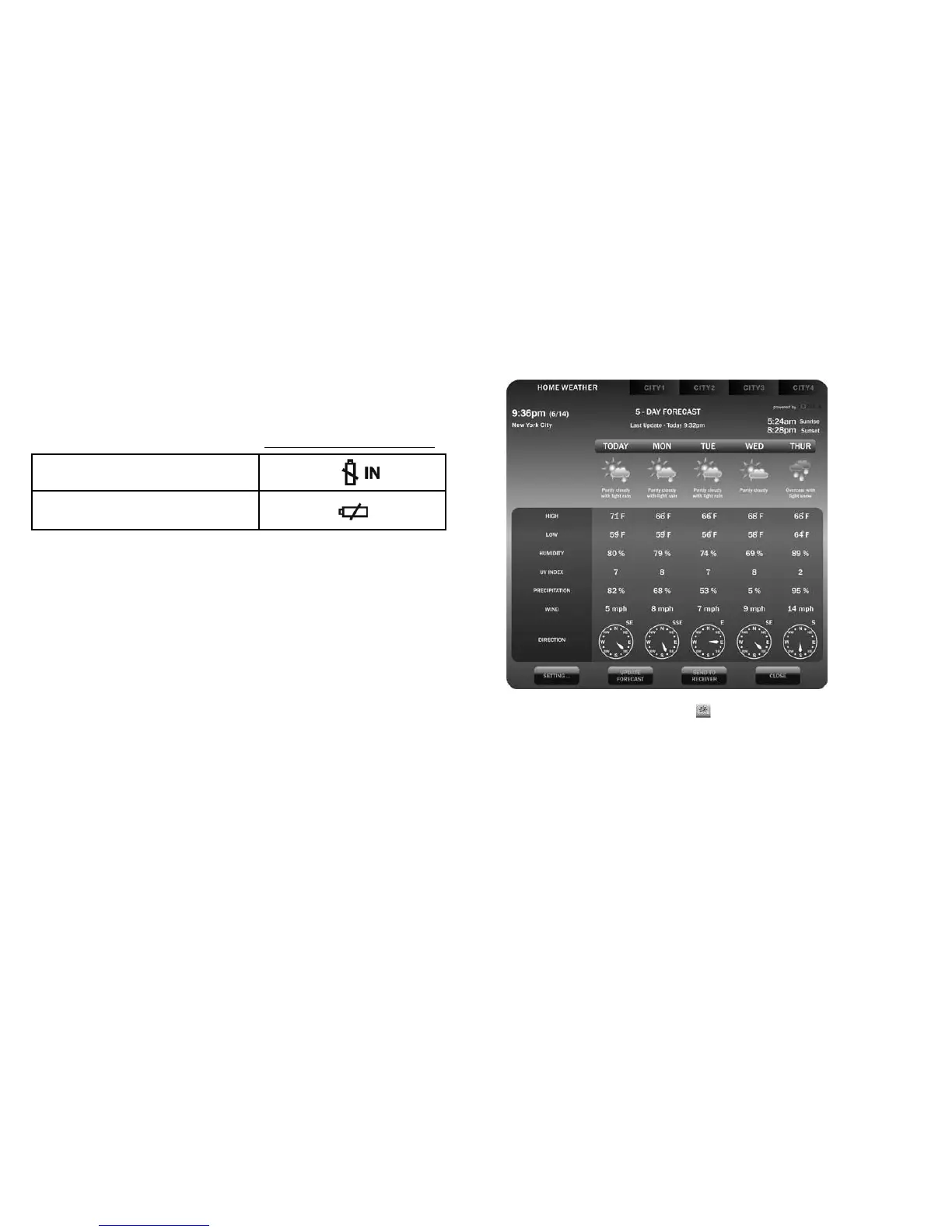
PC Program View
After installation, a small toolbar icon of your PC program appears on
the lower right of the Window indicating your program is running and it will
automatically access 5-day forecast information periodically while your PC is
online. You may open the above PC program window by double clicking this
toolbar icon to view full details.
NOTE:Ifthetoolbaricondisappears(nothidden),yourPCprogramis
terminated and no longer has access to weather information from the Internet.
Simply restart the program again.
17
16
Low battery indicator symbol
Main Unit
USB transmitter


 To Next Page