EasyManua.ls Logo

Sheffield PL612 - Control Panel Functions

Sheffield PL612
18 pages
Print Icon
To Next Page IconTo Next Page
To Previous Page IconTo Previous Page
Loading...
AFTER SALES SUPPORT
PROLINK ASIA LTD
Phone: 0508 776 546 - Mon-Fri 8:30am 4.30pm Page
8
ACCESSORIES
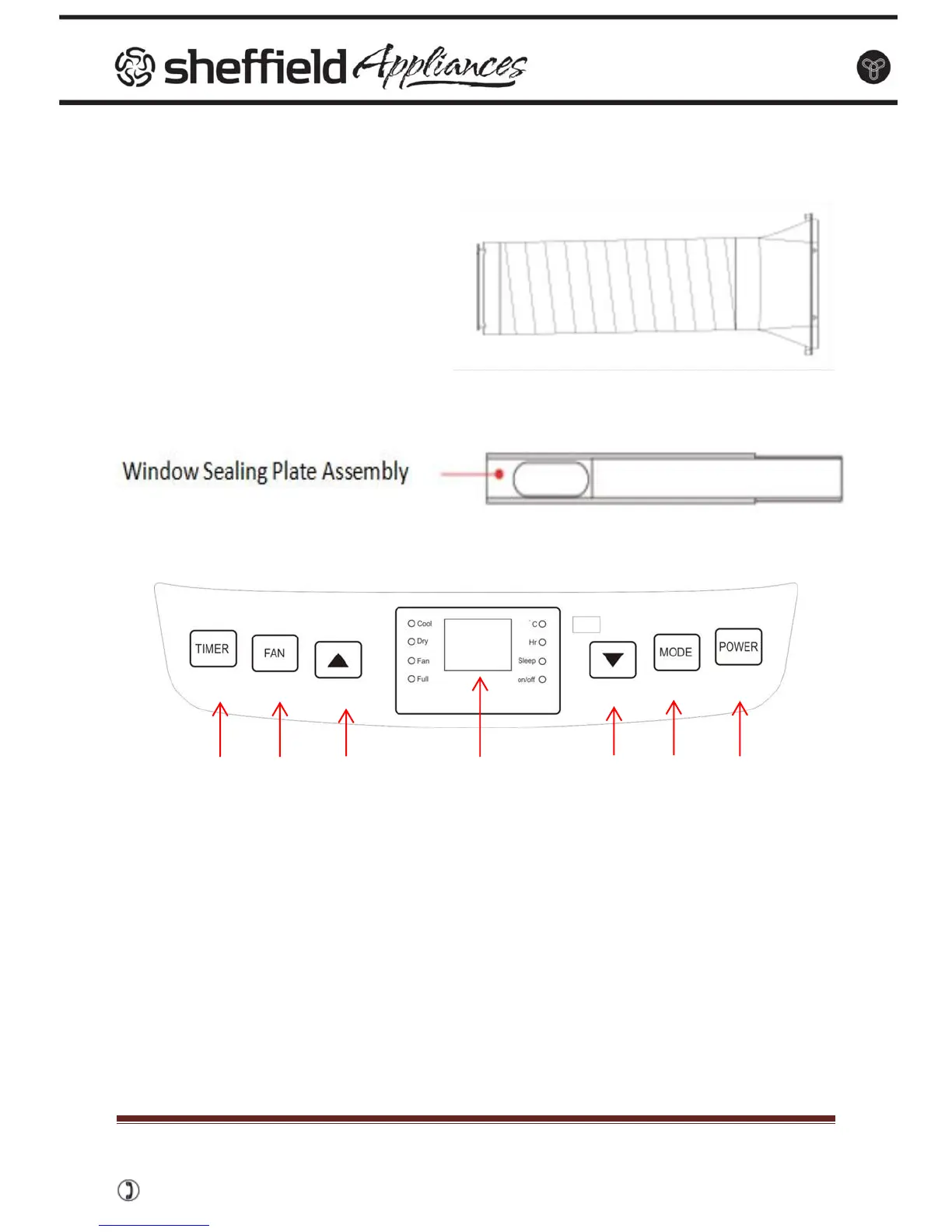
CONTROL PANEL
1. Timer
2. Fan Speed / Selection
3. UP Key
4. Display Window
5. DOWN Key
6. Mode
7. Power Key
1. POWER: press this key to turn on/off machine.
2. MODE: after machine turns on, press this key to select cooling, Fan and
dehumidifying mode.
3. UP Key and DOWN Key: press the two keys to change the temperature or time,
operate as follows:
When setting temperature, press up key or down key to select the required
temperature (not available in fan or dehumidifying mode).
When setting time, press up key or down key to select the required time.
1
2
6
5
4
3
7