1.Picture 4.5 IP607W use static IP address to connect Internet
Under this mode, the network where IP607W exists use the dial-up of ADSL or other ways to
connect Internet, and the whole LAN share the same external IP address, IP cameras in LAN can be
differentiated by port Numbers.
With this connection and to visit IP607W via internet, some necessary setup on IP camera and
router will be required:
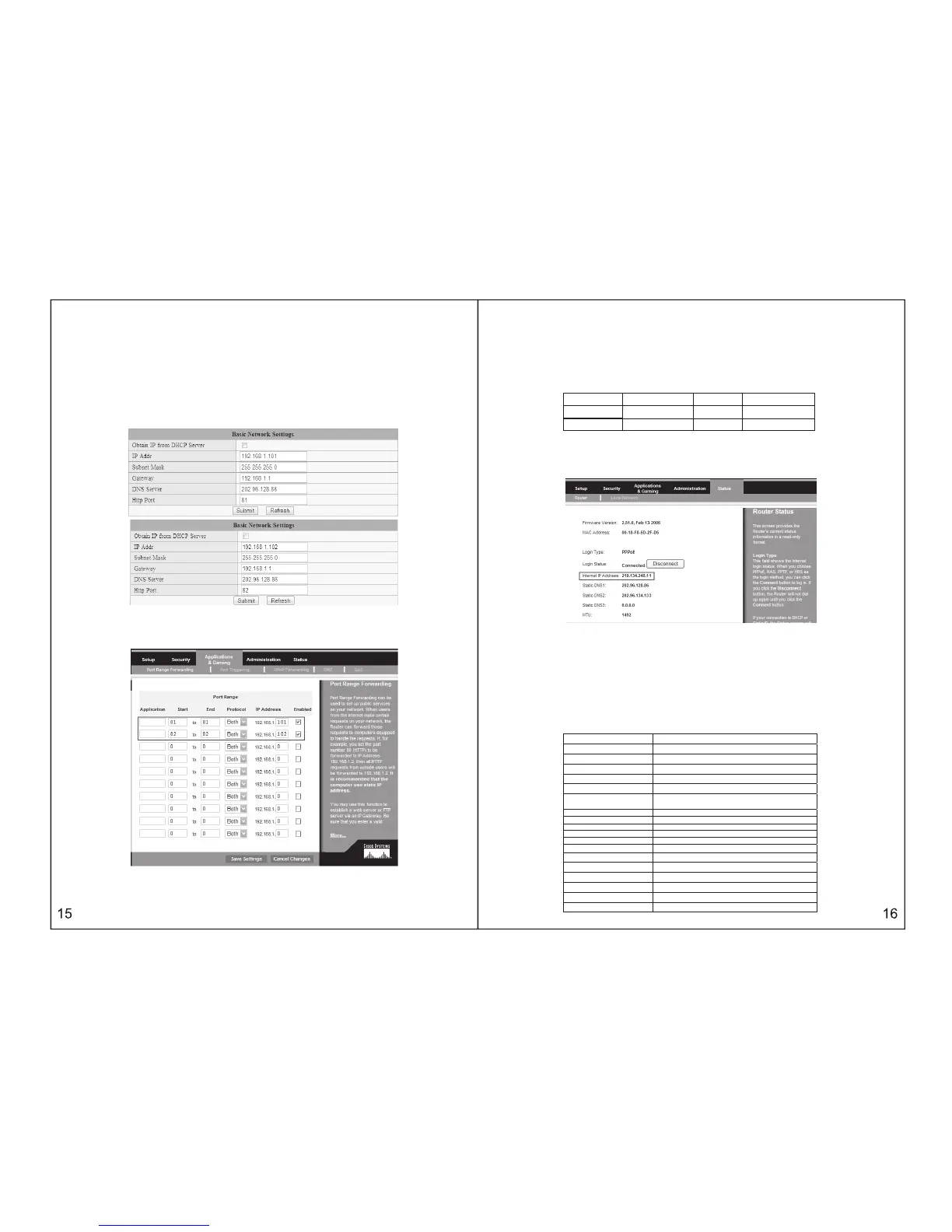
You need to set up IP address of IP607W as static one, and also set up the port number, for example,
the static address of IP_cam1,IP_cam2 is respectively “192.168.1.101”ˈ“192.168.1.102”ˈ port
number is 81ˈ82
2. Open your router, find port transfer page( some routers named dummy service), make the rules
for the port transfer, and please remember the port no. of IP607W after It is assigned
3After finish the settings of IP607W, input the external IP address in Internet of
the router and corresponding port numbers of IP607W into the browser at PC end, then you can view
the picture.
For example: as picture 4.5, the external IP address in Internet of router is 219.134.248.11,IP address
in LAN is 192.168.1.1(gateway address),static IP address of IP607W_1 is 192.168.1.101ˈport number
is 81, static IP address of IP607W-2 is 192.168.1.102ˈport No. is 82. Set up the port transfer of the router
as follows:
camera transfer port start port
IP address
IP607W-1 81 81 192.168.1.101
IP607W-2 82 82 192.168.1.102
When user input http:// 219.134.248.11˖81 on PC, router receives application and automatically
transfers to 192.168.1.101ˈafter that, IP607W 1 and PC will be connected together, then user can view
IP camera through the browser on PC.
Similarly, we need to know and remember the IP address in Internet of the whole LAN, as below picture,
IP address in Internet is “219.134.248.11”ˈthis address can open router page.
THE 5TH CHAPTER
TECHNICAL PARAMETER
5.1 KEY FUNCTIONS
ƔǂSupport UPNP protocol, can penetrate the gateway automatically,
Ɣǂeasily plug and play.
ƔǂSupport DDNS service
ƔǂSupport IE browse
ƔǂDynamic IP address distribution
Ɣ%LGLUHFWLRQDOYRLFH
5.2 KEY PARAMETERS
Image Compression Format M-JPEG
Sensor CMOS,1/4”
Image Resolution
VGA˄640x480˅/QVGA˄320x240˅
Network Interface
RJ-45/10-100 Base T ˈ802.11b/g
Network Protocol
TCP/IPˈDHCPˈSMTP,TPˈDDNSˈUPNPˈPPPoE
Image Transfer Velocity 30frames/sec(QVGA), 15frames/sec(VGA)
Alarm Control Output:1channel(5VDC,0.1A);
Input:1 Channel (closed trigger)
Motion Detection Support
Software Update Automatic upgrade
Monitoring Mode IE browse
Playback Mode Microsoft Media Player
Security Password protection
Minimum Illumination 0Lux
Automatic white balance Support
Working Condition
0 - 50C°ˈ20% - 80%PH
Power Adapter AC 220V-110V/DC 5V 1A
Power Consumption 3W
Figure Size
100mmh100mmh110mm
Net Weight 0.5Kg



 To Next Page