https://shimano-steps.com/
50 51
https://shimano-steps.com/
E6000 MANUALE8000 CONCEPT E8000 MANUAL E6000 CONCEPT
CONNECTION AND
COMMUNICATION WITH DEVICES
The system can be configured and firmware can be updated when the bicycle is connected to a device.
You need E-TUBE PROJECT to configure SHIMANO STEPS and update firmware.
Download E-TUBE PROJECT from the support website (http://e-tubeproject.shimano.com).
For information on how to install E-TUBE PROJECT, check the support website.
• You need SM-PCE1 and SM-JC40/JC41 to connect SHIMANO STEPS to a PC. They are not required if there is an available port.
• Firmware is subject to change without notice.
• PC connection and communication are not possible during charging.
• Connecting to devices is not possible while charging.
About Wireless Functions
Functions
ANT connection
The wireless unit transmits the following information to the cycle computer.
•
Battery level
•
Front and rear derailleur gear positions
•
Adjustment value
The latest functions can be checked by updating the software via E-TUBE PROJECT. For details, consult the place of purchase.
Bluetooth LE connection
E-TUBE PROJECT for smartphones/tablets may be used if a Bluetooth LE connection is established with a smartphone/tablet.
How to Make Connections
ANT connection
ANT transmission will begin automatically when the cycle computer is turned on. To confirm whether connection was successful, check the
[Bluetooth LE/ANT] menu.
Bluetooth LE connection
Generally, Bluetooth LE transmission will begin automatically when the cycle computer is turned on, however, pairing can be started by
[Bluetooth LE] menu when connectivity is poor.
2.4GHz digital wireless system
2.4GHz-frequency digital wireless technology, which is the same technology used for wireless LAN.
However, on very rare occasions, objects and places may generate strong electromagnetic, waves and interference, which may result in incorrect
measurement.
•
Television, PC, radios, motors/engines, or in car and trains.
•
Railroad crossings and near railway tracks, around television transmitting stations and radar bases.
•
Other wireless computers or digitally controlled light.
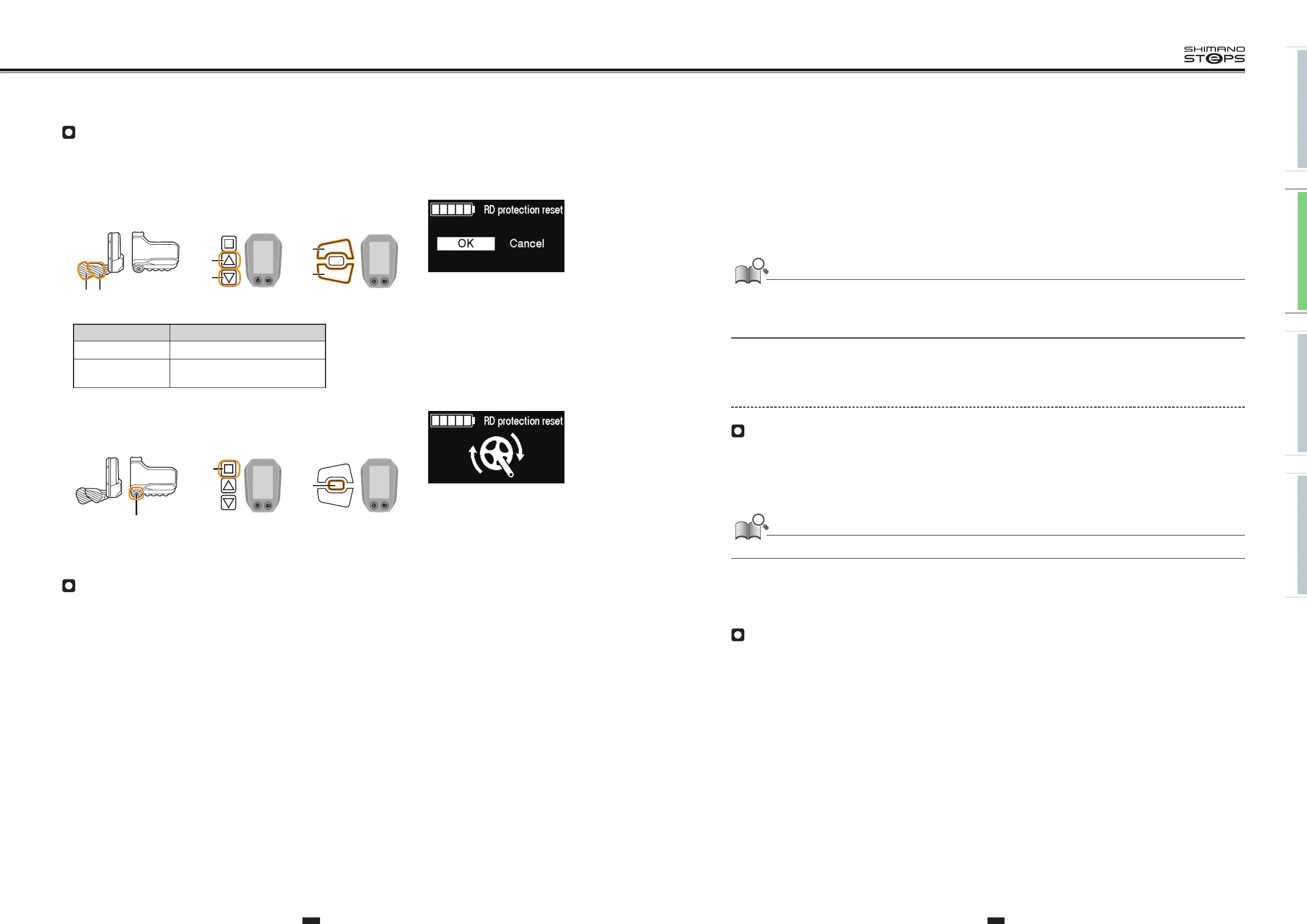
RD Protection Reset
In order to protect the system from falls etc., if the bicycle is subjected to a strong impact, the RD Protection function will operate and the
connection between the motor and the link will be momentarily severed so that the rear derailleur can no longer operate. Executing RD
Protection Reset restores the connection between the motor and the link, as well as the function of the rear derailleur.
1. Press X or Y to select [OK].
Items Details
OK RD Protection Reset will operate
Cancel
To not execute RD Protection Reset,
select [Cancel]
2. Press A to confirm [OK], recover the connection between the motor and
the link by rotating the crank.
Exit
Closes the menu list screen and returns to the basic screen.
1. Press X or Y to select [Exit] on the menu list screen.
2.
Press A to confirm. After confirmation, the screen will return to the basic screen.
DRIVE UNIT SETTING BACKUP
FUNCTION FOR THE CYCLE
COMPUTER
To check the drive unit settings backed up to the cycle computer, export the PDF report from the E-TUBE PROJECT [Unit log acquisition] menu.
When exchanging the drive unit, send the report along with the unit to your place of purchase or a local bicycle dealer.
X
Y
SW-E6000/SC-E6010
XY
SW-E8000-L/SC-E8000
X
Y
SW-E6010/SC-E6010
A
SW-E6010/SC-E6010
A
SW-E6000/SC-E6010
A
SW-E8000-L/SC-E8000


 To Next Page
 Loading...



