37
MAINTENANCE
Replacing the brake pads
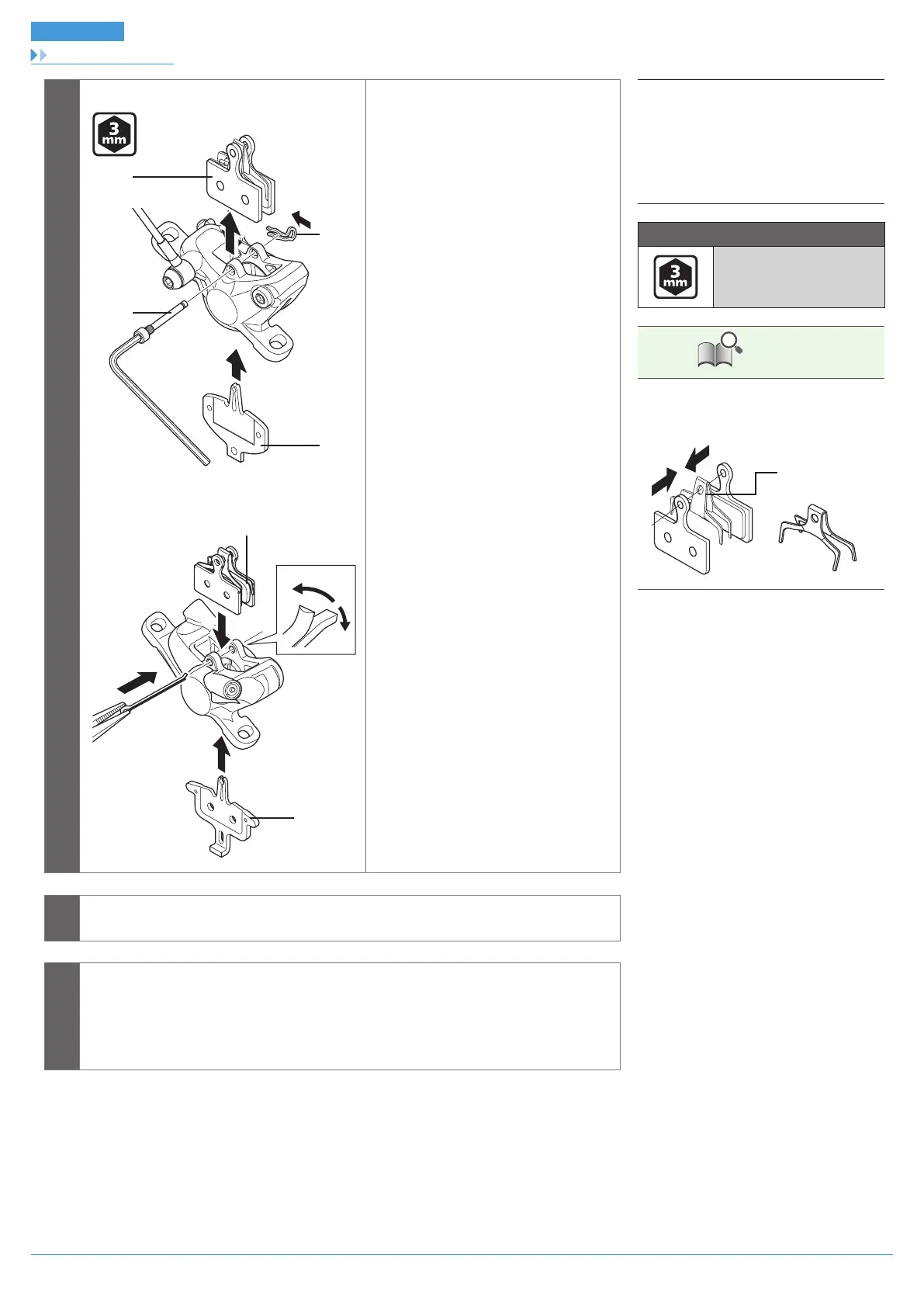
4
BR-M8000
(A)
(C)
(B)
(D)
(E)
(D)
(A)
BR-M6000
Install the new brake pads, the bolt, the
split pin, and the pad spacer (red).
For BR-M8000, at this point, make sure
to install the snap ring as well.
For BR-M6000, after this, bend open the
split pin.
(A)
Brake pad
(B)
Snap ring
(C)
Bolt
(D)
Pad spacer (red)
(E)
Split pin
Tightening torque
2 - 4 N·m
TECH TIPS
Install the pad fixing spring as shown in the
illustration. (There are left (L) and right (R)
marks on the spring.)
Pad fixing spring
5
Depress the brake lever several times to check that the operation becomes stiff.
6
Remove the pad spacer, install the wheel, and then check that there is no interference
between the disc brake rotor and caliper.
If they are touching, adjust while referring to “Installation of the calipers and securing the
hose”.



 To Next Page