5. Edit
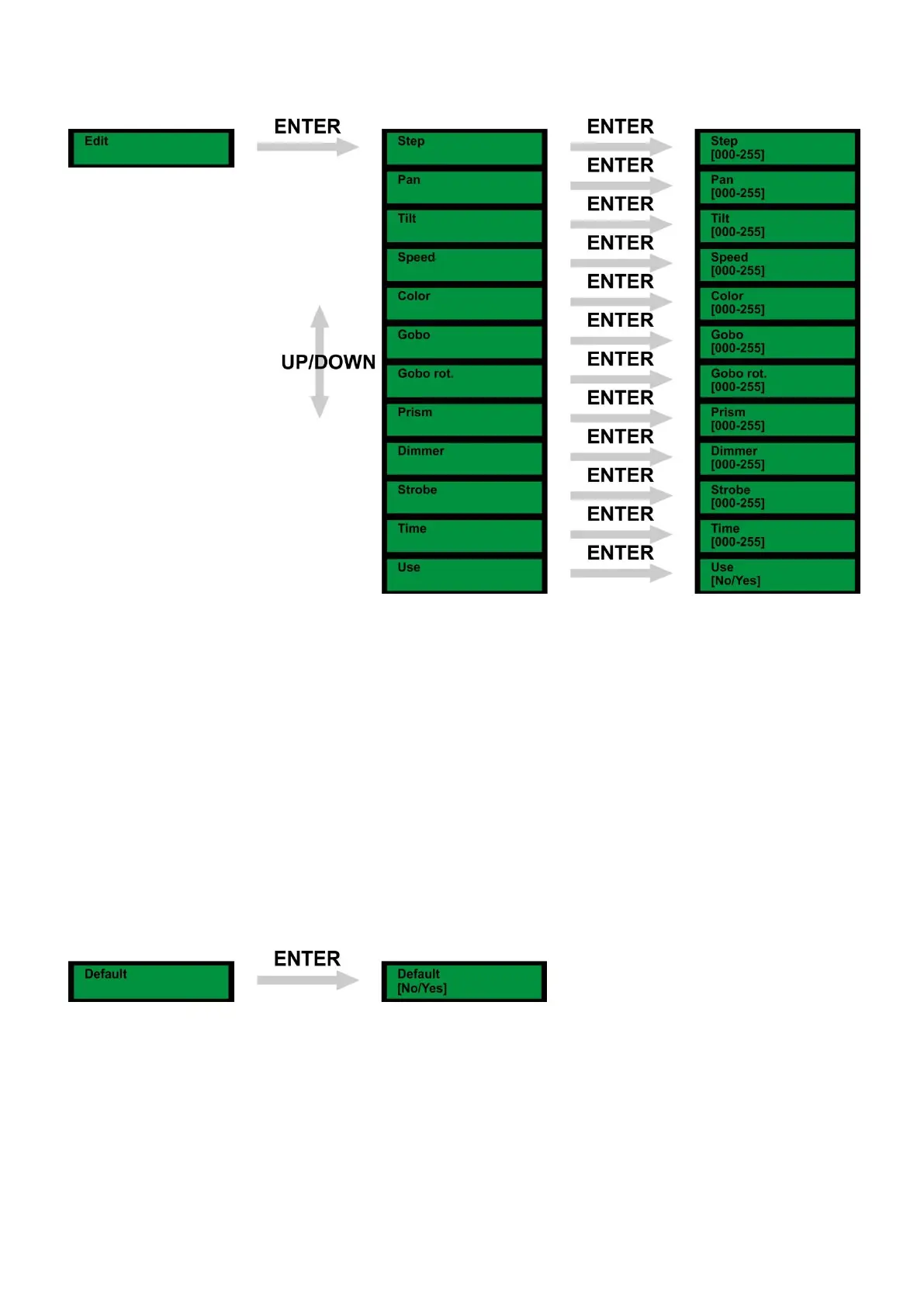
1) Press Menu, until the display shows: Edit
2) Press Enter and use the Up/Down buttons to scroll through the options: Step, Pan, Tilt, Speed, Color,
Gobo, Gobo Rot., Prism, Dimmer, Strobe, Time, Use.
3) Press enter to open this menu. Use the Up / Down buttons to set the desired setting.
4) Once you have set the desired mode, press the enter button to store your setting.
Note: If you want to circulate the created steps, please set the last step as 0.
For example, when you have 3 steps, the setting should be:
Step 1 Time = 4 Use = Yes
Step 2 Time = 5 Use = Yes
Step 3 Time = 0 Use = Yes
6. Default
1) Press Menu, until the display shows: Default
2) Press Enter and use the Up/Down buttons to choose: Yes or No.
3) If you use Yes, the device will return to the factory default setting.



 To Next Page