The Showtec NET-2/3 Pocket is a cutting-edge network routing device designed to convert Art-Net or sACN to DMX-512 and vice versa, facilitating the transmission of up to 1024 DMX channels over a single Ethernet cable. This device is highly versatile, offering remote configuration via a web interface and supporting Power-over-Ethernet (PoE) technology for flexible power options. It incorporates advanced merging options such as Backup, Normal, Single, HTP (Highest Takes Precedence), and LTP (Latest Takes Precedence), making it suitable for a wide range of lighting control applications.
Function Description:
The primary function of the Showtec NET-2/3 Pocket is to act as a bridge between Ethernet-based lighting protocols (Art-Net, sACN) and DMX-512. It can be configured for various operational modes:
- Art-Net/sACN to DMX Outputs: Converts incoming Art-Net or sACN data into DMX-512 signals for controlling lighting fixtures.
- DMX Inputs to Art-Net/sACN: Converts DMX-512 signals from lighting consoles or other DMX devices into Art-Net or sACN for transmission over an Ethernet network.
- DMX Input to DMX Output and Art-Net/sACN: Clones a DMX input signal to both a DMX output and an Art-Net/sACN universe.
- HTP/LTP Merge of Art-Net/sACN Universes to DMX Output: Merges up to two Art-Net/sACN universes using HTP or LTP logic and outputs the combined signal as DMX.
- HTP/LTP Merge of DMX Input and Art-Net/sACN to DMX Output: Merges a DMX input signal with an Art-Net/sACN universe using HTP or LTP logic and outputs the combined signal as DMX.
When configured as an output, each DMX port can merge up to two network sources, sending the merged data to the DMX ports or looping it back to Ethernet as a new universe. Each DMX port can have two different network universes enabled: a primary (main) and a secondary (additional) universe, which can use different protocols (Art-Net or sACN). The device also supports a BACKUP function, where if a primary Art-Net/sACN universe fails or has no DMX values for more than 3 seconds, the device automatically switches to sending DMX values from a backup port.
The merging modes include:
- SINGLE: Disables merging, sending the DMX signal from the primary Art-Net or sACN universe directly to the DMX port.
- HTP (Highest Takes Precedence): Compares values from primary and secondary universes and sends the highest value for each DMX channel.
- LTP (Latest Takes Precedence): Compares values from primary and secondary universes and sends the last changed value for each DMX channel.
Important Technical Specifications:
- DMX: 2 universes (configurable as IN and/or OUT).
- Network: RJ45 connector, 1 Gbps data speed.
- Input Voltage: 12 V DC, 500 mA, or Power-over-Ethernet (PoE).
- Power Consumption: 8 W.
- Connections: 2 x 3-pin XLR IN/OUT, RJ45 connector, DC input connector.
- Power Supply: PoE, AC power adapter.
- Supported Protocols: Art-Net, sACN, TCP/IPv4, DMX-512-A.
- Setup: Control panel with OLED display, web interface.
- Merging Options: HTP, LTP, Normal, Backup.
- DMX Data Refresh Rate: 40 Hz default (adjustable from 10-40 Hz).
- Display: OLED.
- IP Rating: IP20.
- Operating Temperature: 0-40 °C.
- Dimensions: 115 x 67 x 44 mm (L x W x H).
- Weight: 0.3 kg.
- Signal Pin IN/OUT: Pin 1 earth, pin 2 data (-), pin 3 data (+).
- Maximum Ambient Temperature (ta): 40 °C.
- Maximum Housing Temperature (tB): 70 °C.
- Minimum Distance from Flammable Surfaces: 0.5 m.
Usage Features:
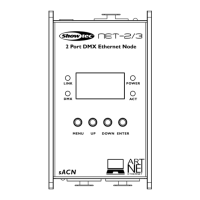
The device features a control panel with an OLED display and buttons (MENU, UP, DOWN, ENTER) for direct configuration.
- OLED Display: Provides status information (Device Info, Port Status) and menu navigation.
- Buttons:
- UP/DOWN: Navigate menus, increase/decrease numeric values, scroll through characters.
- ENTER: Open menus, set selected values, confirm selections.
- MENU: Exit current menu, return to Main Menu.
- Display Orientation: The OLED display orientation can be set to Normal or Reverse (180° rotation). If reversed, button functions are also reversed.
- Backlight: Configurable to stay ON, or turn off automatically after 10 or 30 seconds of inactivity.
- IP Mode: Supports DHCP IP for automatic address generation or Manual IP for custom configuration.
- Netmask: Allows setting the Netmask for the IP address.
- DMX Port Configuration: Each DMX port can be configured for Status (Input, Output, Disable), Mode (Normal, Backup, SINGLE, HTP, LTP), Protocol (Art-Net, sACN), Frame Rate (10-40 Hz), Network (0-255), Primary Universe (0-255), Secondary Universe (0-255, for HTP/LTP output modes), and Resend (rebroadcast merged signal back to network).
- Web Interface: The device can be configured remotely via a web browser by entering its IP address. The web interface offers the same configuration settings as the control panel, including device name, IP mode, netmask, DMX port settings, and firmware updates. Default login credentials are "Admin" for both account and password.
- Firmware Updates: Firmware can be updated via the web interface by uploading a new firmware file.
- Factory Reset: The device can be restored to default factory settings via the control panel or web interface.
Maintenance Features:
The Showtec NET-2/3 Pocket is designed for low maintenance, but regular checks and cleaning are recommended to ensure safe and optimal operation.
- Annual Inspection: Safety-related and machine-technical installations should be inspected annually by a qualified expert.
- Screw Connections: All screws used for installation and parts of the device must be tightly connected and free from corrosion.
- Housing and Fixations: Check for any deformations on housings, fixations, and installation spots.
- Power Supply Cables: Inspect power cables for any damages or material fatigue.
- Cleaning: Keep the unit clean by wiping the cover with a damp cloth. The front glass panel can be cleaned with glass cleaner and a soft cloth. Avoid alcohol or solvents and do not immerse the device in liquid.
- Connections: Keep DMX connections clean. Disconnect electric power before cleaning and ensure connections are thoroughly dry before re-linking equipment or supplying power.
- Troubleshooting Guide: A comprehensive troubleshooting guide is provided to help resolve common issues, such as power problems, erratic responses, or poor data quality. This guide advises against opening the unit to avoid voiding the warranty and recommends returning the device to a Showtec dealer for complex issues.


 To Next Page
 General