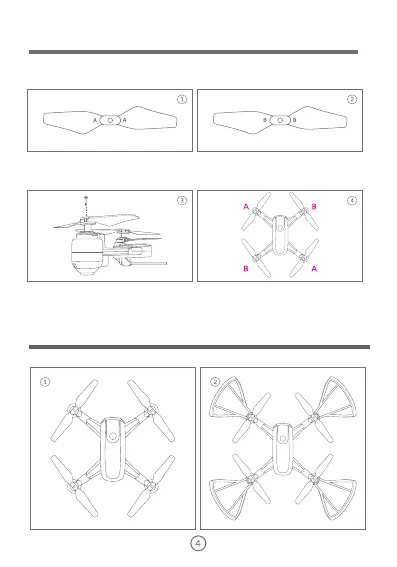
Installing the Propellers
Model A propeller blade Model B propeller blade
Front
Back
The Drone comes with replaceable propellers if the originals are broken or badly
damaged.
(1) When installing for the first time, please carefully distinguish the propellers type.
(2) Referring to Figure 3, insert the groove of propeller opener into the bottom of
propeller which needs to be replaced. And press the handle of the opener to take
down the propeller.
(3) Referring to Figure 4, distinguish between type A and type B propellers, and press
the propeller vertically to install them on the motor shaft. The mark can be found on the
rotor. It is extremely important to use the correct propeller (A or B) for
replacement. Using the incorrect propeller will make the drone out of to control.
Installing the protection ring
The protecting ring should be installed from the bottom in the direction as shown.


 To Next Page