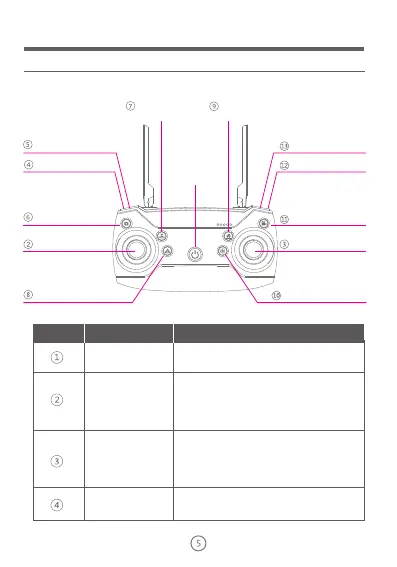
Remote Control
Function Instructions
One button
ascend
Indoor/Outdoor switch
Follow mode
One button return
Power
Speed switch
Set circle mode
Right control lever
Left control lever
Video
Photography
Calibrated
geomagnetism
One button landing
NO.
Function keys
Function Description
Speed gear shifting
Push the control lever upward,the drone will ascend vertically;
Push the control lever downward,the drone will descend vertically;
Push the control lever leftward,the drone will rotate
counterclockwise;
Push the control lever rightward,the drone will rotate clockwise;
Push the control lever upward,the drone will be level flight forward;
Push the control lever downward,the drone will be level flight backward;
Push the control lever leftward,the drone will be level flight leftward;
Push the control lever rightward,the drone will be level flight rightward;
Left control lever
(ascend/descend/turn
left/turn right)
Power switch
Right control lever
(
level flight)
Press the button of power switch the remote control light
will be on/Press again the remote control light will be off.
Changing speed gear


 To Next Page