Shure Incorporated
4/16
6. LOAD Button. Press this button to activate a selected preset.
7. PRESET Indicator. Shows the number of the currently active preset. Blinks to show the number of the other
presets in the DFR22 when pressing the SELECT buttons.
8. SELECT Buttons. Press to scroll through the presets stored in the DFR22.
9. COMM LED. Flashes in unison with the feedback filter LEDs when the detector is deploying a new filter or
changing an existing one, and also blinks whenever the unit is communicating with a connected computer.
10. RS232 Port. Connects the DFR22 to a computer.
11. POWER LED. Illuminates when 100-240 VAC power is applied to the DFR22.
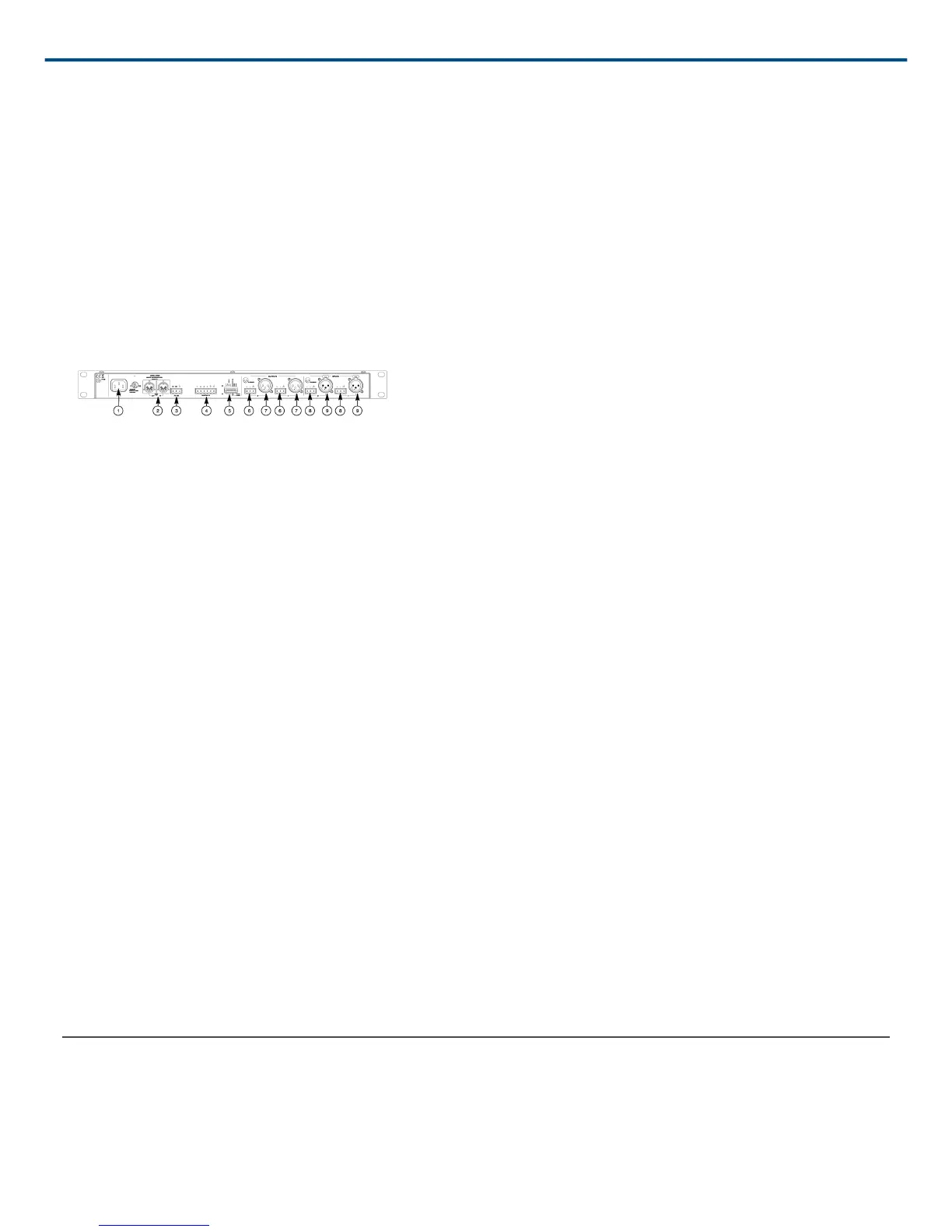
Back Panel
Figure 2: DFR22 REAR PANEL
1. Power Connector. Connects to 100-240 VAC power.
2. Shure Link Interface. Allows linking of up to 16 Shure Link devices, which may be accessed by a computer.
3. 3-Pin RS-232 Port. Connects the DFR22 to a computer. For use with DFR22 software and control systems.
Refer to the Computer Connections section.
4. CONTROL IN Pins. Use control input pins for remote control of preset switching, muting, and gain. Refer to the
Control Pin Connections section.
5. DIP Switches. Use Switches 1-4 to select a Shure Link Device ID. Use Switch 5 to lock or unlock front panel
controls. Refer to the Front Panel Lockout section for information on locking front panel controls.
6. Output Connectors (Phoenix). These active, cross-coupled, balanced outputs can be used with balanced or
unbalanced inputs. They can be switched between +4 dBu/10 dBV linelevel operation, using the DFR22 soft
ware. Refer to the Audio Connections section.
7. Output Connectors (XLR). These active, crosscoupled, balanced outputs can be used with balanced or un
balanced inputs. They can be switched between +4 dBu/10 dBV linelevel operation using the DFR22 soft
ware. Refer to the Audio Connections section.
8. Input Connectors (Phoenix). These active balanced inputs can be used with balanced or unbalanced outputs.
They cannot be used simultaneously with an XLR connector for the same input. They can be switched between
+4 dBu/-10 dBV line-level operation using the DFR22 software. Refer to the Audio Connections section.
9. Input Connectors (XLR). These active balanced inputs can be used with balanced or unbalanced outputs.
They cannot be used simultaneously with a Phoenix connector for the same input. They can be switched be
tween +4 dBu/-10 dBV line-level operation using the DFR22 software. See Audio Connections section for more
information.
10. POWER Switch.
Country dependent
Default Presets
The DFR22 comes with three factory-configured presets. Although a computer is required to configure the
DFR22's equalizers, dynamics processors, delays, and crossover, you can use the DFR22 "out of the box" as an
automatic feedback reducer, without connecting it to a computer.


 To Next Page