Shure Incorporated
9/16
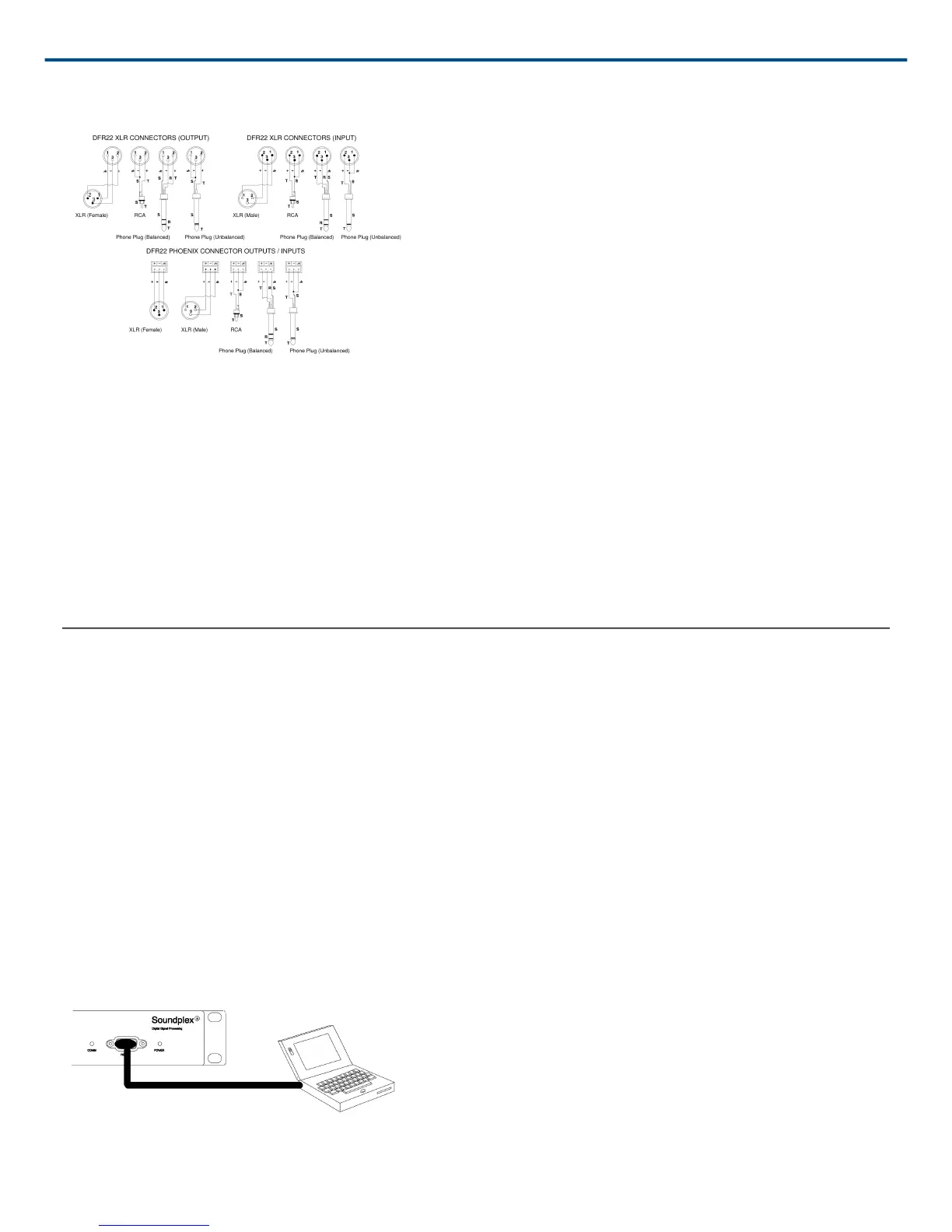
Wiring Connectors
Figure 8: INPUT/OUTPUT CONNECTOR WIRING DIAGRAMS
12 dB and 18 dB Output Pads
Each DFR22 output has a 12 dB pad and an 18 dB pad that can be engaged through the software interface. Use
these pads when connecting the DFR22 to lowerlevel inputs. They cannot be used to prevent clipping at the out
put stage of the DFR22.
The Output meters indicate the signal level present at the digital-to-analog converters. The 12 and 18 dB pads act
upon the signal after the digital-to-analog converters, so the meters do not reflect the pads.
Computer Connections
RS-232 Connections
Connect the COM port on your computer to the 9-pin RS-232 connector on the front panel of the DFR22, shown in
Figure 9, using a male-to-female serial cable. Pin outs for a 9-pin RS-232 cable are shown in Figure 10 and listed
in Table 1.
One the TX, RX, and GND pins need to be connected in order to communicate with the DFR22.
You can also connect a computer or control system to the 3-PIN RS-232 Phoenix connector on the back panel of
the DFR22, as shown in Figure 11.
You CANNOT connect two PCs to the DFR22 at the same time. However, you CAN connect an AMX or Crestron
system and a PC to the DFR22 at the same time.
Figure 9: RS-232 Serial Port Connection


 To Next Page