3
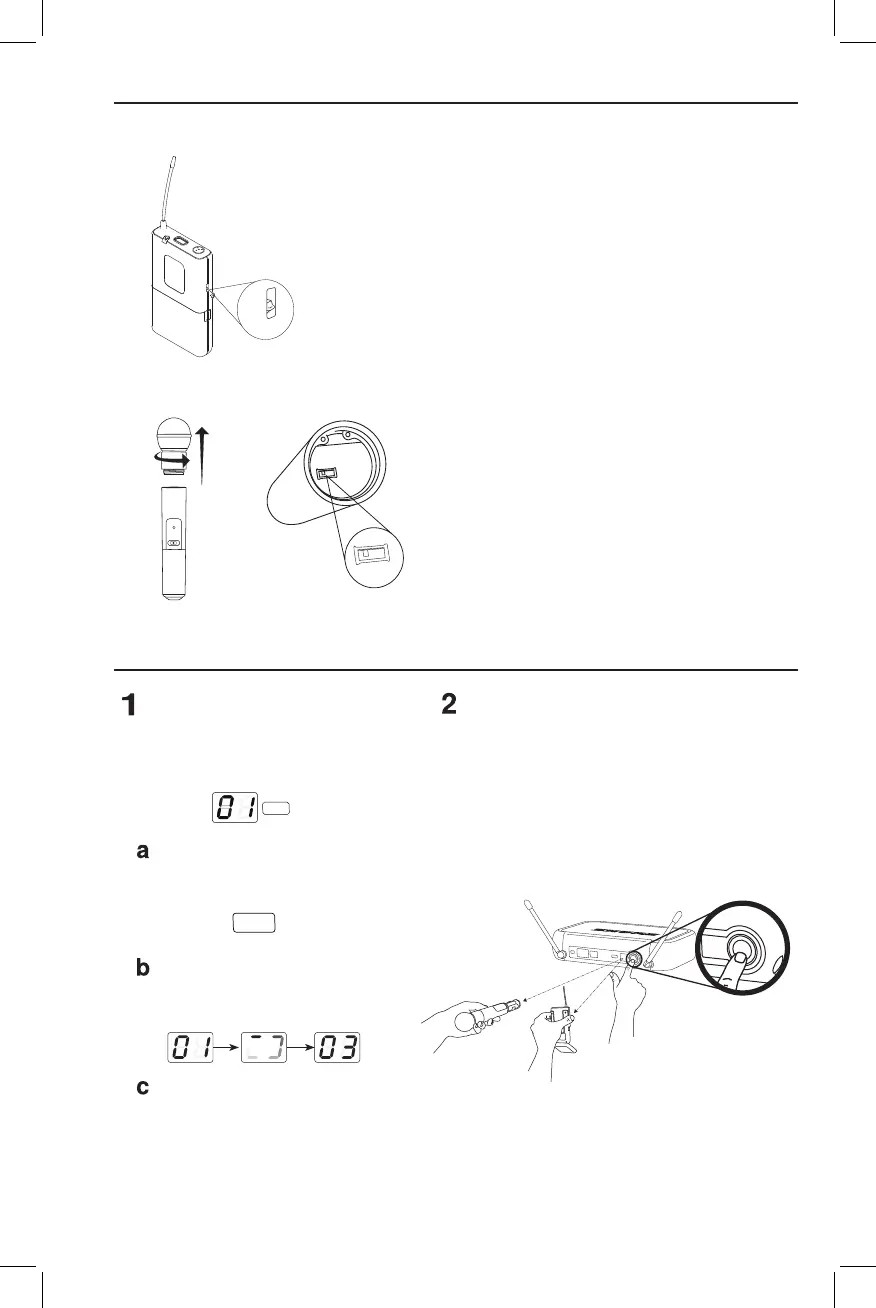
Adjusting Gain
PGX1
PGX2
PGXD
Single System Setup
Scan
Usethescanfeatureonthereceiverto
findaclearchannel.
LED screen displays current
channel
press channelbuttontoscanfor
a clear channel
systemscansforthechannel
withtheleastinterference
Synchronize
Synchronize the transmitter to the receiver by align-
ingtheinfrared(IR)portsandpressingthesync but-
ton. Make sure the IR ports are closely aligned.
Afterasuccessfulsync,thetransmitterLEDmo-
mentarilyflashesredandthereceiverready light
illuminates.
Three gain settings are available on the PGX1. Choose the
appropriatesettingforyourinstrument.
• mic:Microphone(higheramplification)
• 0:Guitarwithpassivepickups(mediumamplification)
• –10:Guitarwithactivepickups(loweramplification)
IfthereceiverLEDindicatestheinputvolumeisoverload-
ing the receiver, try switching the gain to a lower setting.
Accessthegainadjustmentswitchbyunscrewingthehead
ofthemicrophone.
TwogainsettingsareavailableonthePGX2.Usethetipof
a pen or a small screwdriver to move the switch.
• 0dB:Forquiettonormalvocalperformance.
• –10dB:Useonlyifaudioisdistortedduetohighvoal
levels.
channel
channel
sync
ready
audio channel
select
< 15 cm (8 in.)
or
sync
BIAS
AUDIO
0dB
-10dB
AUDIO
0dB
-10dB
0
-10dB
mic
0
-10dB
mic









 To Next Page