4
Multiple System Setup
Usethefollowingstepstoensurethebestperformancewhenin-
stalling multiple wireless systems at the same location.
1. Turn all receivers on and all transmitters off.
Note:Turnonanyotherdigitalequipmentthatcouldcause
interferenceduringtheperformancesoitwillbedetectedduring
thefrequencyscansinthefollowingsteps.
2. Makesurethegroupnumberisthesameforallreceivers(see
Manual Group Selection).
3. Performascanusingthefirstreceiver.
4. Turnonthefirsttransmitterandsyncittothereceiver.
5. Repeatforeachsystem.
• Important: Aftersyncingeachtransmitter,leaveitonsothat
scansfromtheotherreceiverswillnotselectthatchannel.
• BesureonlyonetransmitterIRportisexposedwhen
synchronizing each system.
Transmitter
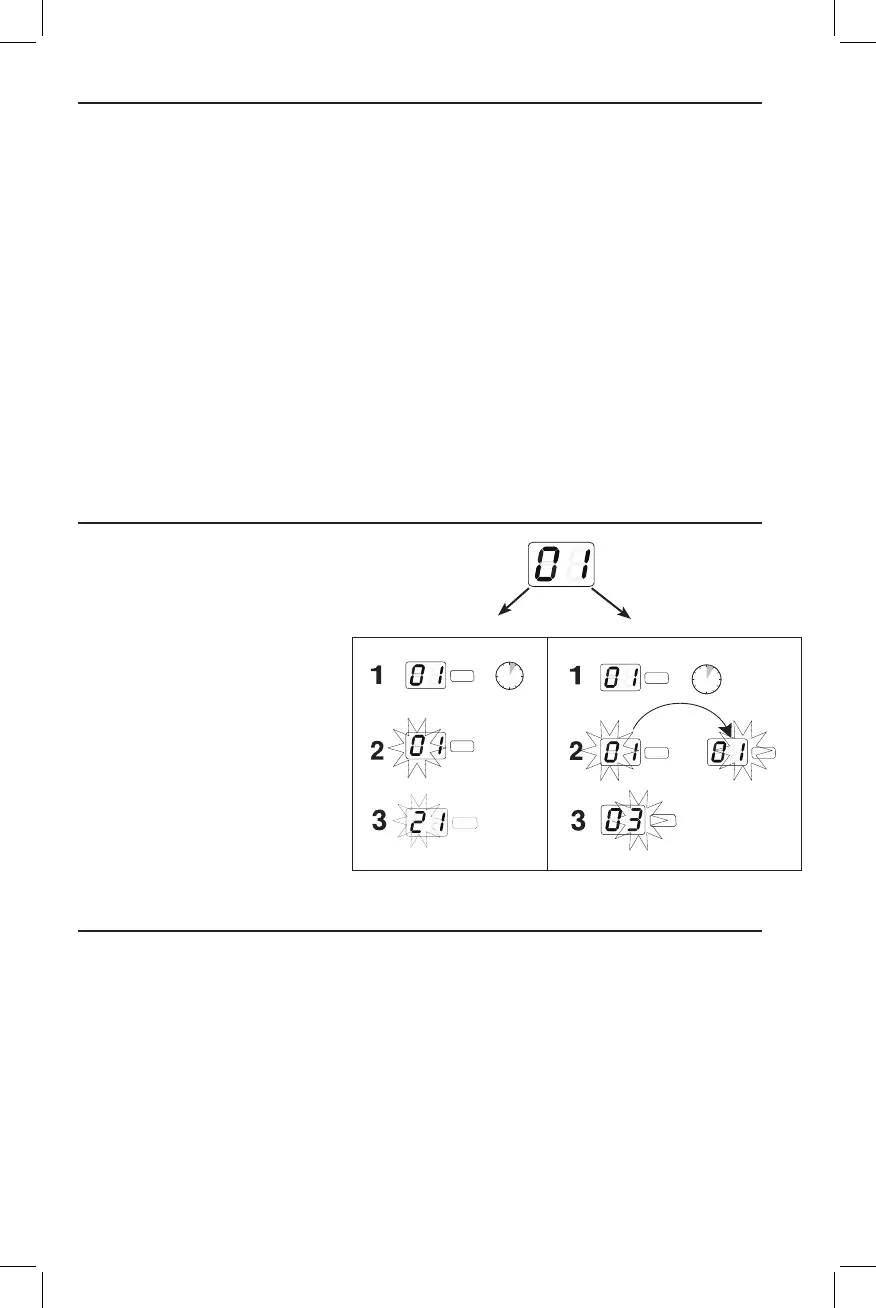
Manual Channel and Group Selection (receiver only)
Locking and Unlocking Controls
Receiver
Usingthereceivertoscanforachannel
isthebestwaytofindthebestfrequency
foryoursystem.However,formultiple
system setup, you may need to manually
set the group number.
1. Press and hold the channel button.
2. Hold the button until the channel or
groupdisplaybeginsflashing.
3. Release and press the button again to
advance the setting.
At the desired channel or group num-
ber,waitfortheflashingtostop.This
activates the new setting.
4. Transferthenewfrequencysetting
to the transmitter using the automatic
syncfunction.
To lock the controls: With the transmitter off, hold
the powerbuttondownuntilthegreenLEDflashes(~5
seconds)
To unlock the controls: With the transmitter on, hold
the powerbuttondownuntilthegreenLEDflashes(~5
seconds)
To lock the channel: Hold the chan-
nelbuttonuntilthenumbersflash(~10
seconds)
To unlock the channel: Hold the channel
buttonuntilthenumbersflash(~5seconds)
Lockingthesystemcontrolspreventsaccidentalmutingor
channeladjustmentduringperformances.
group display
channel
channel
3 s
channel
channel display
channel
channel channel
6 s








 To Next Page