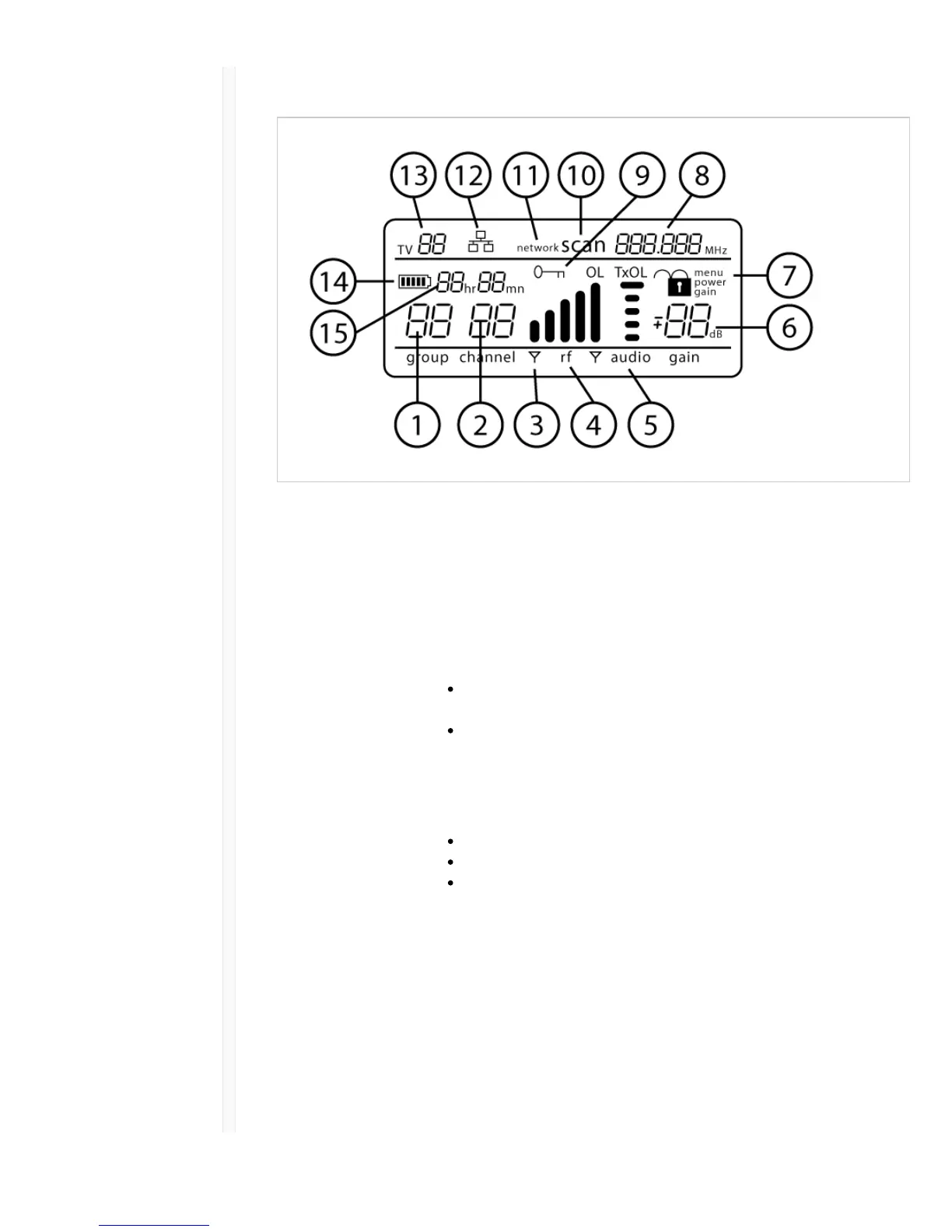
Receiver Display
ɠ Group Displays group setting.
ɡ Channel Displays channel setting.
ɢ Active Antenna
Indicator
Illuminates to indicate which antenna is active.
ɣ RF Signal Meter Number of bars displayed corresponds to RF signal level - OL = overload.
ɤ Audio Meter Number of bars displayed corresponds to audio level.
OL = Illuminates when receiver audio limiter is active to prevent
clipping
TxOL = Illuminates when transmitter input is overloaded. Reduce input
from microphone or instrument to prevent clipping.
ɥ Gain Level Displays receiver gain setting in 1 dB increments.
ɦ Receiver Lock Status Lock icon and name of locked control:
menu
power
gain
ɧ Frequency Setting Selected frequency (MHz).
ɨ Encryption Status Illuminates when encryption is enabled.
ɩ Scan Displayed when scan function is active.
ꋷ Network Scan Displayed when network scan function is active in multi-receiver systems.
ꋸ Network Connection
Indicator
Illuminates when additional Shure components are detected on the
network.
ꋹ TV Channel Displays the number of the TV channel containing the selected frequency.



 To Next Page