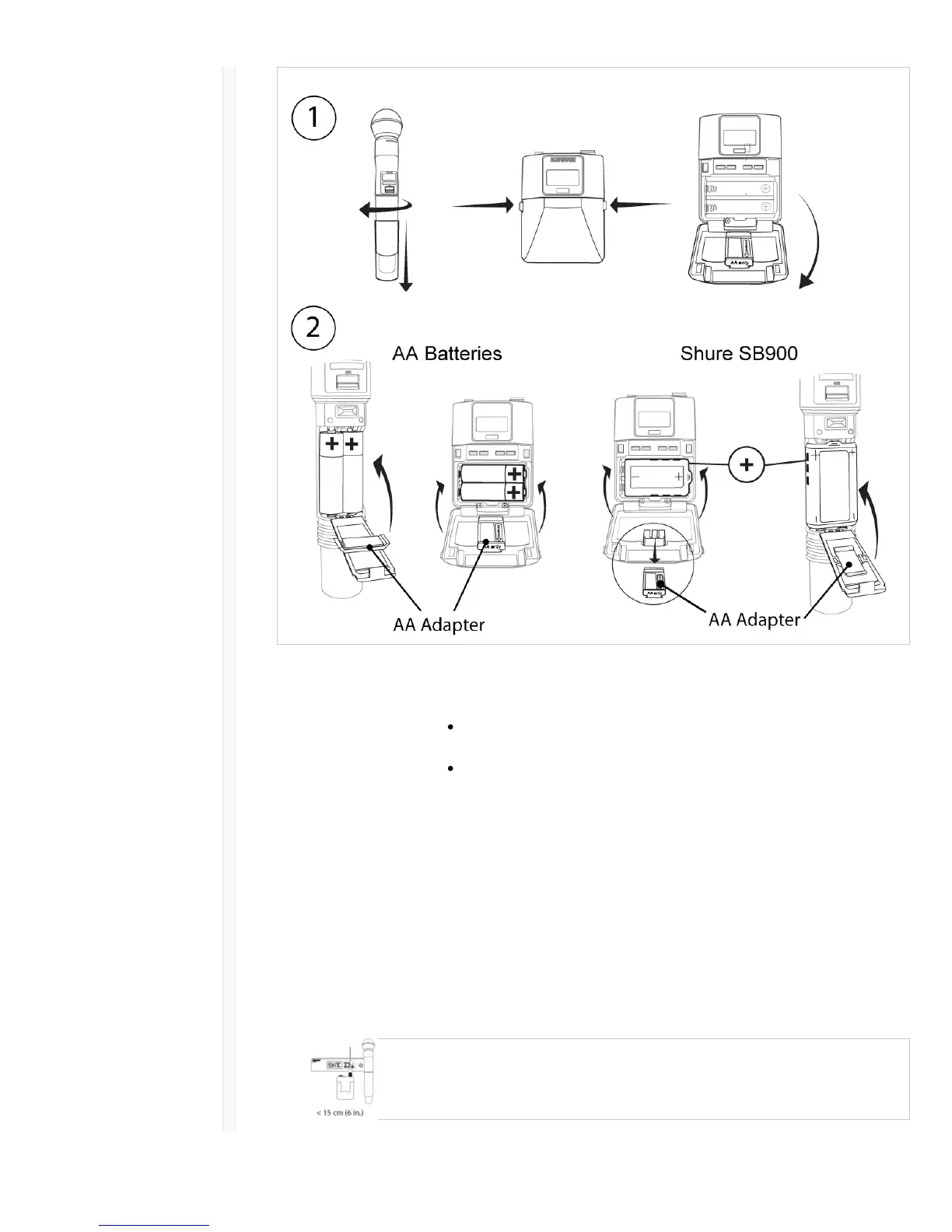
ɠ Accessing the Battery
Compartment
Press the side tabs on the bodypack or unscrew the cover on the handheld
as shown to access the battery compartment.
ɡ Installing Batteries AA Batteries: Place batteries (note polarity markings) and AA Adaptor
as shown
Shure SB900 Battery: Place battery as shown (note polarity markings),
remove AA Adaptor from bodypack transmitter, stow AA Adaptor in
door for handheld transmitter
Note: If using AA batteries, select a battery type from the transmitter menu to ensure accurate battery metering.
Step 4: IR Sync to Create an Audio Channel
1. Turn on the transmitter.
2. Press the sync button on the receiver. The red ir LED will blink indicating that sync mode is active.
3. Align the IR sync windows of the transmitter and receiver at a distance of <15 cm (6 in.). When the
transmitter and receiver are aligned, the red ir LED remains on and the sync will automatically
occur.



 To Next Page