ENGLISH
ENGLISH
– 10 –
Changing the Transmitter Group/Channel Settings
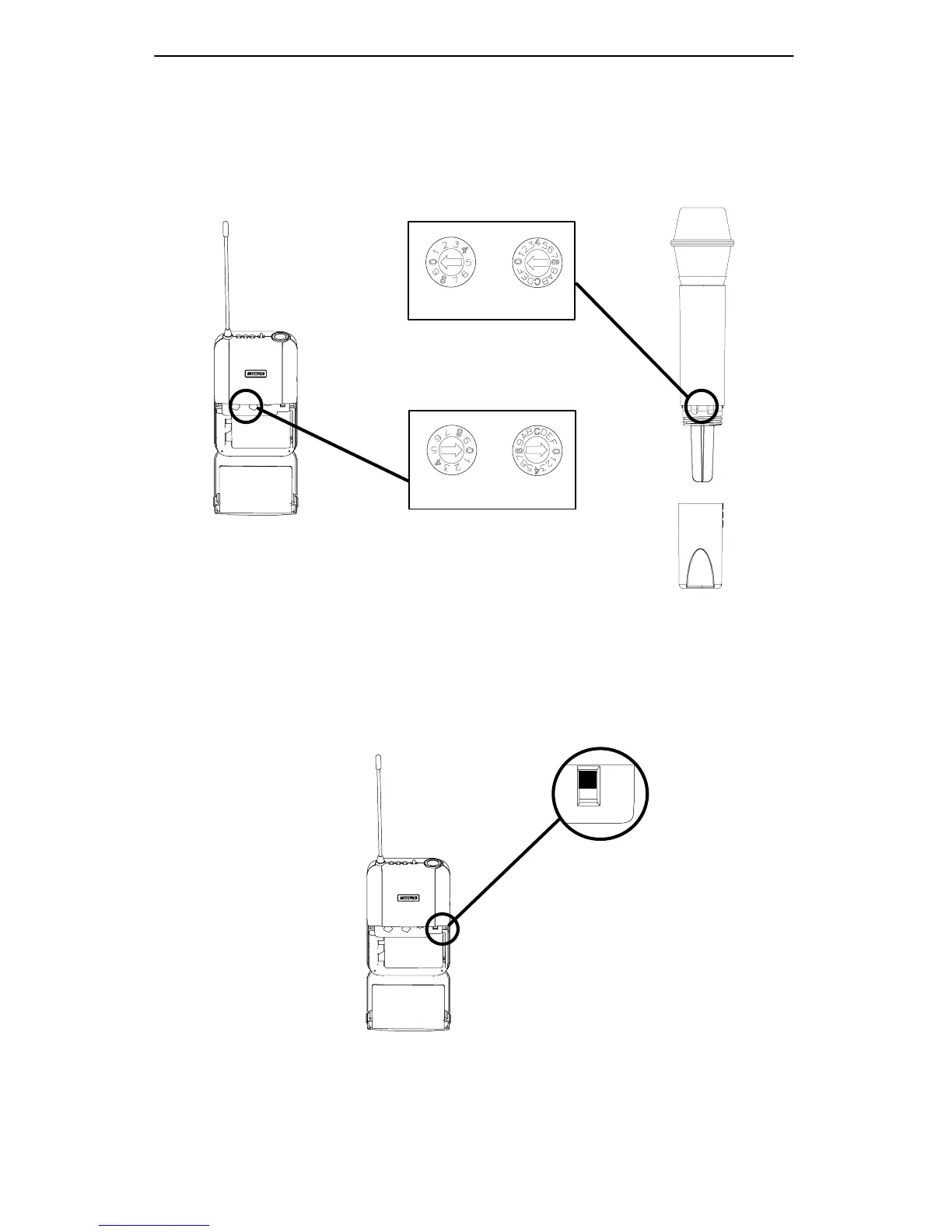
1. Turn the transmitter off and open the battery compartment to expose the GROUP and CHANNEL switches. Refer
to Figure12 below.
2. Using the supplied screwdriver, rotate the GROUP switch until the desired setting is reached. Then rotate the
CHANNEL switch until the the desired setting is reached.
IMPORTANT: Transmitter GROUP and CHANNEL settings must match receiver GROUP and CHANNEL settings.
CHLGRP
CHLGRP
CHANGING THE TRANSMITTER GROUP/CHANNEL SETTINGS
FIGURE 12
Activating the UC1 Attenuator Switch
When using the UC1 transmitter with high output devices such as electric guitar or brass instruments, set the Attenu-
ator switch to the –20 dB position. This will provide additional headroom and prevent unwanted clipping and distortion.
See Figure 13 below.
ATTENUATOR
SWITCH
0
–20
ACTIVATING THE UC1 TRANSMITTER ATTENUATION SWITCH
FIGURE 13


 To Next Page