www.Siargo.com MF / FS4000 User Manual 14 | P a g e
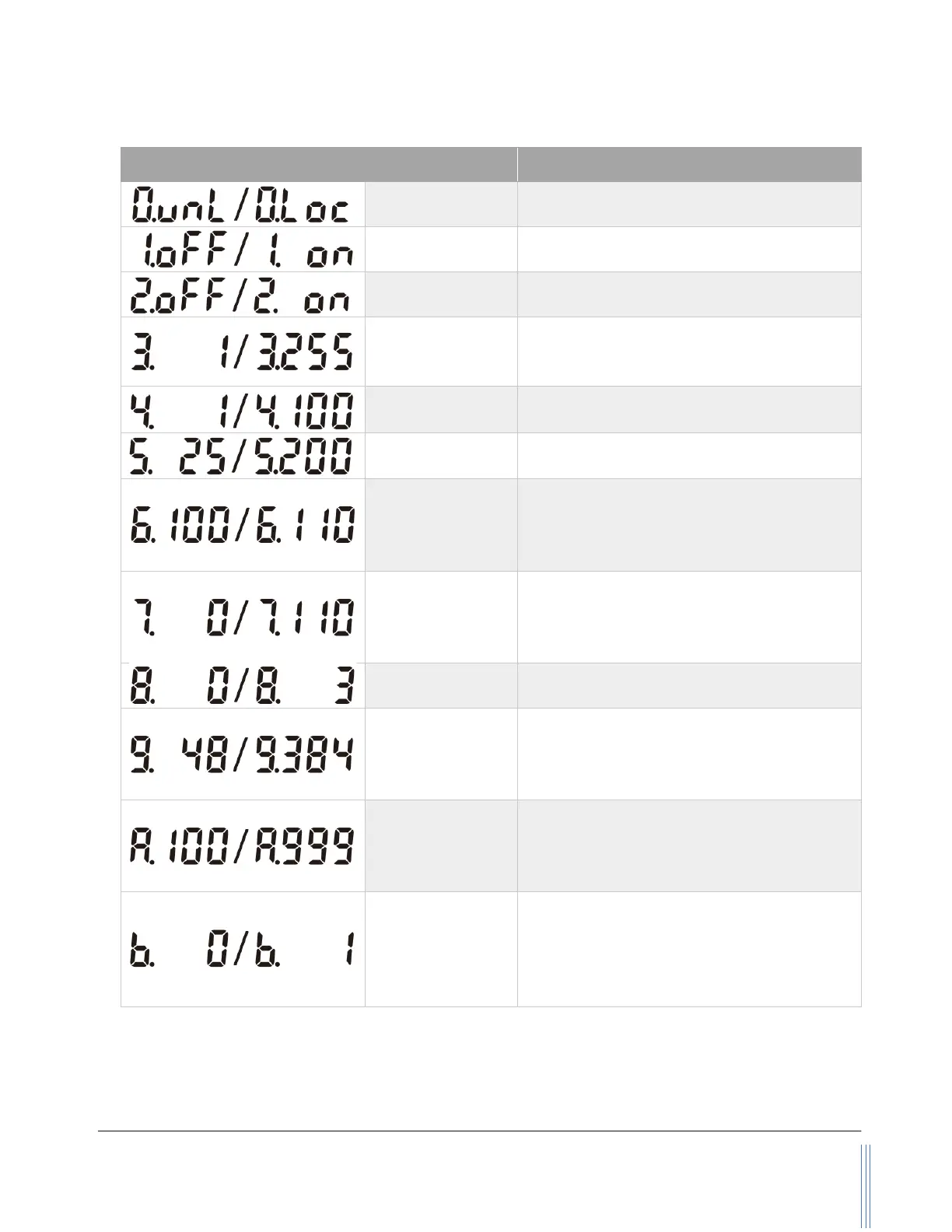
Table 5.1: On-screen characters and their corresponding functions
Reset the accumulated flow
Reset or calibrate the offset
Set the Modbus address
Available: 1 ~ 255,
The default address is 1.
4. 1 / 2 / 5 / 10 /
20 / 50 / 100
Set the display refresh rate
Set the upper flow rate alarm
Available: 0 ~ 110, means of 0% ~ 110%
full scale.
The default value is 100 (100% full scale).
Set the lower flow rate alarm
Available: 0 ~ 110, means of 0% ~ 110%
full scale.
The default value is 0 (0% full scale).
Set the communication baud rate
Available: 48, 96, 192, 384, means of baud
rate 4800, 9600, 19200, 38400.
The default value is 384 (baud rate 38400).
Set the GCF (gas conversion factor)
Available: 10 ~ 999, means of GCF = 100 ~
9990.
Default value is 100, means of GCF = 1000.
Set the accumulated flow rate unit.
➢ scc or SL (instant flow rate unit is
sccm);
➢ SL or Nm
3
(instant flow rate unit is
SLPM).
Note: During this process, the meter will continue to measure the flow without being interrupted.


 To Next Page