[dw_DIN_rail_mounting, 1, --_--]
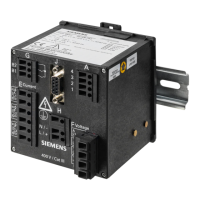
Figure 9-3 Assembly of the DIN Rail Device
(1) DIN rail
(2) Snap-on clip
(3) Guiding of the snap-on clip
(4) Release device
(5) Pulling direction
•
Pull down the release device at the snap-on clip and hold it in this position.
•
Slide the device with the guiding of the snap-on clip on to one side of the DIN rail.
•
Move the device into the desired position on the DIN rail.
•
Release the release device. The device is now firmly mounted on the DIN rail.
The snap-on clip is set to a certain height position by default. To change the height position, proceed as
follows:
•
Lever the release device out of its guiding (no special tool required).
•
Move the release device into the desired position.
•
Press the release device back into its guiding.
NOTE
The assembly instructions above must be carried out correctly to ensure sufficient protection against
touching live parts.
UL-Certification Conditions
Field wires of control circuits can be separated from other circuits with respect to the end-use requirements.
Commissioning and First Steps
9.3 Assembly
194 SICAM, SICAM P850/P855 7KG85X, Manual
E50417-H1040-C482-A9, Edition 03.2022



 To Next Page
 Loading...