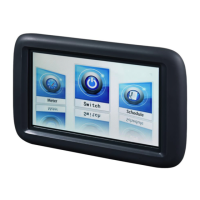
The Siemens Climatix Touch Panel (models POL8T1.4X/STD, POL8T1.7X/STD, POL8T1.8X/STD) is an Android-based human-machine interface (HMI) designed for industrial applications, particularly in heating, ventilating, air conditioning, and refrigeration (HVAC&R) systems. It offers a user-friendly interface with advanced functions, including transparent, cascading, and fading effects, as well as multi-language support.
Function Description:
The Climatix Touch Panel serves as an operation unit for Climatix controllers, allowing users to monitor and control HVAC&R systems. It features a programmable graphical interface, enabling customization with a 3rd party multi-language engineering tool. Key functionalities include:
- System Control: Provides a touch-sensitive screen for operating and triggering configured functions within a project.
- Communication: Connects to Climatix controllers via Modbus protocol over Ethernet (RJ45) or RS485/RS232 serial ports. It supports connection with multiple controllers.
- Data Management: Offers data tag management, time scheduler, and trend view functions.
- Time Synchronization: Synchronizes time with the Climatix controller.
- Graphical Interface: Features a graphical, extendable database with HVAC pictures and animations, and supports C-like script language programming.
- User Management: Provides multi-level password access for enhanced security.
- Configuration: Allows users to set screen brightness, time and date, network configurations (DHCP or Static IP), and language settings directly from the panel. Serial port testing is also available.
- Firmware and GUI Upgrades: Supports firmware upgrades via SD card or USB stick, and GUI application upgrades directly on the field without a configuration PC, using an SD card or USB stick.
Important Technical Specifications:
- CPU: Cortex A8, 720 MHz.
- Power Supply: DC 24V (±15%), with a tolerance range of 20.4 to 27.6V. Power consumption varies by model: 6W for POL8T1.4X/STD, 7W for POL8T1.7X/STD, and 12W for POL8T1.8X/STD.
- Memory: 256 MB flash / 512 MB DDR3.
- Display: LCD TFT with LED backlight.
- POL8T1.4X/STD (4.3"): 480 × 272 pixels, 400:1 contrast (TYP), 500 cd/m² brightness (TYP).
- POL8T1.7X/STD (7"): 800 × 480 pixels, 500:1 contrast (TYP), 250 cd/m² brightness (TYP).
- POL8T1.8X/STD (12.1"): 800 × 600 pixels, 450:1 contrast (TYP), 330 cd/m² brightness (TYP).
- All models support 16,770,000 colors.
- Interfaces:
- Ethernet Port: RJ45, 10/100 Mbps.
- Serial Port: COM1 (RS485/RS232) for POL8T1.4X/STD; COM1 and COM2 (RS485/RS232) for POL8T1.7X/STD and POL8T1.8X/STD. Maximum cable length for RS485/RS232 is 3m.
- USB Port: USB-A for connecting to a configuration PC (max. 500 mA output), and USB-B for data export to a USB stick (max. 500 mA output).
- SD Card Slot: Available on POL8T1.7X/STD and POL8T1.8X/STD (not supported on 4.3" model).
- Environmental Conditions:
- Operation Temperature: -20°C to +50°C.
- Transport Temperature: -25°C to +70°C.
- Humidity: 10% to 90% RH (non-condensing).
- Atmospheric Pressure: min 700 hPa (operation), min 260 hPa (transport).
- Protection Degree: IP65 (front), IP20 (rear panel) in accordance with IEC 60529.
- Housing Material: ABS + PC.
- Touchpad: 4 wires high-precision resistive touch screen.
- Standards: EU Conformity (CE), FCC Class A, UL 508 and CUL 508.
- Dimensions (W x H x D):
- POL8T1.4X/STD: 173 x 95 x 39 mm. Cut-out: 163 x 85 mm. Weight: 0.2 kg.
- POL8T1.7X/STD: 227 x 153 x 40 mm. Cut-out: 210 x 144 mm. Weight: 1.5 kg.
- POL8T1.8X/STD: 340 x 256 x 54 mm. Cut-out: 330 x 246 mm. Weight: 2.2 kg.
Usage Features:
- Touch Screen Operation: The primary method of interaction is through the touch-sensitive screen. Users should only use fingers or a touch pen and avoid sharp objects to prevent damage. Only one operating element should be touched at a time to prevent unintended actions.
- On-Screen Keyboard: Features both customized ASCII keyboards and numeric keypads, which appear automatically based on the required input type. A system keyboard is also available for general input and configuration settings.
- Visual Feedback: Provides immediate visual feedback when an operating element is touched, indicating detection by the panel, independent of communication with the controller.
- Safety Instructions: Emphasizes that only authorized personnel should perform diagnostics, rectify faults, or restart the plant. High voltage sections must be strictly segregated from DC 24V SELV sections to prevent electric shock.
- Installation: Requires proper transport, installation, and commissioning. Clearances around the panel are necessary for self-ventilation. Avoid mounting near AC power cables, output modules, or other electrical equipment that may cause interference.
- Power Supply Connection: Requires a separate, isolated DC 24V power supply. Sharing the power supply with inductive loads or controllers is prohibited. Appropriate protective measures, such as lightning arresters, are recommended.
- DIP Switches: Located on the back of the panel, DIP switches are used to set the operating mode (Normal, Setting, Calibrate touch screen, Enter Android system, Firmware upgrade).
Maintenance Features:
- Maintenance-Free Design: The Climatix Touch Panel is designed for maintenance-free operation.
- Cleaning: Requires regular cleaning of the touch screen and keyboard membrane.
- Always shut down the panel before cleaning.
- Spray cleaning solution onto a cleaning cloth, not directly onto the panel.
- Wipe from the screen edge inwards.
- Use only water with a little liquid soap or a screen cleaning sponge.
- Do not use compressed air, steam jet blowers, aggressive solvents, or scouring powders, as these can damage the panel.
- Fault Rectification: If system faults occur and the user is not authorized to perform diagnostics or rectification, Siemens Building Technologies service personnel should be contacted.
- Disposal: As an electronic device, it must be disposed of via designated channels in accordance with European Directive 2012/19/EU and local regulations, not as domestic waste.

 Need help?
 General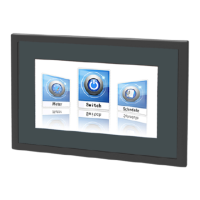






 To Next Page