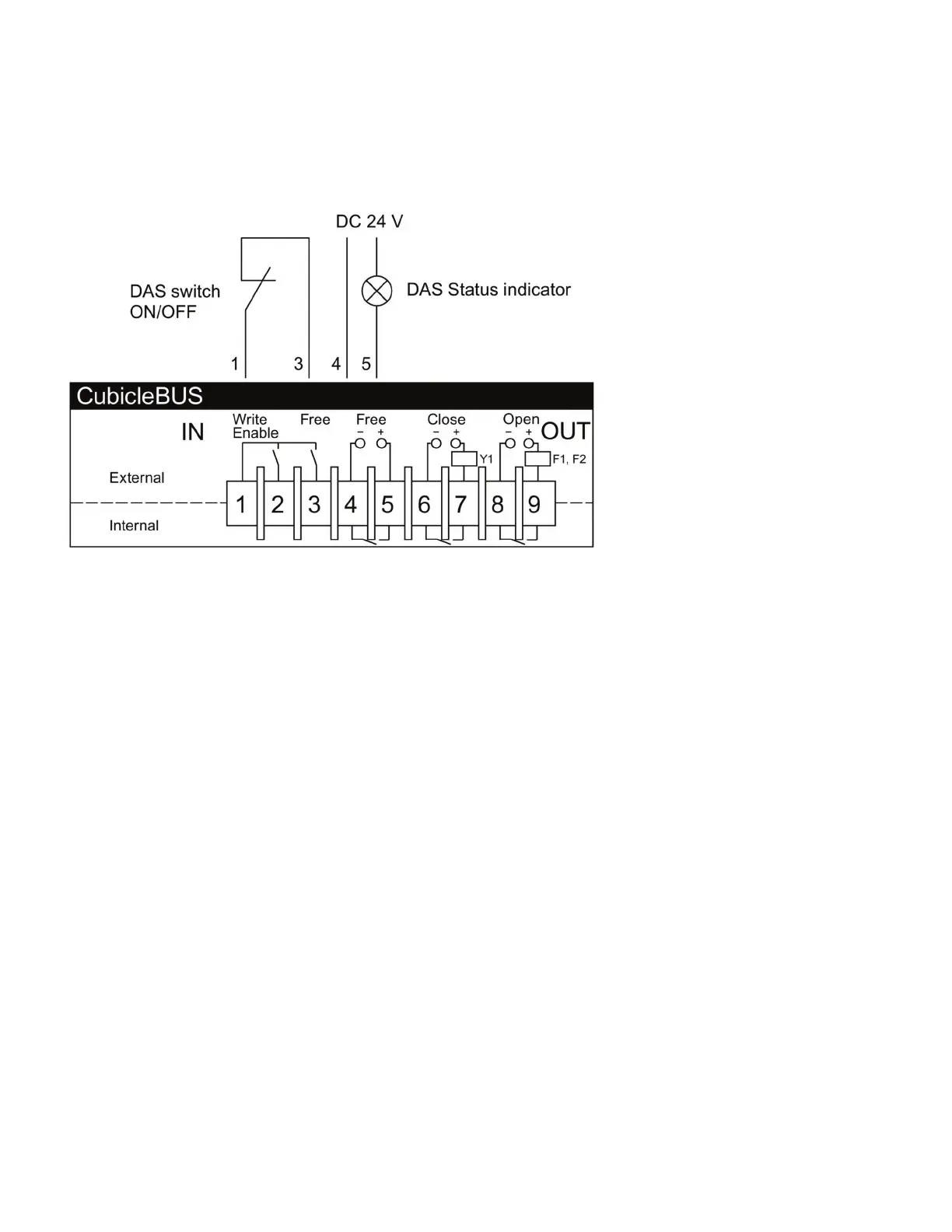
) Once configured to switch parameter sets in DAS mode, the COM has sole control over the active parameter set. Manual
attempts to change from A to B (when in A) or B to A (when in B) will be reversed by the COM within seconds. This
includes attempts made from the front panel of the trip unit or remote selection via communications.
The input and output can be configured separately. If DAS ON/OFF changes will only be mode remotely via communications, the
Com Digital Input can be left in the User Input state, allowing local indication but remote mode switching.
The setting of the input and output can be changed via a Modbus TCP command over the network when the Write Enable jumper
is in place (terminals and ). These packets are in Data Set and are documented in the COM Communications Manual.
How to configure a new COM with powerconfig
Appendix : Configuring the COM for a Dynamic Arc Flash Mitigation application
powerconfig | Quick Start Guide



 To Next Page