EasyManua.ls Logo

Siemens IP Controller N350E - User Manual

Siemens IP Controller N350E
4 pages
Print Icon
To Next Page IconTo Next Page
Loading...
GAMMA instabus
Technical Product Information
February 2013
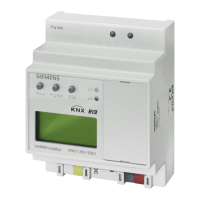
IP Controller N350E 5WG1 350-1EB01
Siemens AG N350E, 4 Seiten Technical manual
Infrastructure & Cities Sector, Building Technologies
Control Products and Systems © Siemens AG 2013 Update: http://www.siemens.com/gamma
P.O. Box 10 09 53, D-93009 Regensburg Subject to change without further notice
2.12.1.12/1
Product and Applications Description
The IP Controller N350E is a DIN rail mounted device.
It provides these functions:
· Weekly scheduler
with up to 100 schedule entries for up to 80 channels,
with up to 8 periods for weekly schedules,
with astronomical schedule function
(+/- 2 hours from sun rise / sun set
· Annual schedule
with up to 50 schedule entries for up to 80 channels
· 30 Logic gates
· Event programs with a total of up to 200 event com-
mand actions
· Event program trigger via schedules, logic functions or
up to 30 threshold values
· Configuration of scheduler functions, event programs,
and logic functions via IP network
(protocol used: KNXnet/IP Device Configuration)
· Battery buffered real-time clock
· Display of date and time on LC-display
· Real-time clock setting manually with three push but-
tons or automatically by a network (Internet) time ser-
vice
· Time zone selection for automatic time synchroniza-
tion
· Automatic Daylight Savings Time change-over se-
lectable
· DHCP for automatic IP address assignment
· Communication via IP network with
- a visualization software
- ETS3 acting as a configuration interface
Via ETS up to 80 objects can be defined for the device
with free data type assignment from this list of data
types
· 1 bit (EIS1)
· 1 Byte, unsigned (EIS 14)
· 1 Byte, signed (EIS 14)
· 2 Byte, unsigned (EIS 10)
· 2 Byte, signed (EIS 10)
· 2 Byte, float (EIS 5)
· 4 Byte, unsigned (EIS 11)
· 4 Byte, signed (EIS 11)
· 4 Byte, float (EIS 9)
All defined objects can be used freely by all software
modules. Hence, up to 80 objects can be selected from
for schedule functions, as input for logic gates, as event
triggers, or as output of event programs (scenes).
With the ETS (Engineering Tool Software) the application
program is selected, its parameters and addresses are
assigned appropriately, and downloaded to the IP Con-
troller N350E.
Application program
21 CO IP Controller 908701
· 80 objects
· 100 schedules
· 50 annual schedules
· 100 event programs (scenes)
· 10 logic gates
· sends date and time
· IP communication for remote configuration and visual-
ization
Supported Software
Here is a list of software supporting the IP Controller
N 350E.
ComBridge Studio Evolution
IPAS GmbH
Hölscher Str. 27
47167 Duisburg
[ http://www.ipas-products.com
]
ETS
KNX Association
De Kleetlaan 5, Bus 11
B-1831 Brussels-Diegem
[ http://www.knx.org ]
Question and Answer IconNeed help?

Do you have a question about the Siemens IP Controller N350E and is the answer not in the manual?

Siemens IP Controller N350E Specifications

General IconGeneral
Product Type DesignationIP Controller
ModelN350E
ManufacturerSiemens
CategoryController
Supply Voltage24 V AC/DC
Degree of ProtectionIP20
MountingDIN rail
Weight200 g
ProtocolsBACnet/IP, Modbus TCP
Power Consumption5 W
Operating Temperature0°C to +50°C
CommunicationEthernet
Memory512 MB Flash

Summary

Product and Applications Description

Weekly Scheduler Functionality

Supports weekly scheduling with up to 100 entries for 80 channels, featuring 8 periods and astronomical functions.

Annual Schedule Capabilities

Enables annual scheduling with up to 50 entries for 80 channels, providing long-term time-based automation.

Logic Gate Features

Includes 30 logic gates for creating complex conditional automation sequences.

Event Program Functionality

Supports up to 200 event command actions and triggers via schedules, logic, or thresholds.

IP Network Configuration

Allows configuration of scheduler, event programs, and logic functions via IP network using KNXnet/IP.

Real-Time Clock Features

Features a battery-buffered real-time clock with manual/automatic setting and time zone selection.

DHCP IP Address Assignment

Supports DHCP for automatic IP address assignment for network integration.

Visualization Software Communication

Enables communication via IP network with visualization software for remote control.

ETS3 Configuration Interface

Utilizes ETS3 as the primary interface for device configuration and parameter assignment.

ETS Configuration and Object Definition

ETS Data Type Options

Lists available data types (EIS1, EIS14, EIS10, EIS5, EIS11, EIS9) for defining up to 80 objects.

Object Usage in Software

All defined objects can be freely used by software modules for schedules, logic gates, and event triggers.

Application Program Download via ETS

ETS is used to select, parameterize, and download the application program to the IP Controller N350E.

Supported Software

ComBridge Studio Evolution Support

ComBridge Studio Evolution from IPAS GmbH supports the IP Controller N350E.

ETS Support from KNX Association

The KNX Association provides ETS, a key configuration tool for the IP Controller N350E.

Installation and Mounting

Installation Location Requirements

Device suitable for permanent interior installations in dry locations on DIN rail EN 60715-TH35-7.5.

Qualified Electrician Requirement

Mandatory mounting and commissioning by an authorized electrician for safety and compliance.

Safety Rules and Guidelines

Adherence to prevailing safety rules and country-specific guidelines for electric installations is essential.

Technical Specifications Overview

Network Communication Details

Supports 10BaseT Ethernet and protocols like ARP, ICMP, UDP/IP, DHCP, and KNXnet/IP.

Power Supply Requirements

Requires DC 24V bus voltage and AC/DC 24V auxiliary power, compatible with 12-30V input range.

Control Elements

Features a learning button and three push buttons (Move, Prg/Set, ESC) for operation and setting.

Display Elements

Includes LEDs for Ethernet link/activity/bus voltage and an LC-Display for date and time.

Physical and Electrical Specifications

Plastic housing, DIN-rail mountable, IP20 protection, overvoltage class III, SELV bus.

Environmental Conditions

Specifies operating temperature (0-45°C), storage (-25-70°C), and humidity (5-93% non-condensing).

Operator Elements and Mounting

Location of Operator Elements

Identifies the AC/DC 24V and KNX terminals, Ethernet socket, LEDs, display, and push buttons.

DIN-rail Mounting Procedure

Instructions for securely mounting the device onto a standard DIN rail.

Wiring Connections

Details on connecting auxiliary power, KNX bus line, and Ethernet via specified terminals and sockets.

Dismounting from DIN-rail

Step-by-step guide for safely removing the device from the DIN-rail mounting.

Setting Time and Date

Procedure for locally setting the device's time and date using the push buttons.

Bus Connection and Battery Handling

Disconnecting Bus Connection Blocks

Instructions for safely removing the bus connection blocks from the device.

Connecting Bus Cables

Guidance on connecting single-core conductors (0.6-0.8mm) to the bus connection blocks.

Disconnecting Bus Cables

Steps for unplugging connection blocks and removing bus cable conductors.

Auxiliary Power Connection Block

Instructions for slipping off and on the auxiliary power connection block.

Real-Time Clock Battery Replacement

Procedure for replacing the battery (Lithium CR 1/2 AA) for the real-time clock.

Dimensional Diagram

Provides a diagram showing the device's dimensions and standard unit (SU) measurements.

General Notes and Support

Includes notes on operating instructions, faulty devices, and contact information for technical support.

Related product manuals