
 Need help?
Do you have a question about the Siemens iQ100 ET611FEB8M and is the answer not in the manual?
Essential safety advice, manual reading, and keeping instructions.
Specifies appropriate and inappropriate usage scenarios for the appliance.
Crucial warnings for preventing fire, burns, and electrical hazards.
How to select, set, change, and switch off individual hotplates and their heat levels.
Instructions for activating the electronic boil start function.
Steps to enable the child lock feature to prevent accidental operation.
Steps to disable the child lock feature.
How to set individual cooking timers for hotplates.
Information for identifying and resolving common appliance faults.
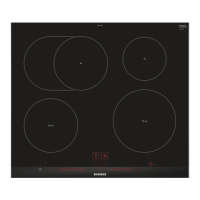
This document describes the Siemens ET6..FE..Q and ET6..FE..M hob, providing comprehensive information on its functions, usage, and maintenance.
The hob is designed for preparing meals and drinks under supervision in private households and enclosed domestic environments, up to an altitude of 2000 m above sea level. It should not be used with external timers or separate remote controls unless specifically designed for such operation. Children aged 8 and over, as well as individuals with reduced physical, sensory, or mental abilities, may use the appliance if supervised and instructed on safe use. Children under 8 years must be kept away from the appliance and its power cable.
Safety Warnings:
To prevent damage to the ceramic surface, ensure pot and pan bases are smooth and clean. Avoid placing empty pans on heated hotplates or allowing them to boil dry. Position cookware correctly to prevent overheating, keeping hot pots and pans away from controls and the hob surround. Do not drop hard or pointed objects onto the hob. Non-heat-resistant materials like oven protective foil, aluminum foil, or plastic containers should not be used on heated hotplates.
The packaging materials are recyclable. To save energy, select cooking zones that match the size of your pan and center cookware on the hob. Use cookware with a base diameter similar to the hotplate. Cover saucepans with suitable lids, preferably glass lids, and use pots and pans with flat bases. Match cookware size to the quantity of food. Cook with minimal water. Turn down to a lower power level early and utilize the hob's residual heat by switching off hotplates 5-10 minutes before the end of cooking.
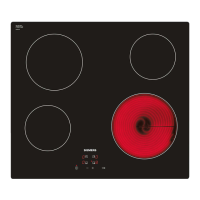
The hob features a control panel with touch fields and displays for various functions. The main switch powers the hob on and off. Hotplate selection allows you to choose which cooking zone to adjust. The electronic boil start control (A) simplifies initial heating. A childproof lock (□□) prevents accidental activation, and a wipe protection function (■□) temporarily locks the control panel during cleaning. The hob also includes a two-stage residual heat indicator (H/h) for each hotplate, showing if it's hot enough to keep food warm (H) or just hot (h).
To switch on the hob, touch the main switch (①). The indicator lamp above it will light up, and the displays will illuminate. To set a hotplate, select it using the hotplate selection field (98) and then choose a heat setting from 1 (lowest) to 9 (highest). Intermediate settings are also available. To change a heat setting, re-select the hotplate and choose a new setting. To switch off a hotplate, select it and then choose 0. The hob will automatically switch off after all hotplates have been off for a while.
This feature heats the hotplate at the highest setting and then automatically reduces it to your selected ongoing cooking setting. It is activated within the first 30 seconds after switching on the hotplate by selecting the desired ongoing cooking setting and then touching A. This function is ideal for cooking with little water and is not suitable for dishes requiring a lot of water, such as pasta.
The childproof lock prevents children from switching on the hob. To activate, press and hold the childproof lock field (□□) for approximately 4 seconds when the hob is switched off. The indicator lamp will light up for 10 seconds, confirming the lock is active. To deactivate, press and hold the same field for approximately 4 seconds.
The hob offers a cooking time function and a kitchen timer.
If a hotplate's settings are not changed for a prolonged period, it will automatically switch off. The duration depends on the heat setting selected (1 to 10 hours). The hotplate display will show "FB" and the residual heat indicator (H/h) alternately. To continue cooking, touch any touch field, and then reset the settings.
The power manager limits the appliance's maximum power consumption to the value specified on the rating plate. If the power limit is reached, the appliance automatically adjusts to the maximum possible heat settings, and the heat setting indicator briefly shows the adjusted setting.
This function prevents accidental changes to settings when wiping the control panel while the hob is on. To activate, touch the wipe protection field (■□). A signal sounds, the indicator lamp above ■□ lights up, and the control panel is locked for 30 seconds. The main switch remains functional, allowing you to switch off the hob at any time.
This function shows the total energy consumed (in kilowatt-hours, e.g., 1.08 kWh) between switching the hob on and off. The display appears for 10 seconds after switch-off. Its accuracy depends on factors like voltage quality. This feature can be activated in the basic settings.
You can customize various basic settings for your appliance. These include:
To change basic settings, switch off the hob, then switch it on and press and hold the settings field (5) for approximately 4 seconds within 10 seconds. Use the settings field to navigate through the options and the control panel to set the desired value.
Regular cleaning and maintenance ensure the appliance's efficiency.
Minor faults can often be rectified by referring to the troubleshooting information. Common issues include:
Dispose of the appliance in an environmentally friendly manner, as valuable raw materials can be reused through recycling. Information on disposal methods is available from specialist dealers or local authorities. The appliance is labeled in accordance with European Directive 2012/19/EU (WEEE).
Detailed information on warranty periods and terms is available from customer service, retailers, or the Siemens website. When contacting customer service, provide the product number (E-Nr.) and production number (FD), which can be found on the appliance's rating plate (on the appliance certificate or the lower section of the hob).
 General
| Number of Zones | 4 |
|---|---|
| Control Type | Touch |
| Power Levels | 9 |
| Total Power | 6600 W |
| Residual Heat Indicator | Yes |
| Child Safety Lock | Yes |
| Timer | Yes |
| Installation Type | Built-in |
| Color | Black |
| Type | Electric |
| Surface Material | Glass |


 To Next Page