EasyManua.ls Logo

Siemens LOGO! Basic - Disassembly Instructions

Siemens LOGO! Basic
18 pages
Print Icon
To Next Page IconTo Next Page
To Previous Page IconTo Previous Page
Loading...
Recycler Guide for LOGO!
Product Information, 09/2024, A5E54068028-AA
7
Disassembly instructions
4
The following guide provides detailed information on how to disassemble the product at the
end of its service life and on what materials you can collect and recycle. In doing so, you
support the recycling economy.
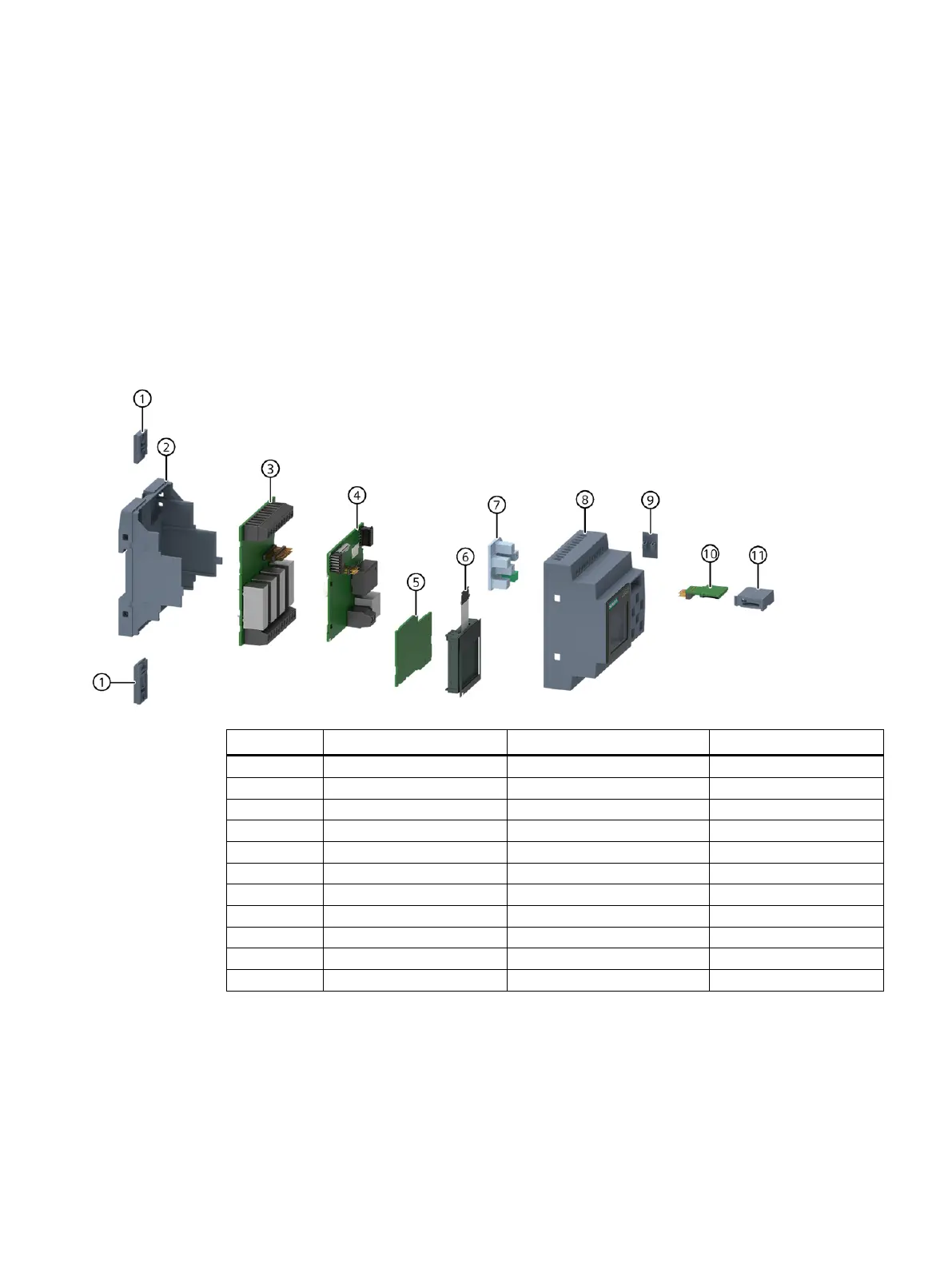
Components of the product

Position
Part
Material
Disassembly step
1
Mounting slides
POM
Step 7
2
Rear enclosure
Polycarbonate
Step 6
3
Assembled PCB
Electronics
Step 8
4
Assembled PCB
Electronics
Step 8
5
Assembled PCB
Electronics
Step 8
6
LCD
Electronics
Step 9
7
Keypad
Silicone rubber
Step 5
8
Front enclosure
Polycarbonate
Step 4
9
Connector cap
Polycarbonate
Step 3
10
Assembled PCB of SD card
Electronics
Step 2
11
SD card holder
Polycarbonate
Step 1