
 Need help?
Do you have a question about the Siemens SIMATIC NET CP 5622 and is the answer not in the manual?
Lists components supplied with the CP 5622 communications processor.
Specifies the product and article number for which the operating instructions are valid.
Summarizes the installation and configuration information covered in the operating instructions.
Provides a link to find the current version of the operating instructions online.
Lists related documents offering more detailed information on commissioning and using the processor.
Lists registered trademarks of Siemens AG and other trademarks used in the publication.
Information on Siemens' online platform for product documentation, support, and services.
Details Siemens' training programs for industrial automation and networks.
Describes training and certification courses for industrial network design and implementation.
Discusses industrial security functions and best practices for protecting plants and networks against cyber threats.
Explains specialist terms used in the SIMATIC NET documentation.
Provides guidance on the environmentally compliant recycling and disposal of electronic waste.
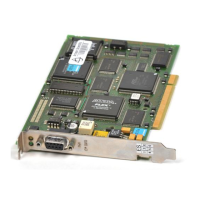
Details the essential properties and features of the CP 5622 communications processor.
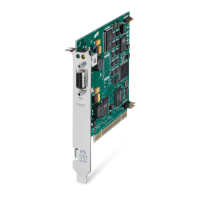
Illustrates the physical layout and components of the CP 5622 communications processor.
Describes the PROFIBUS network connection, data rates, and connector pin assignment.
Explains the status indications provided by the LEDs on the communications processor.
Outlines the procedure for installing the necessary software package for the communications processor.
Describes the recommended procedure for removing the SIMATIC NET PC Software from the PG/PC.
Provides essential safety precautions, including electrical shock and ESD protection, during hardware installation.
Details the step-by-step procedure for physically installing the communications processor into the PG/PC.
Discusses compatibility with other communications processors and slot requirements.
Lists available engineering tools and describes the steps for configuring the communications processor.
Explains how to handle configuration when the specific CP 5622 is not yet available in the hardware catalog.
Provides detailed technical specifications, including transmission speeds, electrical data, and operating conditions.
Lists the physical module format, weight, and dimensions of the CP 5622.
Details emission and immunity standards and test results for the device.
States compliance with the EU EMC Directive and specifies design areas and requirements.
Confirms compliance with the EU RoHS Directive regarding restriction of hazardous substances.
Provides information on where to find the official declaration of conformity for the communications processor.
Indicates compliance with the Australian AS/NZS 3548 standard.
Confirms approval according to the Canadian CAN/CSA C22.2 No. 60950-1 standard.
States compliance with the Canadian ICES-003 standard for digital devices.
Details FCC compliance, testing, and guidelines for preventing radio frequency interference.
Confirms approval according to the US standard UL 60950-1.
Explains the EAC marking for the Eurasian Economic Union and its technical regulations.
The SIMATIC NET PG/PC - PROFIBUS CP 5622 is a communications processor designed to connect personal computers (PCs) or programming devices (PGs) to PROFIBUS and MPI networks. This device acts as a crucial link, enabling seamless data exchange and control within industrial automation environments. Its primary function is to facilitate communication between a host PC/PG and various devices on a PROFIBUS or MPI network, such as SIMATIC S7 controllers or ET 200 distributed I/O systems.
The CP 5622's core function is to provide a robust and reliable interface for industrial communication. It supports a wide range of transmission speeds, from 9.6 Kbps up to a maximum of 12 Mbps, ensuring compatibility with diverse PROFIBUS network configurations. The physical link to the PROFIBUS network is established via a floating RS-485 interface, which is integrated into the module. This design allows for flexible network topologies and reliable signal transmission even in electrically noisy industrial settings.
Beyond basic data transmission, the CP 5622 also supports additional interface signals for direct links to Programmable Logic Controllers (PLCs) at speeds up to 187.5 Kbps. This capability is vital for applications requiring direct control and monitoring of PLCs without the overhead of higher-level protocols, thus enhancing real-time performance.
The device is designed to integrate into existing PC/PG systems equipped with a PCI Express slot. It supports PCI Express x1, and importantly, can also be operated in x4, x8, and x16 slots, offering broad compatibility with various computer hardware. This "plug and play" functionality simplifies installation and ensures that the operating system can automatically detect and configure the device with minimal user intervention.
For network management, the CP 5622 enables the linking of up to 32 devices (PC, PG, SIMATIC S7, or ET 200) to form a single network segment. Furthermore, by incorporating repeaters, the network can be extended to connect up to 64 nodes, providing scalability for larger industrial setups. The communications processor handles the underlying PROFIBUS and MPI protocols, abstracting the complexity from the application software running on the host PC/PG. This allows users to focus on their automation tasks rather than low-level communication details.
The device's operational status is clearly indicated by a set of LEDs. These indicators provide immediate visual feedback on the network's health and the CP 5622's operational mode. For instance, a steady green light signifies normal operation (token rotation), while a rapidly flashing green light indicates that the module has not started or has just undergone a reset. Alternating green and yellow flashes can be used for module identification in systems with multiple communication processors, aided by a diagnostics tool. A steady yellow light indicates DP slave mode, and yellow flashing at one-second intervals signals an error in DP slave mode. These visual cues are invaluable for quick troubleshooting and status checks.
The CP 5622 is designed for straightforward integration and use within industrial automation systems. Its "plug and play" feature, when activated in the PC/PG's BIOS, significantly streamlines the hardware installation process. Users are guided through the installation by the Windows Hardware Wizard, ensuring that the correct drivers are identified and installed without needing to search online.
For configuration, the CP 5622 is compatible with standard Siemens engineering and configuration tools, including STEP 7 V5.5, STEP 7 Professional (TIA Portal), and Communication Settings (COML S7). This ensures that users familiar with the Siemens ecosystem can easily set up and manage the communications processor. The configuration process is detailed in the "Commissioning PC Stations" manual and relevant online help resources, providing comprehensive guidance.
A key usage feature is its backward compatibility. If a CP 5622 is not yet available in the hardware catalog of a specific STEP 7 version, users can select a CP 5621 or CP 5611 for configuration. The CP 5622 is designed to be downwards compatible with the configurations of these older models, simplifying upgrades and ensuring continuity for existing projects. This also means that if an older CP is replaced, its configuration can often be adopted by the new CP 5622, minimizing reconfiguration efforts.
The device's ability to operate in various PCI Express slots (x1, x4, x8, x16) provides flexibility in choosing a suitable slot within the host PC/PG, accommodating different hardware layouts. This adaptability is crucial in diverse industrial PC environments where slot availability can vary.
Maintenance of the CP 5622 primarily involves ensuring proper software and hardware installation, as well as monitoring its operational status through the LED display. The installation manual for "SIMATIC NET PC Software" provides detailed instructions for both installation and uninstallation, which are critical for maintaining a stable and functional communication system. It is recommended to install the software before inserting the hardware to ensure proper driver recognition.
In terms of hardware maintenance, the device is designed for robust operation within specified ambient conditions, including temperature and humidity ranges. Adherence to these conditions is essential for the longevity and reliable performance of the CP 5622. The manual emphasizes the importance of proper mounting, ensuring the module sits firmly and uniformly in its slot to prevent physical damage or intermittent connections.
Safety notices are a crucial aspect of maintenance. The manual explicitly warns against working on the PG/PC when the power supply is on, highlighting the risk of electric shock. It also provides guidelines for handling electrostatically sensitive devices (ESD), such as picking up components by their edges and discharging static electricity from the body and tools before working on the PG/PC. These precautions are vital for preventing damage to the CP 5622 and other sensitive electronic components.
For troubleshooting, the LED display serves as a primary diagnostic tool. By interpreting the meaning of the various LED states (e.g., green on, green off, yellow on, flashing patterns), users can quickly identify common issues such as incorrect bus parameters, defective bus connections, or firmware errors. This immediate visual feedback helps in narrowing down the cause of a problem, facilitating faster resolution.
In cases of module replacement, the CP 5622's compatibility with older CPs simplifies the process. The ability to reload a previous configuration onto the new CP 5622, especially after removing the old CP, significantly reduces downtime and reconfiguration effort. This feature is a testament to Siemens' commitment to ease of maintenance and upgradeability within their industrial automation product line.
The documentation itself is a key maintenance feature, with comprehensive manuals and online support resources available. Users can access updated operating instructions and other relevant documents through the Siemens Product Support pages, ensuring they always have access to the latest information for installation, configuration, and troubleshooting. This continuous support helps users maintain their systems effectively and address any issues that may arise.
 General
| Product Type | Communication Processor |
|---|---|
| Product type designation | CP 5622 |
| Interface | PCI |
| Slot type | PCI |
| Protocols Supported | PROFIBUS |
| Data Rate | Up to 12 Mbps |
| Operating Temperature | 0 to 60 °C |
| Operating System | Windows 7 |
| Compatibility | SIMATIC NET |
| Current consumption | Approx. 400 mA |


 To Next Page