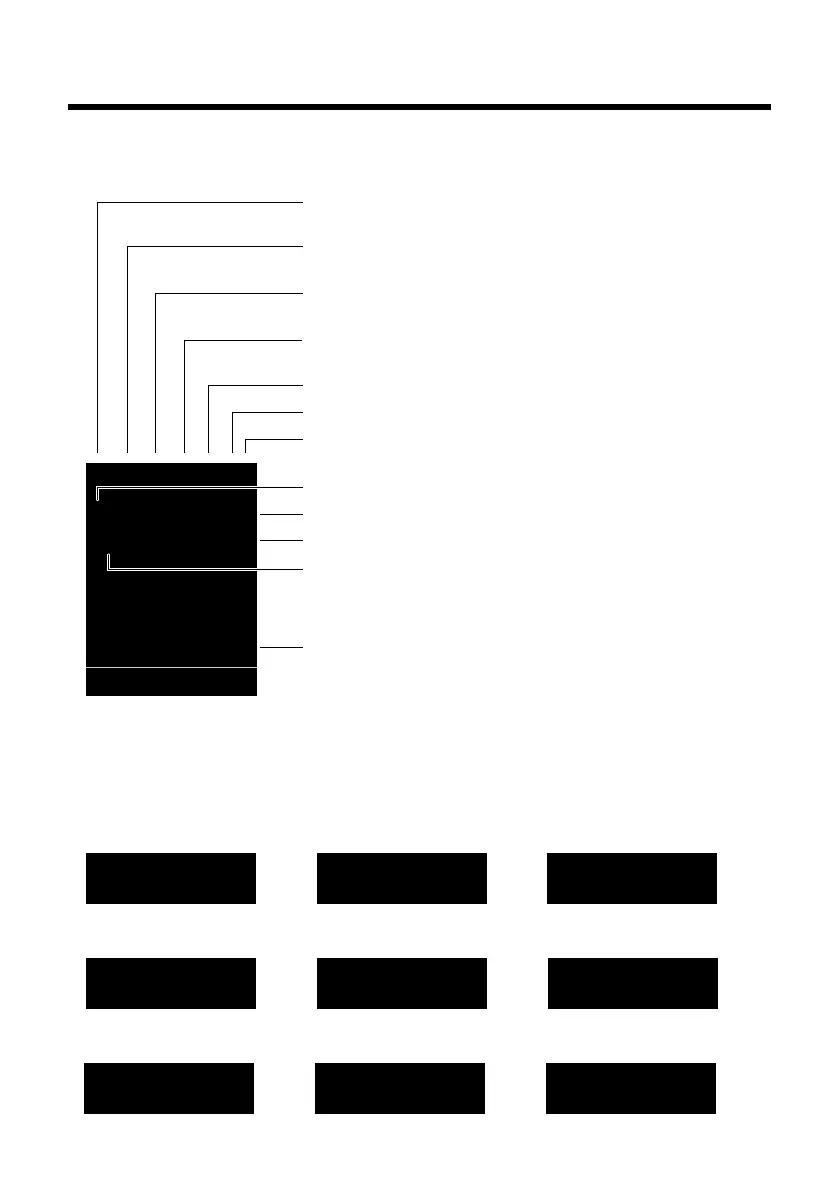
The following symbols are displayed dependent on the settings and the operating status of
Signalling
Establishing a connection
W
Connection established
Connection cannot be estab-
lished or connection inter-
rupted
i Ã
»
ó
˝
¼ 08:00
07:15
INT 1 05 Apr
Ã
™ ¾
02 10 09 08
Calls Calendar
Ø
å
Ú
Internal call (¢ page 58)
Ø
«
Ú
External call (¢ page 28)
Signal strength i(¢ page 54)
or ECO Mode+ icon ¼
(¢ page 54)
Answering machine activated (SL400A only)
Bluetooth activated (¢ page 62)
or ô/ õ (Bluetooth headset/data device) connected
Ringtone switched off (
¢ page 68)
or ñalert tone activated (
¢ page 68)
Keypad lock switched on (
¢ page 22)
Ø
þ
Ú
Answering machine
is recording (¢ page 47)
Battery charging (
¢ page 17)
Battery charge status (
¢ page 17)
Alarm switched on and wake-up time set (¢ page 57)
Current time (
¢ page 16)
Current day and month (
¢ page 16)
Name of the handset (¢page 60)
Number of new messages:
u à on the network mailbox (¢page 37)
u ™ in the missed calls list (¢ page 37)
u ¾ in the SMS list (¢page 41)
u in the missed alarms list (¢ page 38)






 To Next Page