2 Connecting a Sierra Wireless LX40 Router to an Eaton Network Card P-164001160—Rev 01
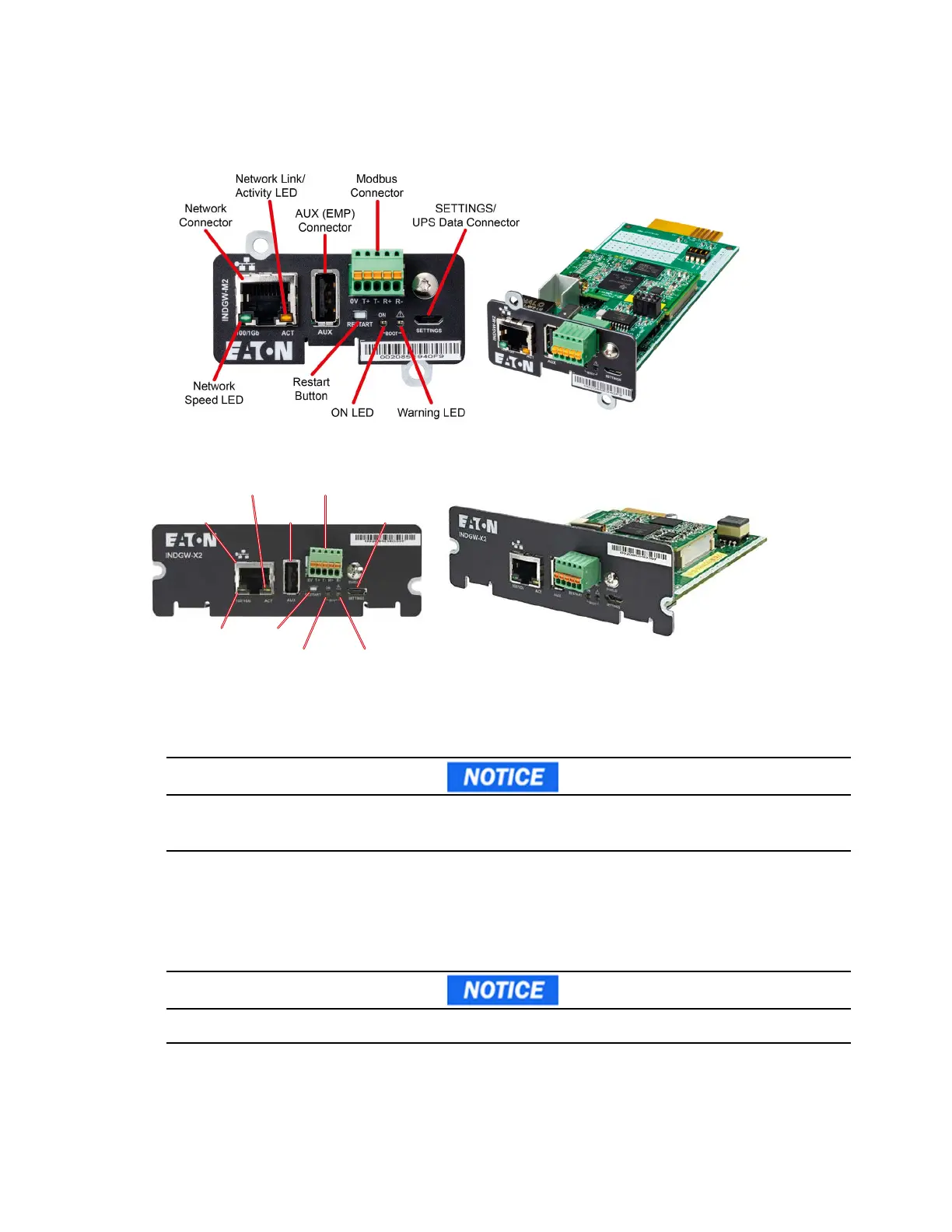
Figure 1. INDGW-M2 Card
Figure 2. INDGW-X2 Card
6. Connect a USB cable from the SETTINGS port of the INDGW-M2 or INDGW-X2 card to a USB port on the
laptop.
• Windows will automatically detect the INDGW-M2 or INDGW-X2 card connection
If Windows does not automatically detect the INDGW-M2 or INDGW-X2 card, contact the Brightlayer Data
Center at 800-356-5737, option 2, option 2 to troubleshoot.
7. Open a web browser and enter https://169.254.0.1. You are prompted to log in.
8. Log in using the username admin and password admin.
9. You are prompted to change your password.
10. Enter the new password Eaton123!, re-enter the new password, and press Submit.
Entering a password other than Eaton123! will cause the PredictPulse activation to fail.
11. Read and accept the license agreement.
Network
Connector
Network
Speed LED
Network Link/
Activity LED
AUX (EMP)
Connector
RESTART
Button
ON LED
Warning LED
SETTINGS/
UPS Data Connector
Modbus
Connector
INDGW-M2 or INDGW-X2 Card Installation


 To Next Page