15
Taking a Measurement
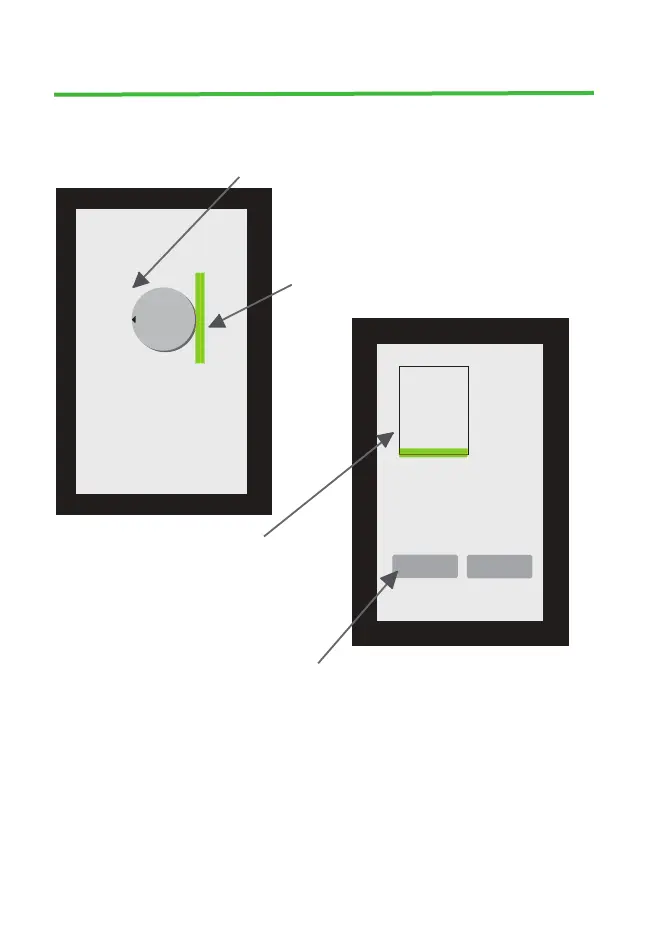
2. If the sample is round, 2 lines will appear on the screen. Place the
sample on the screen so that the left edge of the sample is aligned with
the left line
The right edge of the sample sould be aligned
with the right line, close enough so that the
edge of the sample is in the green bar
x
________________________
________________________
Place
coin
or sample
Total Weight 1.00 Ozt
Diameter: 37.53 mm
Surface Area: 1106.37
Coin Thickness: 2.68 mm
Min Diam: 33.7mm
Max Diam: 39.7 mm
x
SA: 1110.5 Thickness: 2.67mm Total Weight 1.00 Ozt.
Width: 31.0 mm Length: 35.8 mm
Max Length: 38.11 mm Min Length: 32.2 mm
Width
+
Width
-
3. If the sample is rectangular,
a rectangle will appear on the
dimension screen. Place the sample
on the screen so that the upper left
corner of the sample is aligned with
the upper left corner of the rectangle
4. Adjust width with + / - buttons until the rectangle matches sample
width


 To Next Page